User from Old Portal
If you have an existing account on the Old Portal (https://ai.fptcloud.com), this page explains what changes, what carries over, and how to complete the migration to FPT AI Factory Next (https://neo.fpt.ai).
What's better
FPT AI Factory Next brings three core improvements over the Old Portal:
| Centralized Operations | Governance & Access Control | Cost Management & Transparency |
|---|---|---|
| Control resources, regions, and workspaces from one unified platform. | Manage organizational structure, roles, and permissions with precision and scalability. | Gain full visibility into usage and spending, with centralized billing across all services. |
How to migrate
-
Go to the FPT AI Factory Next portal (https://neo.fpt.ai) and sign in with your Old Portal account. You will land directly on the migration page.
-
On the migration page, you have three options:
- Start migration — proceed with migrating this account (enabled once all three confirmation boxes below are checked).
- Sign in with another account — switch to a different login if you meant to migrate a different account.
- Back to current platform — exit without migrating and return to the Old Portal; nothing is changed or transferred.
-
Review what will be transferred — your Wallet balances (VN and JP), the total balance in USD, and (if you qualify) the $20 migration bonus are shown on the page.
-
⚠️ Please review before starting
- VM status check: Make sure your VMs are not in "Processing" status before starting migration.
- No downtime for your VMs: Your running virtual machines stay active and uninterrupted throughout the migration process — they are not stopped or terminated.
- API Gateway: The API Gateway on AI Factory Next is available at https://token-api.fpt.ai.
- API keys: API keys created on the current (Old Portal) AI Factory will no longer work. Generate new API keys on AI Factory Next before switching over any integrations.
- Billing continues during migration: Your balance keeps being deducted as normal while migration is in progress, so make sure you have sufficient credits before starting.
- Export what won't transfer automatically: Models, configurations, billing history, and audit logs must be downloaded from the Old Portal before you migrate.
-
Check all three confirmation boxes to confirm you understand:
- Your Old Portal account will be closed.
- You have exported your important data (GPU VM databases migrate automatically).
- You are ready to upgrade now.
-
Click "Start migration" — setup runs automatically (about 7 seconds):
- Creates your new Organization and Workspace (if not already set up).
- Transfers your VN and JP Wallet balances.
- Adds the $20 migration bonus, if you qualify.
- Migrates your active Billing Plan(s), one at a time.
- Deactivates your Old Portal account.
- Marks migration as complete.
-
Complete the onboarding survey — a few quick questions about your use case.
-
Land on your Workspace Dashboard — migration is complete.
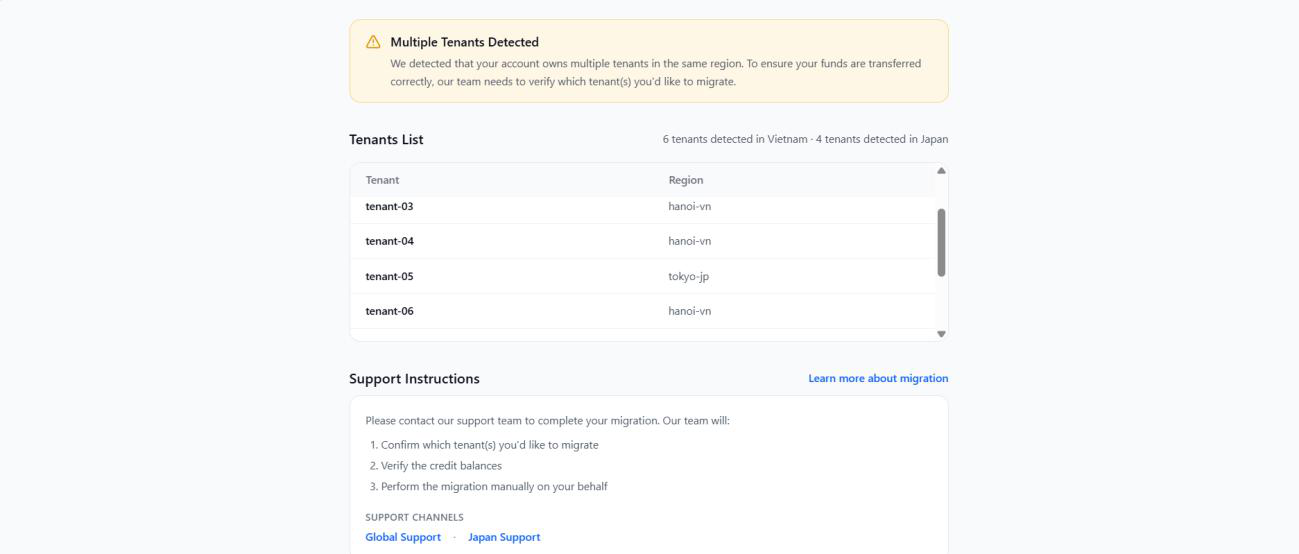
If you have multiple tenants on Old Portal
If you own more than one tenant on the portal (https://ai.fptcloud.com), the self-service migration flow only migrates one account at a time. To migrate a specific tenant, contact support and provide:
- Your email address
- The tenant name you want migrated (only one tenant)
About migration program
What happens to my current account?
Your current FPT AI Factory account will be closed after migration completes. All credits from both your Vietnam and Japan wallets will be automatically transferred to your new FPT AI Factory Next account.
Important: Instances, models, API keys, payment methods, policies, and all billing/audit records will NOT transfer — you'll need to reconfigure these in the new platform.
- No downtime for your Virtual Machines: Your running virtual machines will stay active and uninterrupted throughout the migration process.
- Billing continues during migration: Your balance will keep being deducted as normal while the migration is in progress, so please make sure you have sufficient credits before starting.
Can I cancel or rollback after migration?
We strongly recommend exporting your important data before migrating (instances, models, API keys, payment methods, policies, billing history, and audit logs). Once migration completes, rollback is not supported. Please ensure all critical data is exported from your current account before proceeding.
Will my billing plans transfer?
Active billing plans that are still valid and have remaining balance will be transferred automatically to your FPT AI Factory Next account. Only plans that are active, have a remaining balance, and are within their validity period at the time of migration are eligible for transfer. Expired or depleted plans will not carry over. Your transferred credits (vouchers and top-ups) remain usable for all services on the new platform.
Will all my credits transfer?
Yes! All credits from your Vietnam and Japan wallets will be converted and transferred automatically. Additionally, you'll receive a $20.00 migration bonus as a thank you for upgrading.
How long will the migration take?
The migration process typically takes 5–10 minutes. You'll see a progress indicator showing each step being completed in real-time.
Will there be any downtime?
Your current FPT AI Factory account will continue to work normally until you complete the migration. Once you start the migration process, you'll be unable to access your old account for about 10 minutes.
Is this required or optional?
This is an opt-in early access program for selected users. You can continue using your current account for now, but we strongly recommend migrating soon. We plan to deprecate the current platform in the near future, and early adopters will benefit from a smooth transition, continued support, and the $20.00 migration bonus. Migrating now ensures you won't face any disruption when the old platform is retired.
What if I have questions after migration?
Our support team is here to help! Contact us at support@fptcloud.com or visit our knowledge base for detailed documentation and troubleshooting guides.
Still have questions? Create a support ticket or email support@fptcloud.com.
What's next
If you'd like to learn more about FPT AI Factory Next before deciding whether to migrate, please visit the FPT AI Factory | FPT Cloud Documentation for more information.