Create a Network Volume
Prerequisites
- An FPT AI Factory account with sufficient credit.
- Owner or Editor role in the target workspace.
Steps
1. Open the create form
- In the left sidebar, click FPT GPU Cloud → Network Volume.
- Click + Create Network Volume.
The Create volume panel slides in from the right.
2. Fill in the form
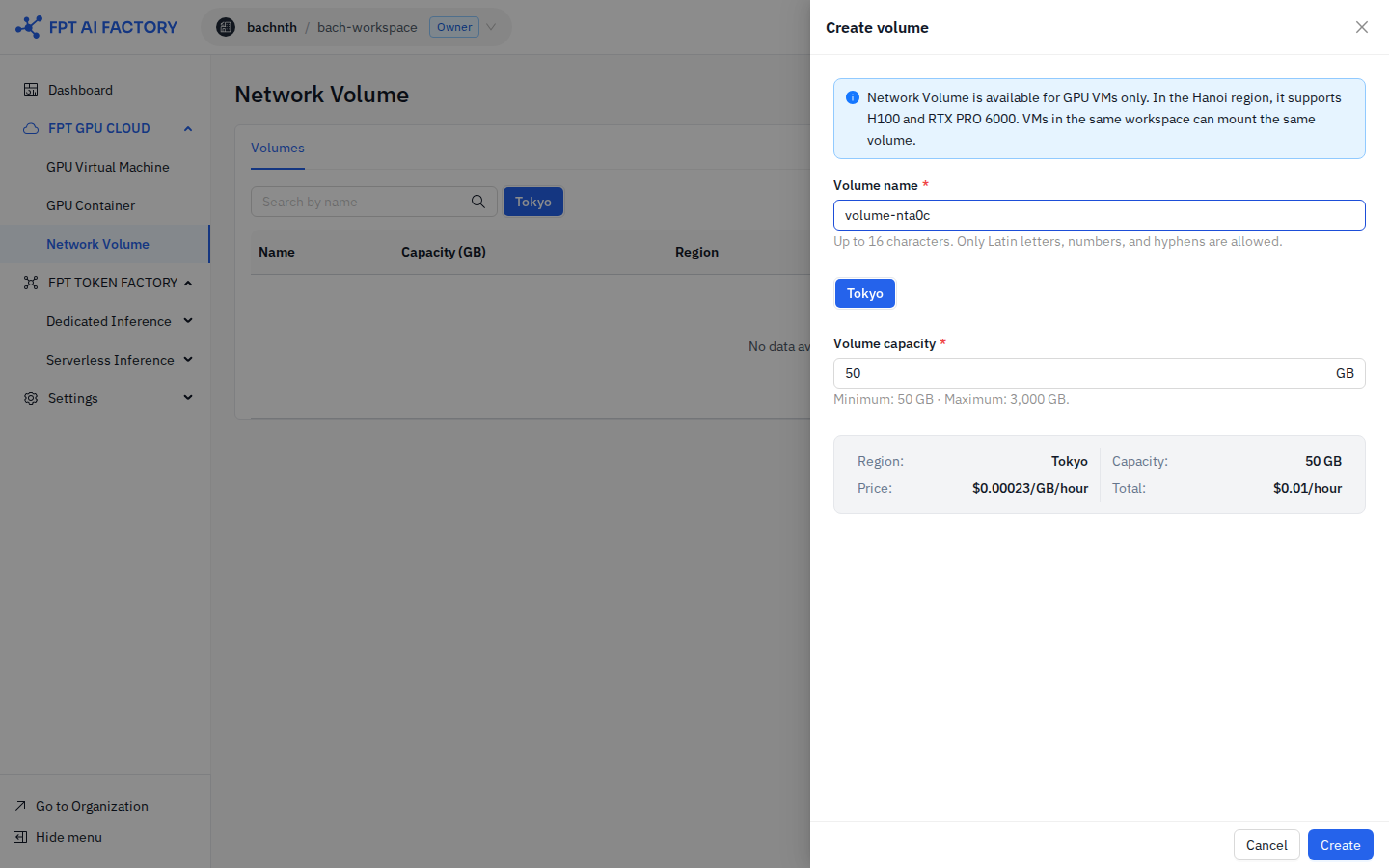
| Field | Description | Constraints |
|---|---|---|
| Volume name | A name to identify the volume | Up to 16 characters; Latin letters, numbers, and hyphens only |
| Region | The region where the volume is created | Must match the region of the GPU VMs you intend to attach it to |
| Volume capacity | Storage size in GB | Minimum 50 GB, maximum 3,000 GB |
The pricing summary at the bottom of the form shows the estimated cost based on the selected capacity and region.
note
Network Volume is available for GPU VMs only. In the Ha Noi region, it supports H100 and RTX PRO 6000 GPU instances.
3. Confirm creation
Click Create. The volume appears in the Volumes tab with status Creating, then transitions to Available within seconds.