Audit Logs
Audit Logs record all user and system actions across your Organization. Use them to monitor who did what, when, and whether it succeeded.
Logs are read-only and retained for 3 months. Events older than 3 months are no longer accessible.
Access and scope
The Audit Logs page is accessible to all roles, but what you see depends on your role:
| Role | Scope visible |
|---|---|
| Organization Owner | All events: Organization, Billing, Workspace, and Service |
| Workspace Admin | Workspace and Service events for their Workspace only |
| Workspace Member | Workspace and Service events for their Workspace only |
There are two ways to open Audit Logs:
- Organization-level — click Go to Organization at the bottom of the left sidebar, then select Audit Logs.
- Workspace-level — click Settings in the left sidebar, then select Audit Logs.
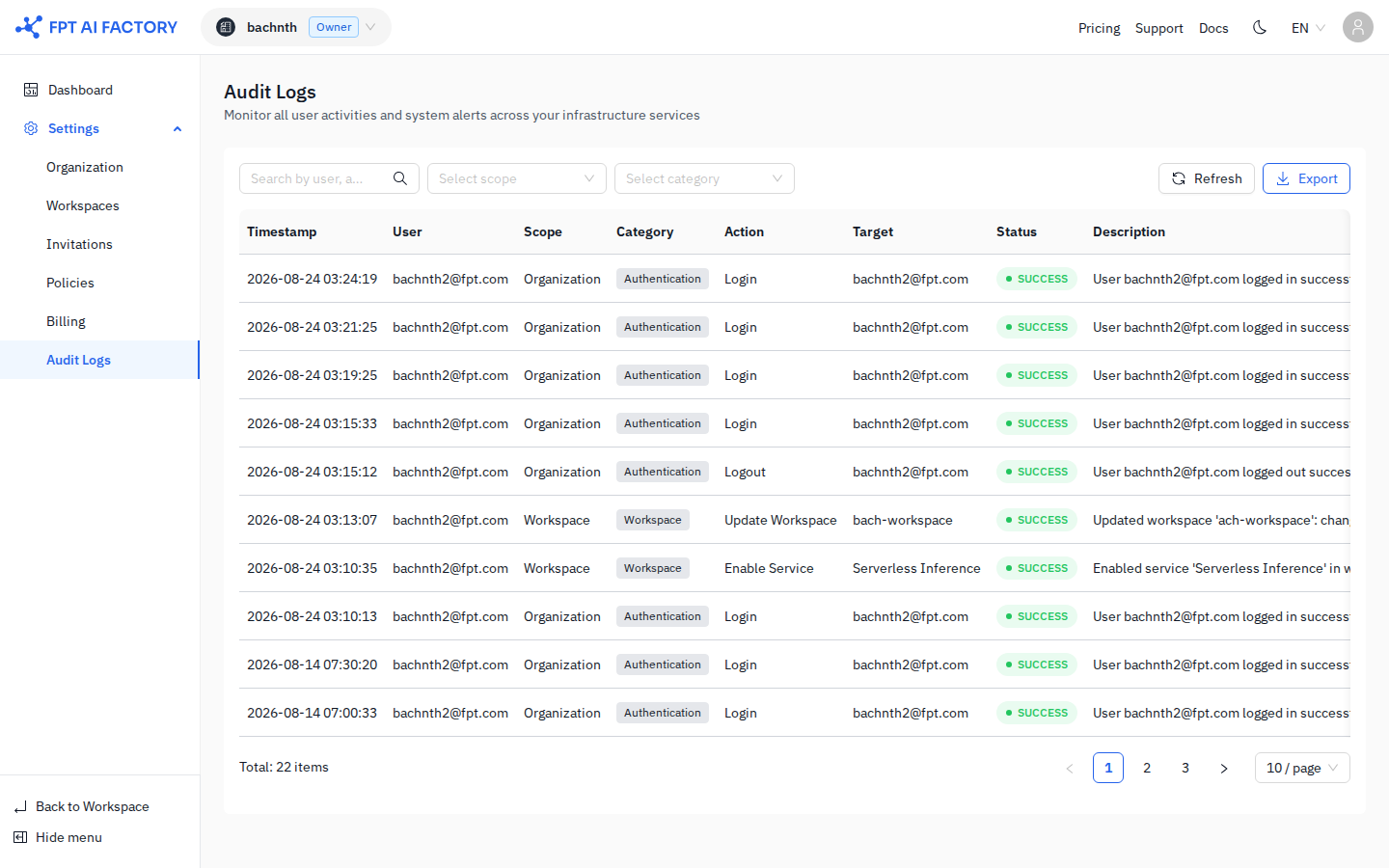
Table columns
Each row represents a single event. Timestamps are shown in your local timezone.
| Column | Description |
|---|---|
| Timestamp | Date and time the event occurred |
| User | Email of the user who performed the action |
| Scope | Area of the system: Organization, Billing, Workspace, or Service |
| Category | Sub-area within the scope (e.g. Authentication, Workspace, Billing) |
| Action | The specific action taken (e.g. Login, Update Workspace, Enable Service) |
| Target | The resource or user affected |
| Status | SUCCESS (green) or FAILED (red) |
| Description | A human-readable summary of the event |
Filter events
Use the filter bar above the table to narrow results.
- Search — type any keyword to filter across user, action, target, and description fields.
- Select scope — filter by scope: Organization, Billing, Workspace, or Service.
- Select category — filter by category within the selected scope.
Refresh
Click Refresh to reload the latest events without reloading the page.
Export
Click Export to download all records matching your current filters as a CSV file.
Export includes all filtered records, not just the current page. If the result set is too large, narrow your filters before exporting. Timestamps in the exported file are in UTC.
What's next
- Policies — use audit logs to verify policy creation and attachment events.
- Workspaces — trace workspace updates and service enable/disable events.