Configuring Email Notifications
This guide describes how to enable and configure scheduled email notifications from Cloud Advisor.
Prerequisites
- Signed in to FPT Cloud Console Portal
- Access to Cloud Advisor on the Tenant
Access the configuration page
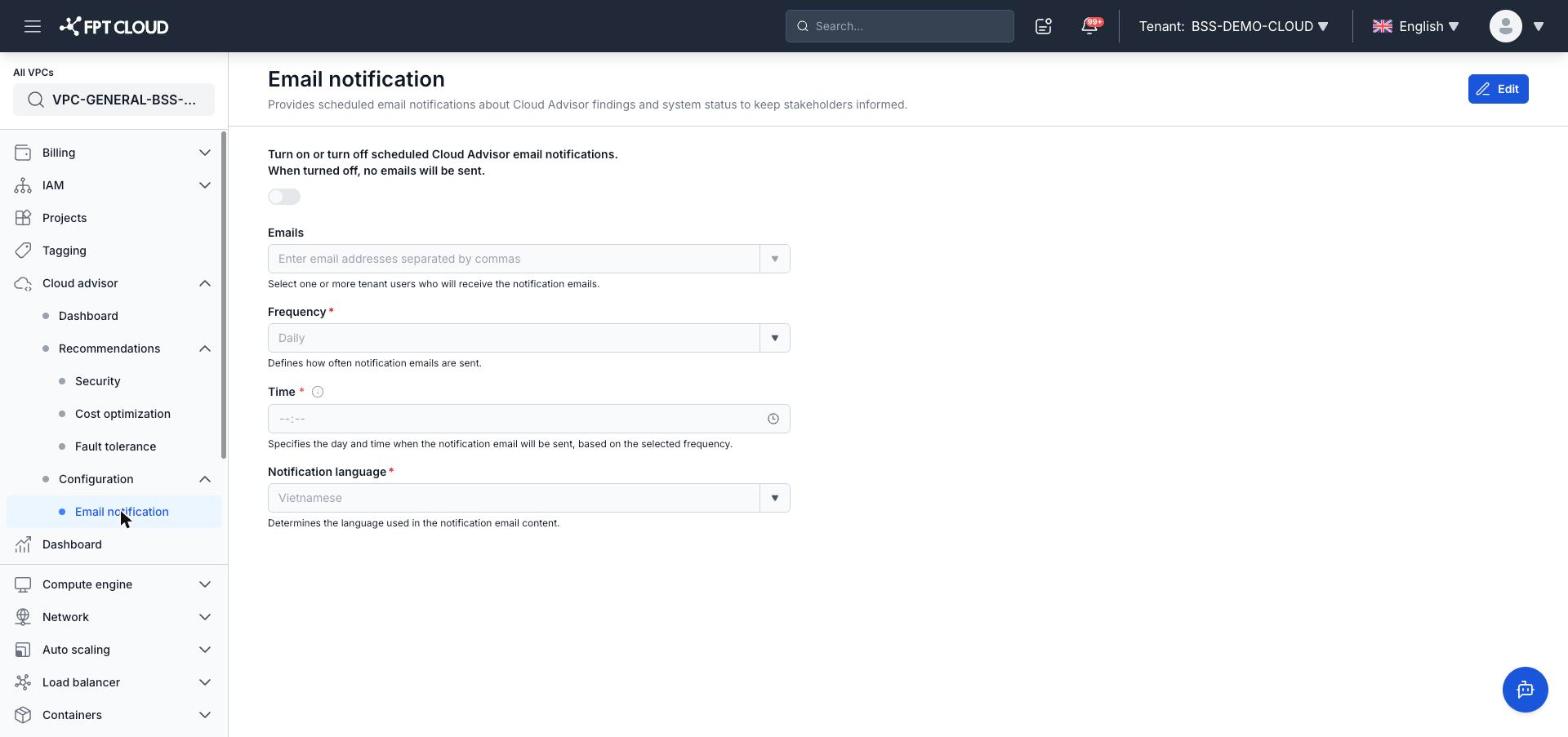
Select Cloud advisor → Configuration → Email notification in the left menu.
Enable email notifications
Toggle the Turn on or turn off scheduled Cloud Advisor email notifications switch at the top of the page to enable the feature. When turned off, no emails will be sent.
Fill in the configuration
Click Edit in the top-right corner to edit the settings.
| Field | Description |
|---|---|
| Emails | Enter recipient email addresses separated by commas. Select from the list of Tenant users |
| Frequency | How often notification emails are sent (for example: Daily) |
| Time | The day and time when the notification email will be sent, based on the selected frequency |
| Notification language | The language used in the notification email content (for example: Vietnamese) |
Save the configuration
After filling in all required fields, click Save to apply the configuration.
Note: When the toggle is off, all configuration is preserved but no emails are sent until the toggle is turned on again.