Account Restricted
An account becomes Restricted the moment its prepaid Credit reaches zero. This state protects your account from further spend while keeping your data intact and giving you one day to top up before service is suspended.
What Restricted does
As soon as the balance hits Credit ≤ 0, the system:
- Powers off all running VMs.
- Allows only view and delete on your resources.
- Blocks every other VM action: Console, power on, reboot, resize, snapshot, template, rename, reset password, lock.
- Stops public IP allocation to VMs.
- Cuts off Terraform and every API that creates new resources.
A one-day countdown to Service Suspended starts from the moment the balance is detected at zero.
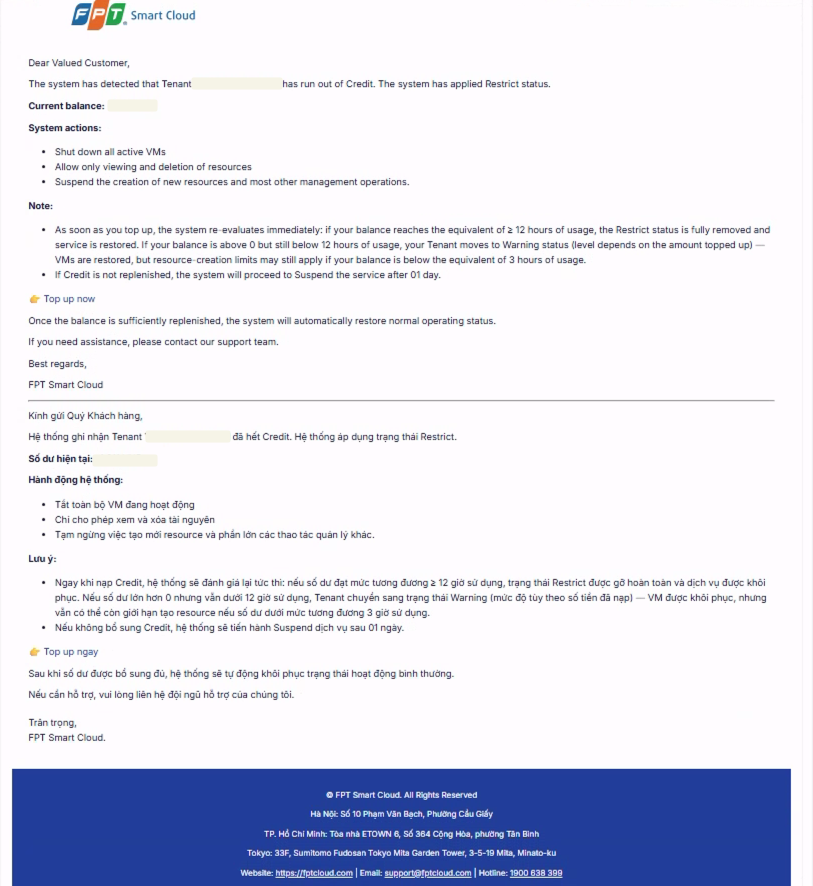
When your account moves to Restricted, you receive an email notification like the one below:
Recovering from Restricted
Top-ups are re-evaluated immediately and cancel the countdown when they lift the state:
- Credit reaches ≥ 12h of usage → Restricted is removed fully and service is restored. You power your VMs back on.
- Credit is above 0 but below 12h → the account returns to the matching Warning level right away; VMs are restored, with creation limits kept for that level.
- Credit stays at or below 0 → Restricted remains and the countdown continues.