Tutorial: Request GPU Instance activation
This tutorial helps you submit a request to activate GPU service — a required step for the FPT Cloud Sales team to assist with signing a postpaid contract before you can create a GPU Instance.
Before you begin
- Signed in to FPT Cloud Portal.
- Your account has completed onboarding and you can access the main screen.
- Have your contact phone number ready.
Submit a GPU activation request
-
From the left navigation bar, select Compute Engine → Instances.
-
Click the create Instance button in the top-right corner.
The Create instance → Configuration page appears.
-
Under Instance type, select GPU.
The GPU card shows a message:
"This service is currently not available under the current billing model." "You currently have 0 project(s) under Postpaid Subscription." "To use GPU with postpaid billing, please submit a request to our Sales team by clicking Request Postpaid Activation below."
Direct contact information if you need further assistance:
- Hotline: 1800 6139
- Email: support@fptcloud.com
-
Click Request Postpaid Activation.
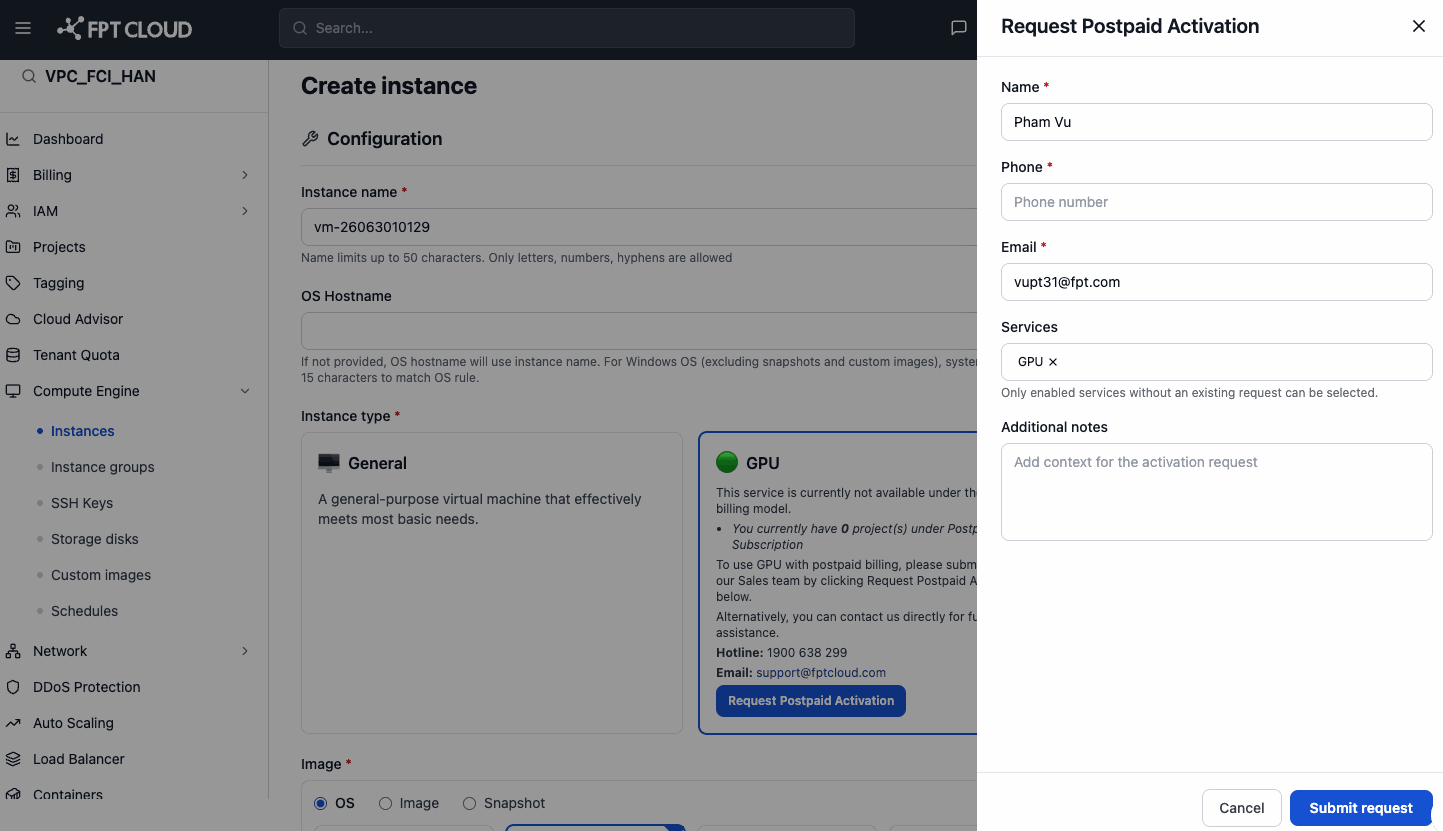
The Request Postpaid Activation panel slides out on the right side of the screen.
-
Fill in the panel:
| Field | Notes |
|---|---|
| Name * | Pre-filled from your account information. |
| Phone * | Enter a contact phone number for the Sales team to call back. |
| Email * | Pre-filled from your account information. |
| Services | Defaults to GPU (pre-selected). Only shows services without a pending request. |
| Additional notes | Optional — describe your GPU usage needs (e.g., AI training, 3D rendering). |
-
Click Submit request.
Your request is sent to the FPT Cloud Sales team.
After submitting the request
The FPT Cloud Sales team will contact you via email or phone to:
- Confirm your needs and recommend a suitable service plan.
- Assist with signing the postpaid contract.
- Activate GPU service on your account.
Once the contract is activated, you can create GPU Instances normally without submitting another request.
📝 If you haven't received a response within 3 business days, contact us directly at hotline 1800 6139 or email support@fptcloud.com.