Tutorial: Top up your wallet
This tutorial walks you through adding funds to your FPT Cloud wallet via the VNPay payment gateway.
Prerequisites
- Signed in to FPT Cloud Portal.
- A bank account, e-wallet, or domestic card that supports VNPay.
Top up your wallet
-
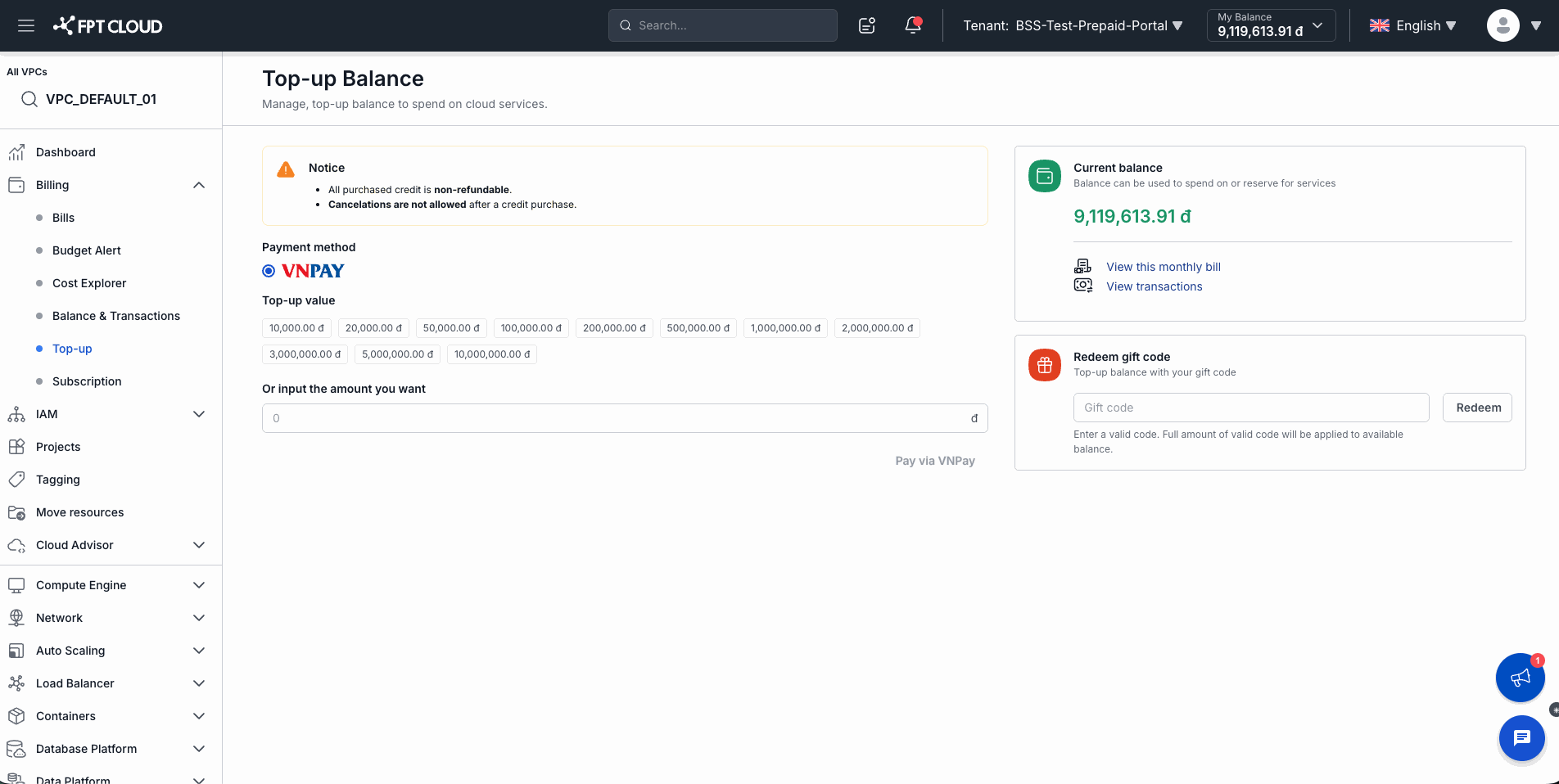
From the left navigation, go to Billing → Top-up.
The Top-up Balance page appears.
-
Read the Notice:
All purchased credit is non-refundable. Cancelations are not allowed after a credit purchase.
Confirm you want to proceed before continuing.
-
Under Payment method, select VNPay (selected by default).
-
Under Top-up value, choose a preset amount or enter a custom amount:
- Preset amounts: 10,000 ₫ to 10,000,000 ₫
- Or type a custom amount in the Or input the amount you want field
-
Click Pay via VNPay.
You are redirected to the VNPay gateway. Complete the payment following the instructions on VNPay.
-
After a successful payment, the system automatically returns you to FPT Cloud Portal.
The topped-up amount is immediately added to My Balance in the top navigation bar.
Result
- My Balance increases by exactly the amount you topped up.
- The transaction appears in Billing → Balance & Transactions → Top-up Transactions tab with status Success.
⚠️ If the transaction fails (Failed): No money is deducted. Check your account and try again. If money was deducted but the wallet was not credited, contact support: 1800 6139 or support@fptcloud.com.
Redeem a gift code
If you have a gift code, you can redeem it directly on the Top-up Balance page:
-
Enter the code in the Gift code field in the right sidebar.
-
Click Redeem.
The full value of the code is credited immediately to your wallet balance.