Microservices architecture on FKE
This is a reference system architecture for deploying microservices applications on FPT Cloud with FPT Kubernetes Engine, based on core network, security, and high-availability design principles.
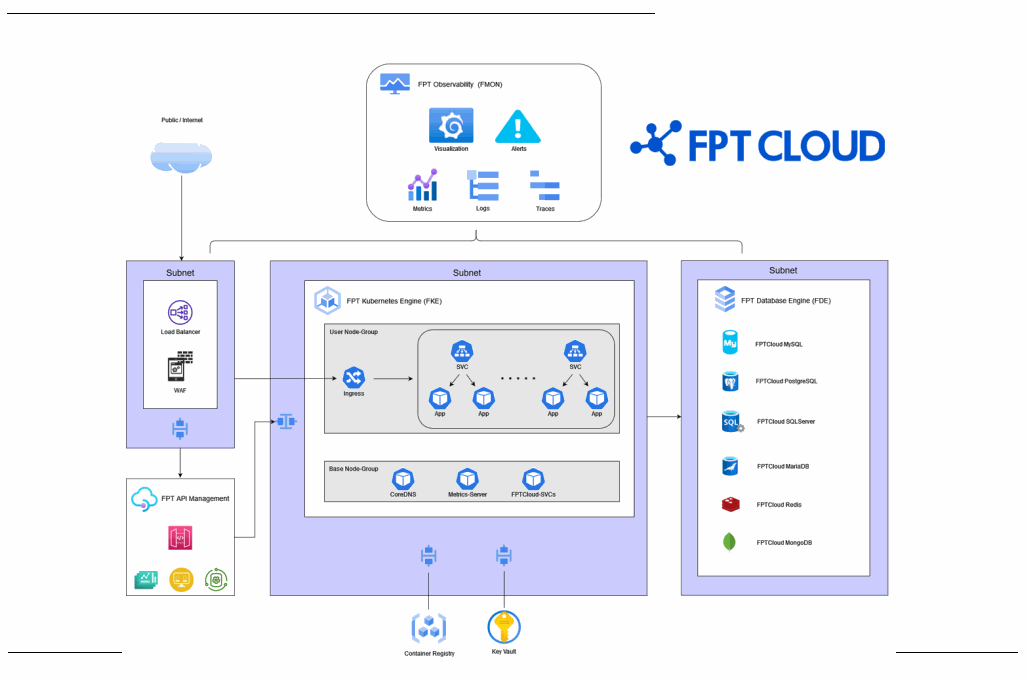
FPT Cloud provides supporting products as Services (API Management, FMON, Container Registry, Key Vault) placed in a VPC managed by FPT Cloud.
Network topology
The network model separates each component into its own subnet for easier management; you can place firewalls between subnets for extra security.
- Database subnet: typically has no internet access. Access from the Kubernetes subnet is restricted to specific ports per database.
- Kubernetes Cluster subnet: with the Dedicated model, every node sits in the same subnet. With the Managed model, you choose a subnet per Worker Group. This subnet connects to Databases, Registry, Vault, FMON, API Gateway, WAF, and the Load Balancer.
- Web Application Firewall (WAF) subnet: WAF protects web applications and HTTP APIs by monitoring and filtering HTTP traffic. Placing WAF in front of your application blocks external attacks; it's typically kept in its own subnet for easier administration.
- Load Balancer subnet: the
192.168.255.1/25CIDR block is reserved for LB nodes and configured by FPT Cloud — don't configure a subnet that overlaps with it. The Load Balancer supports L4 and L7.
Components
- FPT Kubernetes Engine (FKE): provides a Kubernetes Cluster in two models, Dedicated and Managed (recommended). With Managed, FPT Cloud operates the control plane; you manage and access Worker Nodes.
- FPT Database Engine (FDE): a range of databases to fit different needs.
- FPT API Management: a professional API management system built for easy integration and scaling.
- FPT Observability (FMON): comprehensive monitoring (metrics, logs, and traces) with easy alert configuration.
- FPT Container Registry: stores and manages container images.
- FPT Key Vault: stores and manages secure key-value pairs.
Request workflow
- An HTTPS request enters the system through the L4 firewall FPT Cloud provides by default on the VPC. Configure the firewall by IP and port here.
- The request passes through WAF, which blocks invalid requests and lets valid ones through.
- With FPT API Management, requests continue to the API Gateway and then to backend services (the Ingress Load Balancer in this architecture). Without API Management, requests go straight to the Ingress Load Balancer.
- The Load Balancer distributes traffic across ingress controllers on the Worker Nodes. It's created automatically when you create a Kubernetes cluster — when you set up ingress, create the ingress
Servicewith typeLoadBalancerso it works correctly with the cluster autoscaler. - Ingress exposes microservices externally, routing each request to the right Service based on domain and path.
- A
Serviceexposes a group of Pods to the network and load-balances traffic across them. Microservices call each other through Services, which are configured as the backend for ingress. - Pods run the microservices themselves. They communicate through Services and can connect to other services such as Databases and Key Vault. Pods reach the external network through the Worker Nodes network.
Recommendations for production
- Choose HA Master Nodes with the Dedicated model. Use HA Master Nodes for critical systems; non-HA is fine for Dev/Test.
- Separate Worker Groups on Managed FKE. For production and heavy load, keep the base Worker Group separate from the Worker Group your application runs on, and configure autoscale with a minimum of 3 nodes per Worker Group.
- Use namespaces. Create namespaces to separate applications or environments. Avoid deploying into system-created namespaces.
- Use Readiness and Liveness Probes. A Readiness Probe routes traffic to a Pod only once it's ready to receive requests — Pods often take time to start, so this avoids sending traffic to a Pod that isn't ready. A Liveness Probe restarts a Pod if its application process stops running.
- Set resource requests and limits. This ensures containers get enough resources to run without exceeding what's allowed — without limits, a Pod can consume more than intended and crash the Node.
- Use Autoscale. FKE's Autoscale feature, built on Kubernetes HPA, helps applications respond quickly to traffic spikes, then scales Pods and Nodes back down when usage drops.
- Run multiple Pods (2 or more). For high availability, run at least 2 Pods per service, with anti-affinity so replica Pods land on different Nodes.
- Set Pod Disruption Budgets (PDB). A PDB limits how many Pods can be terminated at once (during a node scale-down or a deployment) to avoid service interruptions. For example, with 5 replicas where only 2 should ever be down at once (3 running), set
minAvailable: 3. - Use Persistent Volumes. FKE supports Block and File Storage. Block Storage is the default, supports RWO, and performs well per the Storage Policy. File Storage supports RWX over NFS — don't use it for databases.
- Back up your data. Schedule cluster backups as instructed. You're responsible for backing up data on your PVCs — back up to a VM, then back up that VM with the FPT Cloud Backup & Recovery solution.
- Set up monitoring and logging. Use FMON to integrate monitoring and logging with your Kubernetes cluster, and configure alerts.