Snapshot Persistent Volume on Kubernetes
The snapshot Persistent Volume (PV) feature creates a point-in-time copy of a PV's contents in an M-FKE cluster, so you can back up cluster data or copy data to other resources without creating a new volume.
You create a snapshot by applying a YAML file that defines the PVC to snapshot — the VolumeSnapshotClass component handles the rest, and once the snapshot resource exists in the cluster, a corresponding snapshot is created in the VPC. To snapshot on a recurring schedule, create a script that periodically calls the Kubernetes API. See the Kubernetes documentation on volume snapshots for background.
Configure a VolumeSnapshotClass
If the cluster doesn't already have one, create a VolumeSnapshotClass:
apiVersion: snapshot.storage.k8s.io/v1
kind: VolumeSnapshotClass
metadata:
  name: csi-cinder-snapclass
  annotations:
    snapshot.storage.kubernetes.io/is-default-class: "true"
driver: cinder.csi.openstack.org
deletionPolicy: Delete
parameters:
  type: [type-storage-policy]
  force-create: "true"
[type-storage-policy] is the storage policy type you're using — find this value in the parameters/type field of the default StorageClass configuration.
Create a snapshot
You need a volume already in use in the cluster (created by a PVC). Assume the PVC configuration is:
apiVersion: v1
kind: PersistentVolumeClaim
metadata:
  name: test-pvc
  namespace: default
spec:
  accessModes:
    - ReadWriteOnce
  resources:
    requests:
      storage: 20Gi
Create a VolumeSnapshot to snapshot that volume:
apiVersion: snapshot.storage.k8s.io/v1
kind: VolumeSnapshot
metadata:
  name: new-snapshot-test
  namespace: default
spec:
  volumeSnapshotClassName: csi-cinder-snapclass
  source:
    persistentVolumeClaimName: test-pvc
volumeSnapshotClassName— FPT Cloud provides a default; use whicheverVolumeSnapshotClassmatches your requirements.persistentVolumeClaimName— the name of the PVC to snapshot.
Verify the snapshot
After creating the snapshot, verify it under Compute Engine → Snapshot in the Unify Portal.
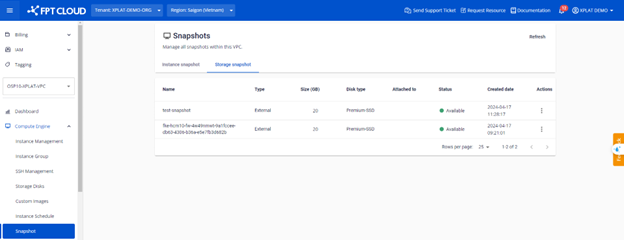
You can also verify it with kubectl:
kubectl get volumesnapshots.snapshot.storage.k8s.io -n default