Audit Log
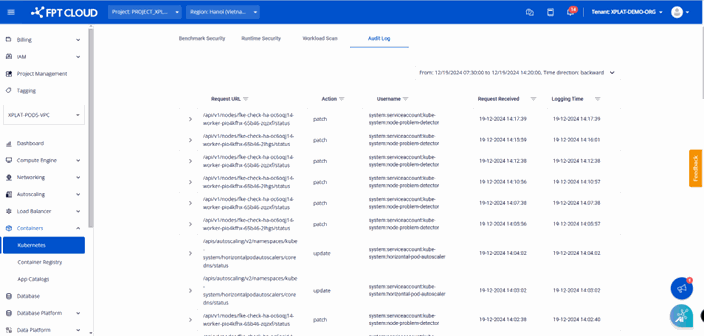
Audit Log is a self-service security feature on the FPT Cloud portal for M-FKE. It records every activity and API request sent to kube-apiserver, so you can trace who did what, when, which objects were affected, and the result.
Benefits of Audit Log:
- Monitors activity of components interacting with the Kubernetes cluster API server.
- Provides security analysis and anomaly detection.
- Supports incident tracing and compliance.
Audit Log fields

- Request URL: the API endpoint path called on
kube-apiserver. - Audit ID: a unique ID for each audit event, used for log tracing.
- Object Reference: information about the Kubernetes resource being operated on:
apiGroupapiVersion: API version (e.g.v1)name: name of the resourcenamespaceresource: resource type (e.g.nodes)
- Action: the operation performed (e.g.
patch/create/delete/update). - Username: the account or service that performed the action.
- Request Received: when
kube-apiserverrecorded the request (format:dd-MM-yyyy HH:mm:ss). - Logging Time: when the event was recorded in the M-FKE log system — usually later than Request Received, since pushing logs from the cluster's
kube-apiserverto the centralized log system takes time.
Security enhancement features are available only after the cluster is successfully created (status: Succeeded/Running).
Enable Audit Log
Go to console.fptcloud.com, select Kubernetes, select the cluster to audit, open the Security tab, then select Audit Log.

The screen automatically queries and shows all logs from the last hour, with the fields described above.

Search logs in a different time range
-
Select the time picker in the upper-right corner.

-
Enter the time range and select Apply Filter.

The system shows all logs from the selected time range, sorted newest first.
- You can filter logs within a maximum range of 3 days.
- Logs are retained for the last 7 days.