Deploy applications on a Worker Group
Managed FKE organizes workers into Worker Groups, so you can deploy applications without worrying about resource scaling.
Target a Worker Group in your manifest
Example: deploying an application on a cluster with 2 Worker Groups, each with one Worker Node.


Worker Nodes carry labels that identify their Worker Group, so you can target deployments at nodes with a shared label.
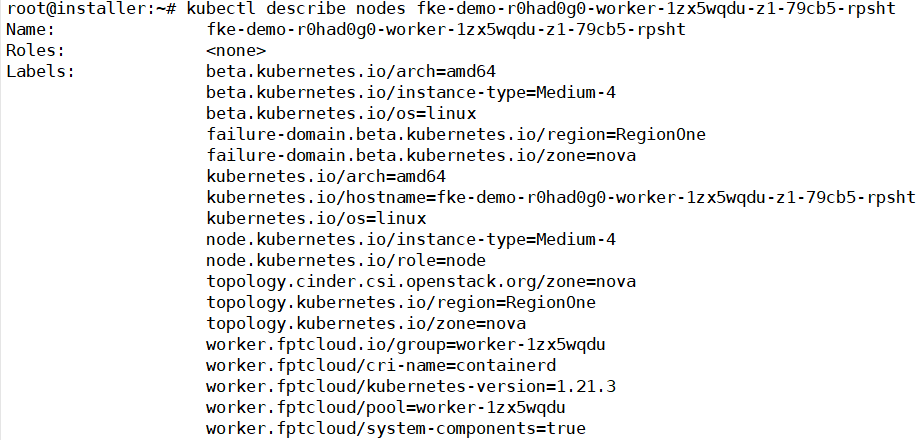
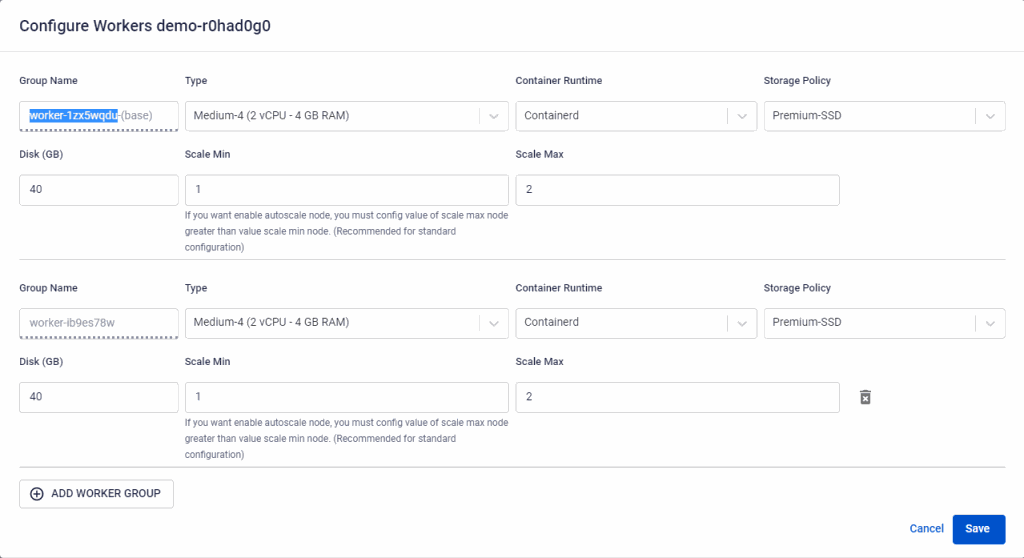
Worker Nodes in Worker Group worker-1zx5wqdu are labeled worker.fptcloud/pool=worker-1zx5wqdu. Copy the Worker Group name from its configuration details.
Add a Node Affinity Rule or Node Selector to the spec section of any workload resource (Pod, Deployment, StatefulSet, DaemonSet, ReplicaSet).
Using a Node Affinity Rule:
apiVersion: apps/v1
kind: Deployment
metadata:
  name: nginx-deployment-test
  labels:
    app: nginx
spec:
  replicas: 2
  selector:
    matchLabels:
      app: nginx
  template:
    metadata:
      labels:
        app: nginx
    spec:
      containers:
      - name: nginx
        image: nginx:1.14.2
        ports:
        - containerPort: 80
        resources:
          requests:
            memory: "700Mi"
            cpu: "800m"
          limits:
            memory: "900Mi"
            cpu: "900m"
      affinity:
        nodeAffinity:
          requiredDuringSchedulingIgnoredDuringExecution:
            nodeSelectorTerms:
            - matchExpressions:
              - key: worker.fptcloud/pool
                operator: In
                values:
                - worker-1zx5wqdu
Using a Node Selector:
apiVersion: apps/v1
kind: Deployment
metadata:
  name: nginx-deployment-test
  labels:
    app: nginx
spec:
  replicas: 2
  selector:
    matchLabels:
      app: nginx
  template:
    metadata:
      labels:
        app: nginx
    spec:
      containers:
      - name: nginx
        image: nginx:1.14.2
        ports:
        - containerPort: 80
        resources:
          requests:
            memory: "700Mi"
            cpu: "800m"
          limits:
            memory: "900Mi"
            cpu: "900m"
      nodeSelector:
        worker.fptcloud/pool: worker-1zx5wqdu
The values entry (Node Affinity Rule) and the nodeSelector value are both the target Worker Group's name.
Deploy and watch it scale
Deploying nginx with the manifest above:

If a Pod is pending because the pool's Worker Nodes lack the requested resources:

Cluster Autoscaler automatically adds a Worker Node to that pool to serve the pending Pod.
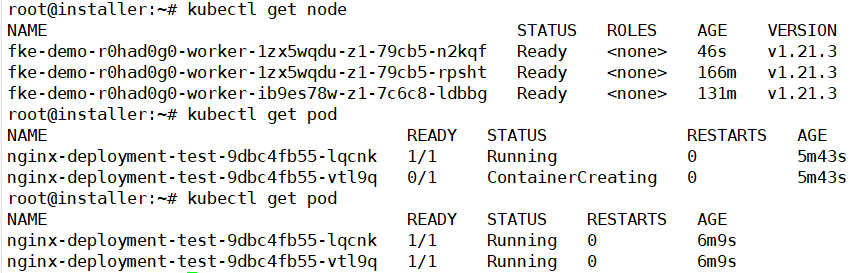
Once the new node is ready, the previously Pending Pod moves to Running.
Scaling the application down frees up Worker Node resources. When a node's CPU and memory usage stays below 50% of capacity for 10 consecutive minutes, Cluster Autoscaler removes it from the Worker Group, saving cost.
Cluster Autoscaler behavior (scale-out and scale-in thresholds) is configurable per Worker Group — see Cluster Autoscale.