Required outbound firewall rules for cluster creation
Before a Managed - FPT Kubernetes Engine cluster can start or scale, its subnet needs outbound access to a small set of destinations: public DNS resolvers, NTP, the image registry, and (for a Public cluster) the Control Plane. If your network hasn't opened these yet, cluster creation or worker scaling can fail without an obvious cause.
To help you configure this correctly the first time, the Portal shows a Required outbound firewall rules banner right on the cluster creation screen, listing the exact rules your cluster needs.
Where the banner appears
-
Select the network and cluster endpoint access mode for your cluster.
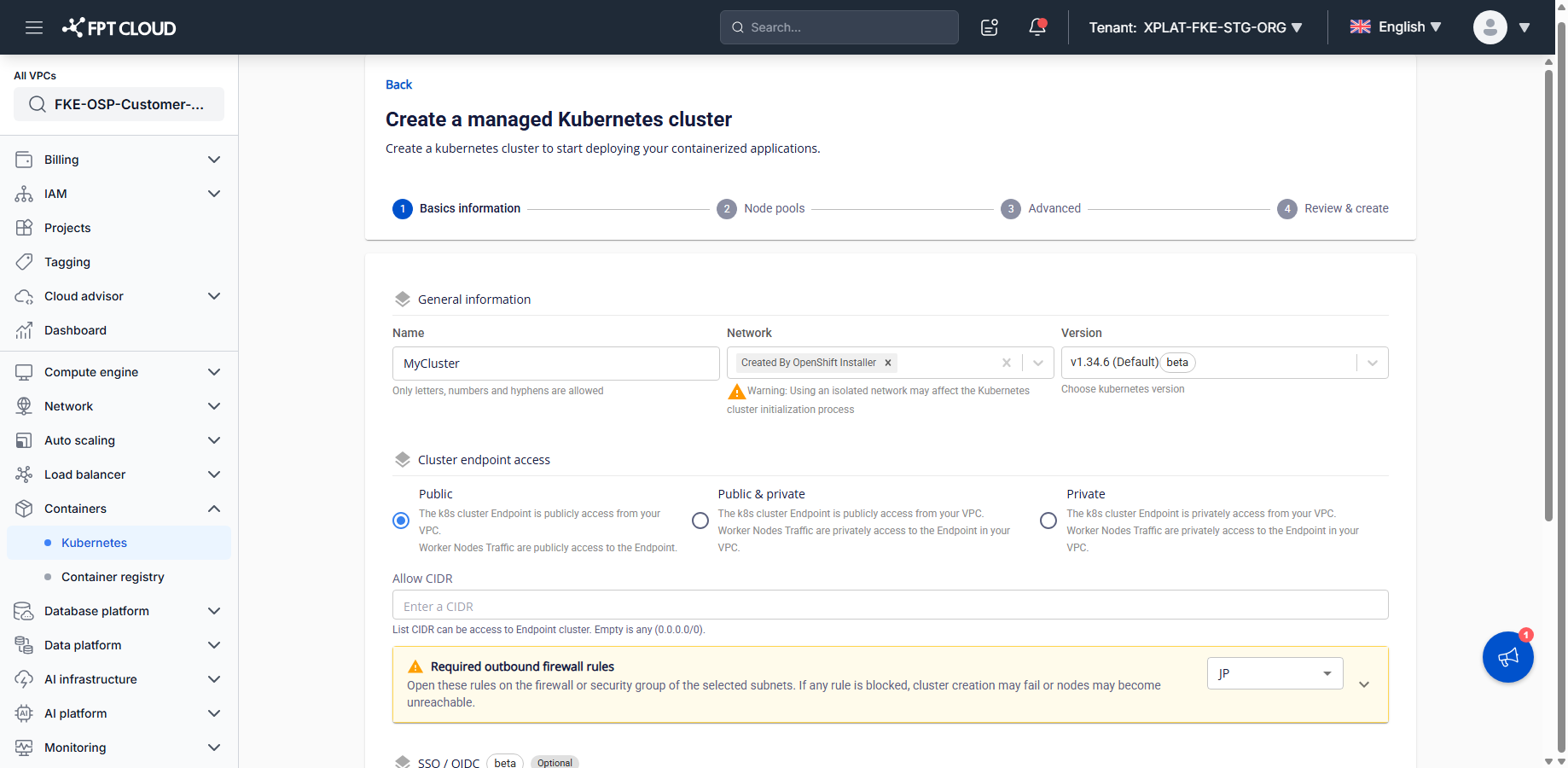
The Required outbound firewall rules banner appears automatically under Cluster endpoint access, showing "Open these rules on the firewall or security group of the selected subnets. If any rule is blocked, cluster creation may fail or nodes may become unreachable." A dropdown on the right of the banner selects the region (
HAN,SGN,HAN2,JP) — use it to check the Control Plane IP for the region you're creating the cluster in. -
Select the arrow (▼) to expand the banner.
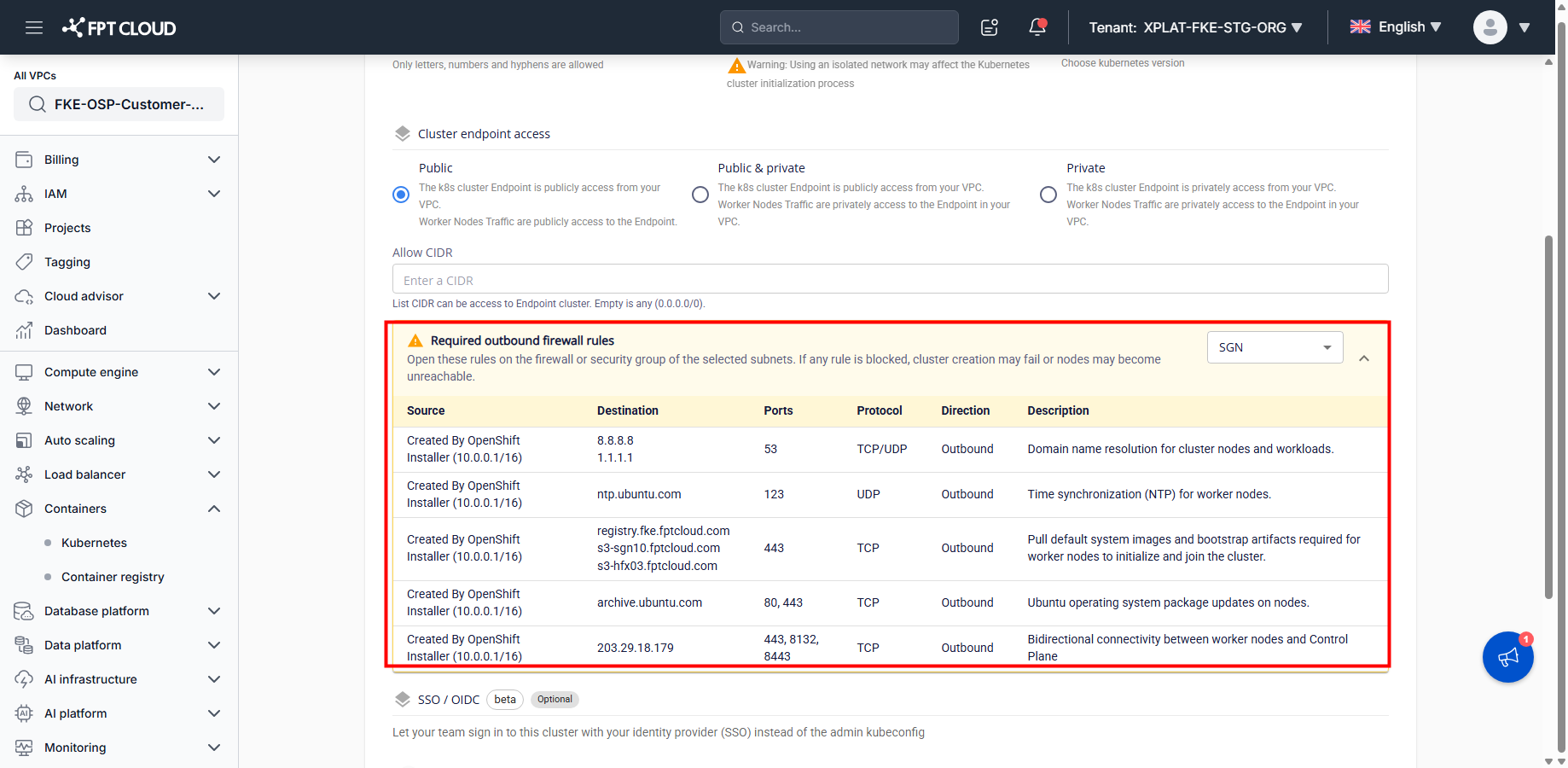
The full table shows Source, Destination, Ports, Protocol, Direction, Description for every required rule.
-
Configure the matching outbound rules on your firewall or security group.
Using the table in the banner, open the corresponding outbound rules on your subnet's firewall or security group before you submit. This step happens on your own network, outside the Portal.
-
Submit the cluster creation or scaling request.
Once the required rules are open, submit as usual. The cluster or worker node is created and connects successfully because your network already meets the outbound requirements.
Interface reference
| Element | Description |
|---|---|
| Banner header | "Required outbound firewall rules" — appears under Cluster endpoint access |
| Region dropdown | Selects the region (HAN, SGN, HAN2, JP) whose Control Plane IP the table shows |
| Expand/collapse arrow (▼ / ▲) | Shows or hides the full rule table |
| Source column | The network CIDR you selected for the cluster |
| Destination column | The target address for the rule — fixed public DNS resolvers, a fixed FKE domain, or the Control Plane IP for the selected region |
| Ports / Protocol / Direction columns | Fixed values for each rule |
| Description column | The purpose of the rule (DNS, NTP, image pull, OS update, Control Plane connectivity, and similar) |
Required rules
Cluster mode: Public
| Source | Destination | Ports | Protocol | Direction | Purpose |
|---|---|---|---|---|---|
| app subnet | 8.8.8.8, 1.1.1.1 | 53 | TCP/UDP | Outbound | Domain name resolution for cluster nodes and workloads |
| app subnet | ntp.ubuntu.com | 123 | UDP | Outbound | Sync time on worker nodes |
| app subnet | registry.fke.fptcloud.com, s3-sgn10.fptcloud.com, s3-hfx03.fptcloud.com | 443 | TCP | Outbound | Pull system images |
| app subnet | archive.ubuntu.com | 80, 443 | TCP | Outbound | Update Ubuntu packages on worker nodes |
| app subnet | Control Plane IP for your region (see Control Plane IPs by region) | 443, 8132, 8443 | TCP | Outbound | Bidirectional connectivity between worker nodes and the Control Plane — only required for Public cluster mode |
Cluster mode: Public & Private / Private
| Source | Destination | Ports | Protocol | Direction | Purpose |
|---|---|---|---|---|---|
| app subnet | 8.8.8.8, 1.1.1.1 | 53 | TCP/UDP | Outbound | Domain name resolution for cluster nodes and workloads |
| app subnet | ntp.ubuntu.com | 123 | UDP | Outbound | Sync time on worker nodes |
| app subnet | registry.fke.fptcloud.com, s3-sgn10.fptcloud.com, s3-hfx03.fptcloud.com | 443 | TCP | Outbound | Pull system images |
| app subnet | archive.ubuntu.com | 80, 443 | TCP | Outbound | Update Ubuntu packages on worker nodes |
The Control Plane rule (443/8132/8443) only applies to Public cluster mode, since only then does the Control Plane have a public endpoint.
Control Plane IPs by region
This IP can change as the underlying platform is upgraded. Always use the IP shown directly in the banner at the time you create the cluster instead of this reference table.
| Region | Control Plane IP |
|---|---|
| HAN | 103.176.147.43 |
| SGN (HCM) | 203.29.18.179 |
| HAN2 | 192.223.13.64 |
| JP | 161.248.3.88 |
Common issues
| Issue | Cause / fix |
|---|---|
| Cluster creation fails with a DNS or timeout-related error | Check that outbound TCP/UDP port 53 to 8.8.8.8 and 1.1.1.1 isn't blocked on your firewall or security group, then create the cluster again. |
| Worker nodes can't pull images or update the OS | Check that outbound rules to registry.fke.fptcloud.com, s3-sgn10.fptcloud.com, s3-hfx03.fptcloud.com (port 443) and archive.ubuntu.com (port 80/443) are open. |
| A Public cluster can't reach the Control Plane | Check that outbound rules to the correct Control Plane IP for your region (see the table above) are open on ports 443/8132/8443. |
| Changed the region or cluster mode, but the banner still shows the old rule | Collapse and re-expand the banner, or reselect the region from the dropdown, to reload the rule for the new selection. |
Tips
- Open all required rules before you submit cluster creation, to avoid troubleshooting a failure afterward.
- For a Public cluster, use the region dropdown on the banner to confirm the Control Plane IP for the region you're creating in.
- Save the rule table (screenshot or export) to share with your network team.
- If you still see an error after opening the required rules, contact support with a screenshot of the banner and the rules you configured.