Create a PostgreSQL source connector
Stream every row change in your PostgreSQL tables to Kafka topics, where sink connectors can deliver it to other systems. The connector reads the write-ahead log (WAL) through logical replication with the pgoutput plugin.
Prerequisites
- A CDC Service whose status is Healthy. See Create a CDC Service.
- Superuser access to the primary PostgreSQL server. CDC runs on the primary, not on a hot or warm standby replica.
- The database prepared for CDC as described in Prepare the PostgreSQL database.
Prepare the PostgreSQL database
Run these statements on the primary server as a superuser.
-
Check
wal_level, and set it tologicalif it has another value.SHOW wal_level;ALTER SYSTEM SET wal_level = 'logical'; -
Restart the PostgreSQL service so that the new
wal_leveltakes effect. Skip this step ifwal_levelwas alreadylogical.warningRestarting the primary server interrupts the applications that use the database. Plan the restart for a maintenance window.
-
Create the user that the connector connects as, with the
REPLICATIONrole. You can also use an existing superuser.CREATE USER YOUR_USER WITH REPLICATION LOGIN PASSWORD 'YOUR_PASSWORD';To check whether an existing user is a superuser, run
SELECT rolsuper FROM pg_roles WHERE rolname = 'YOUR_USER';. -
Create a publication for the tables to capture if the connector user is not a superuser. Give it a name in lowercase letters and digits only, because the Publication name field accepts nothing else.
-- All tablesCREATE PUBLICATION YOUR_PUBLICATION FOR ALL TABLES;-- Or only some tablesCREATE PUBLICATION YOUR_PUBLICATION FOR TABLE YOUR_SCHEMA.YOUR_TABLE, YOUR_SCHEMA.OTHER_TABLE;A superuser can skip this step. The connector then creates a publication for all tables, with the name you enter in Publication name.
-
Grant
SELECTon the captured tables to the connector user. Skip this step if the user is a superuser.GRANT SELECT ON TABLE YOUR_SCHEMA.YOUR_TABLE TO YOUR_USER;To grant
SELECTon every table in a schema, run:DO $$DECLAREtable_record RECORD;BEGINFOR table_record INSELECT table_nameFROM information_schema.tablesWHERE table_schema = 'YOUR_SCHEMA' AND table_type = 'BASE TABLE'LOOPEXECUTE 'GRANT SELECT ON TABLE YOUR_SCHEMA."' || table_record.table_name || '" TO YOUR_USER';END LOOP;END $$; -
Let the user create and write the signal table
public.cdc_signalif you plan to select Enable incremental snapshot. Creating the connector creates this table, and snapshots run through it.GRANT USAGE, CREATE ON SCHEMA public TO YOUR_USER;-- If public.cdc_signal already exists, for example from another connectorGRANT INSERT ON public.cdc_signal TO YOUR_USER;If your publication lists its tables one by one, add
public.cdc_signalto it after you create the connector. See Change the tables in a publication. -
Set
REPLICA IDENTITY FULLon each captured table, so that change events carry the row values before and after the change.ALTER TABLE YOUR_SCHEMA.YOUR_TABLE REPLICA IDENTITY FULL;To change every table in a schema, run:
DO $$DECLAREtable_record RECORD;BEGINFOR table_record INSELECT table_nameFROM information_schema.tablesWHERE table_schema = 'YOUR_SCHEMA' AND table_type = 'BASE TABLE'LOOPEXECUTE 'ALTER TABLE YOUR_SCHEMA."' || table_record.table_name || '" REPLICA IDENTITY FULL';END LOOP;END $$; -
Create the heartbeat table. The connector writes its heartbeat to this table whenever Heartbeat interval (ms) is above
0. The default is0, which sends no heartbeat.CREATE TABLE IF NOT EXISTS public.cdc_heartbeat (id integer PRIMARY KEY,last_heartbeat timestamptz NOT NULL); -
Check that the server has room for one more replication slot. The connector creates the slot you name in Slot name, or reuses an existing slot with that name.
SHOW max_replication_slots;SELECT slot_name, plugin, slot_type, database, active FROM pg_replication_slots;To free a slot that is no longer active, run
SELECT pg_drop_replication_slot('YOUR_SLOT');. To raise the limit, changemax_replication_slotsinpostgresql.conf.
Change the tables in a publication
If you created the publication for a list of tables, run these statements as a superuser when the set of captured tables changes.
-- List the publications
SELECT * FROM pg_publication;
-- Add tables
ALTER PUBLICATION YOUR_PUBLICATION ADD TABLE YOUR_SCHEMA.YOUR_TABLE;
-- Remove tables
ALTER PUBLICATION YOUR_PUBLICATION DROP TABLE YOUR_SCHEMA.YOUR_TABLE;
Create the connector
-
Select Data platform → Workspace management, then select your workspace.
-
On the Overview tab, under Services, select the CDC card.
-
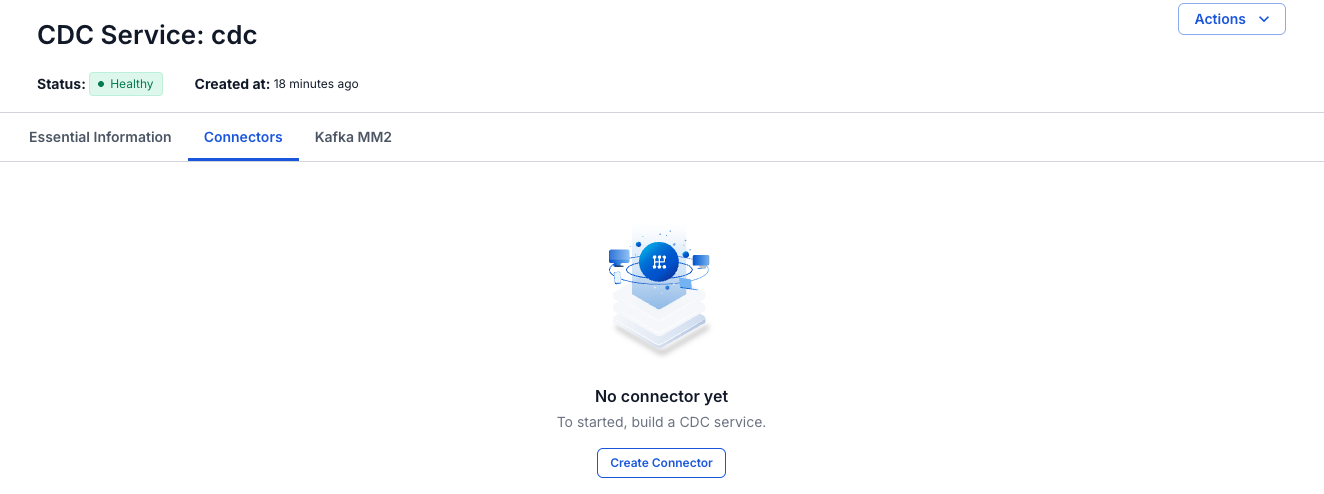
Select the Connectors tab, then select Create Connector.
-
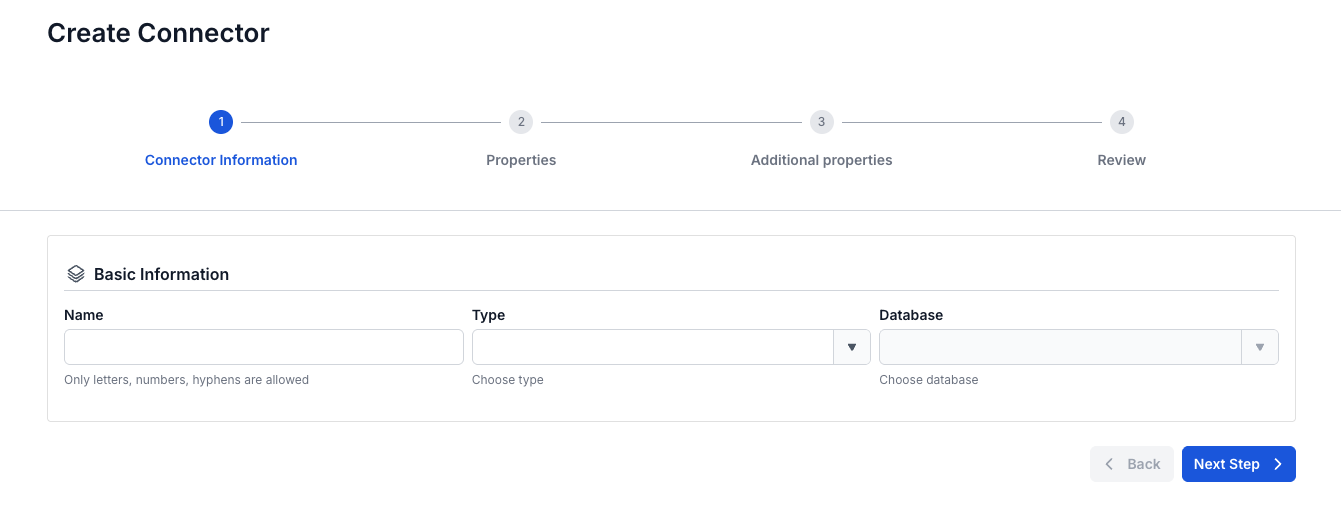
On the Connector Information screen, enter a Name, select source in Type, and select PostgreSQL in Database.
-
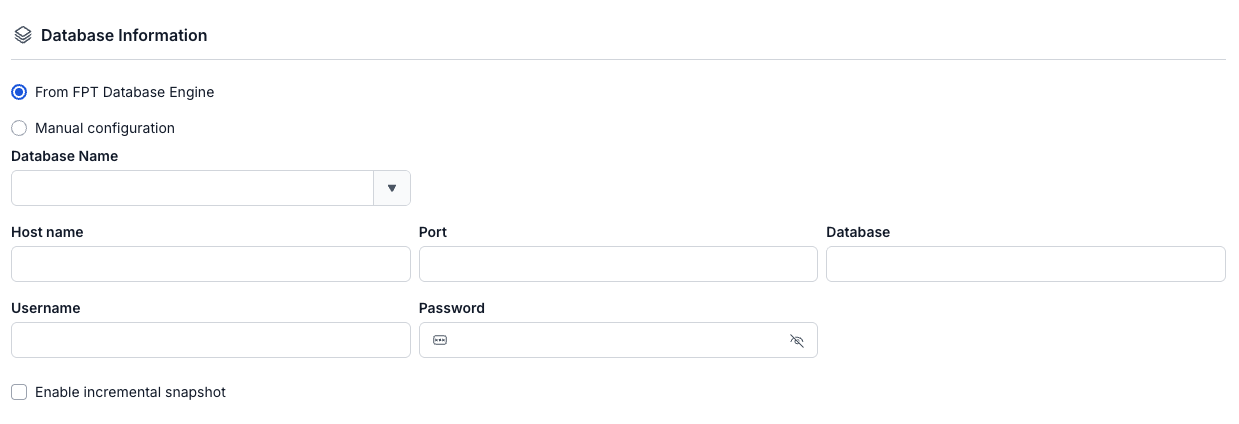
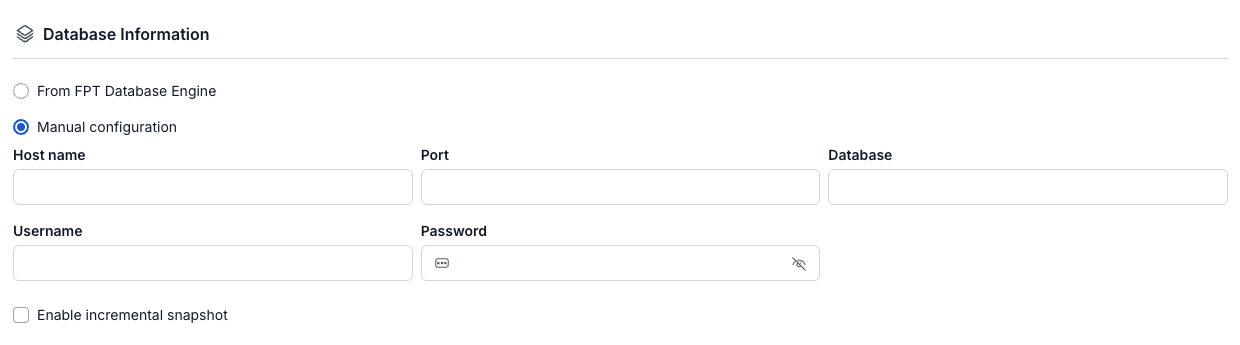
Select Next Step. On the Properties screen, enter the connection details, the Topic prefix, and the slot and publication names, then select Test connection. Next Step becomes available after the test succeeds with the message "Connect Successfully".


-
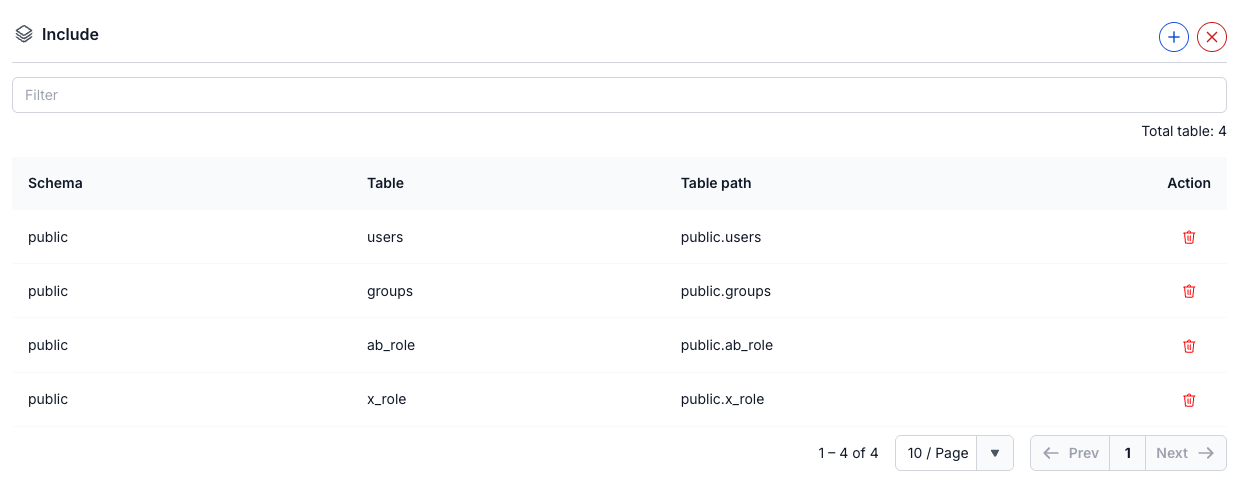
Select Next Step. On the Additional properties screen, select the snapshot Mode, add the tables to capture, and set the Heartbeat interval (ms).


-
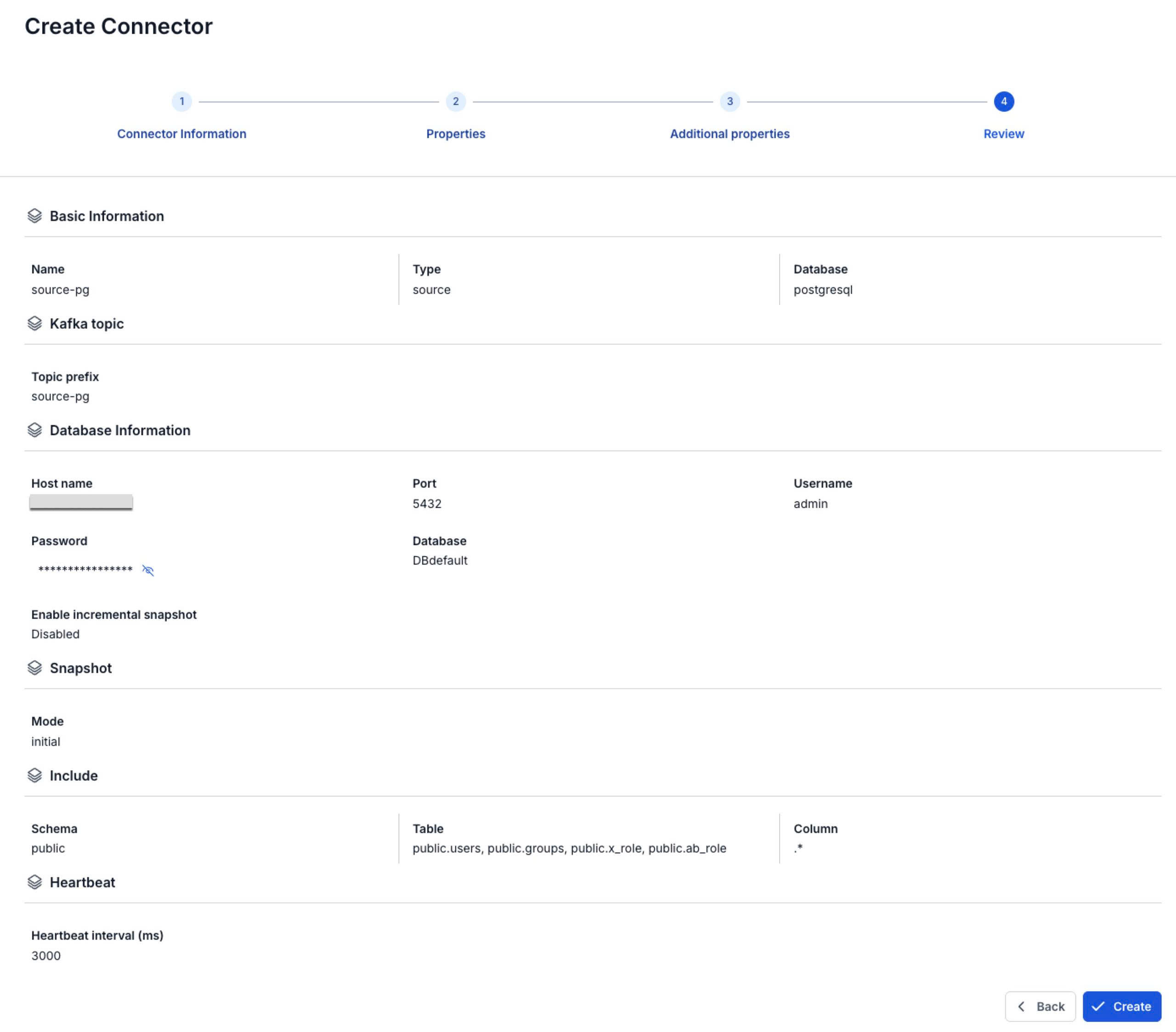
Select Next Step and check the settings on the Review screen.
-
Select Create.
The portal shows "Create Successfully" and opens the Essential Information tab of the CDC Service. On the Connectors tab, the new connector shows Running, with every Tasks counter at
0until its task starts, for up to about 2.5 minutes. Snapshot Status shows Not Started until you run an incremental snapshot.
Connector settings
Connector information
| Field | Required | Description |
|---|---|---|
| Name | Yes | The connector name, in lowercase letters, digits, and hyphens (-). Uppercase letters, _, ., and spaces give the error "Name has invalid characters". |
| Type | Yes | Select source. |
| Database | Yes | Select PostgreSQL. |
Properties
| Field | Required | Description |
|---|---|---|
| From FPT Database Engine / Manual configuration | Yes | Select a PostgreSQL instance from FPT Database Engine, or enter the connection details yourself. Manual configuration is selected by default. See Connection mode. |
| Database Name | With From FPT Database Engine | The PostgreSQL instance in FPT Database Engine. The list also shows the instances that Lakehouse created. Selecting one fills in Host name and Port, which you can still edit. Database, Username, and Password stay empty. |
| Host name | Yes | Host name or IP address of the PostgreSQL server. |
| Port | Yes | The PostgreSQL server port, for example 5432. The field has no default in Manual configuration. |
| Database | Yes | The database to capture changes from. |
| Username | Yes | The user you prepared in step 3. |
| Password | Yes | The user's password. |
| Enable incremental snapshot | No | Lets you run incremental snapshots on this connector. Creating the connector then also creates the signal table public.cdc_signal, and Test connection checks the CREATE TABLE and INSERT permissions. The signal table also gets a topic, TOPIC_PREFIX.public.cdc_signal. Without this option there is no signal table, so Snapshot → Execute cannot run, although the menu still shows it. See Incremental snapshot. |
| Topic prefix | Yes | Prefix of the Kafka topics the connector writes to. Each table gets the topic TOPIC_PREFIX.SCHEMA.TABLE, for example syncdata.inventory.customer. See Topic prefix. |
| Slot name | Yes | The replication slot the connector reads from. Lowercase letters and digits only. Other characters, such as _, give the error "Slot name has invalid characters". The connector creates the slot, or reuses an existing slot with this name. |
| Publication name | Yes | The publication you created in step 4. For a superuser, the name of the publication that the connector creates. Lowercase letters and digits only. Other characters, such as _, give the error "Publication name has invalid characters". |
Additional properties
| Field | Required | Description |
|---|---|---|
| Mode | Yes | What the connector does with existing rows. The field has no default, so select one. initial snapshots them, then captures changes. initial_only snapshots them without capturing changes. no_data captures new changes only. See Snapshot mode. |
| Include | No | The tables to capture. Select + to load the schemas and tables of the database, then select tables, up to 100. Use Filter to search the list and the delete icon to remove a table. If you add no table, the connector captures all tables. |
| Heartbeat interval (ms) | Yes | Time between heartbeat messages, from 0 to 30000. Default 0, which sends no heartbeat. The connector writes the heartbeat to the table from step 8. See Heartbeat. |
Clean up after you delete the connector
Deleting a PostgreSQL source connector leaves its replication slot and publication in the database.
Until you drop the replication slot, PostgreSQL keeps all WAL that the slot has not consumed, so disk usage keeps growing.
Drop the slot and the publication as a superuser.
SELECT pg_drop_replication_slot('YOUR_SLOT');
DROP PUBLICATION YOUR_PUBLICATION;