Filter rows with a row level filter policy
A row level filter policy lets several teams share one table while each team sees only its own rows. For example, the sales team of each region sees only the orders of that region.
Prerequisites
- Your role includes
governance:row_policies:write. Theportal_adminandpolicy_managerroles have it. See Portal roles and permissions. - The people in the policy already have
SELECTon the table through an access policy. - You know the column names of the table. Check them in Data Explorer.
Create a row level filter policy
- In the left sidebar, select Data Security → Security policies, then open the Row level filter tab.
- Select Create policy.
- Enter a Policy name and, optionally, a Description.
- Add the people the filter applies to in User, Group, or Service Account. Add at least one.
- Select the Catalog, Schema, and Table. A policy covers one table.
- In Row Filter Condition, type the condition rows must match. Do not type
WHERE. - Keep Active selected.
- Select Create.
Permission is always SELECT and cannot be changed.
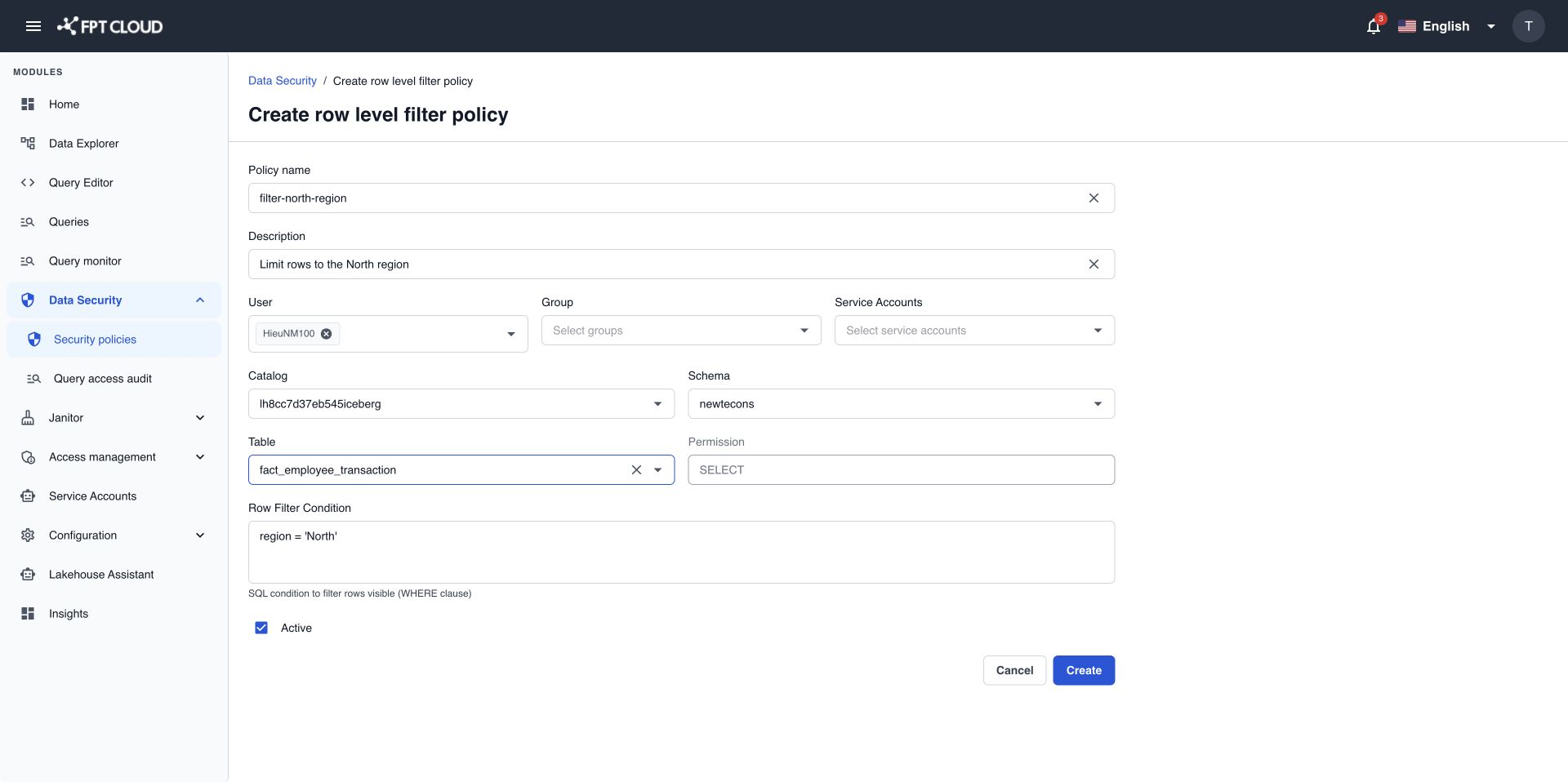
About 1 minute later, the people in the policy see only the matching rows in every query on that table.
Condition examples
Write the condition the way you would write it after WHERE.
| You want people to see | Row Filter Condition |
|---|---|
| Rows of one department. | department = 'IT' |
| Rows of several regions. | region IN ('North', 'Central') |
| Orders from 2026 onward. | order_date >= DATE '2026-01-01' |
| Rows that are not archived. | is_archived = false |
A condition must be a single expression. You cannot add a second statement after it.
Check that it works
Ask a person in the policy to run SELECT COUNT(*) on the table in Query Editor. The count includes only the matching rows. People not in the policy still see every row allowed by their access policies.
If an action fails
| Message | What it means | What to do |
|---|---|---|
Enter a row filter condition. | Row Filter Condition is empty. | Type a condition. |
Only a single filter condition is allowed. | The condition contains more than one statement. | Keep one expression only. Combine checks with AND or OR. |
The row filter condition is invalid. | The condition has a syntax error or names a column that does not exist. | Check the spelling and the column names. |
A table can have only one row level filter policy. To change the condition, edit the existing policy.