Configure default maintenance settings
The Settings page holds the defaults for all maintenance jobs. A job uses these values unless you change them on the job itself.
Janitor starts with safe defaults. You can use it without changing anything here.
Prerequisites
- Your role includes
maintenance:manage. To only view the settings,maintenance:readis enough.
Open the settings
- Select Janitor → Settings in the sidebar.
- Find the card you want to change. There are four cards: Schedule, Maintenance window, Concurrency, and Maintenance options.
- Select the edit icon in the top right corner of the card.
- Change the values, then select Save.
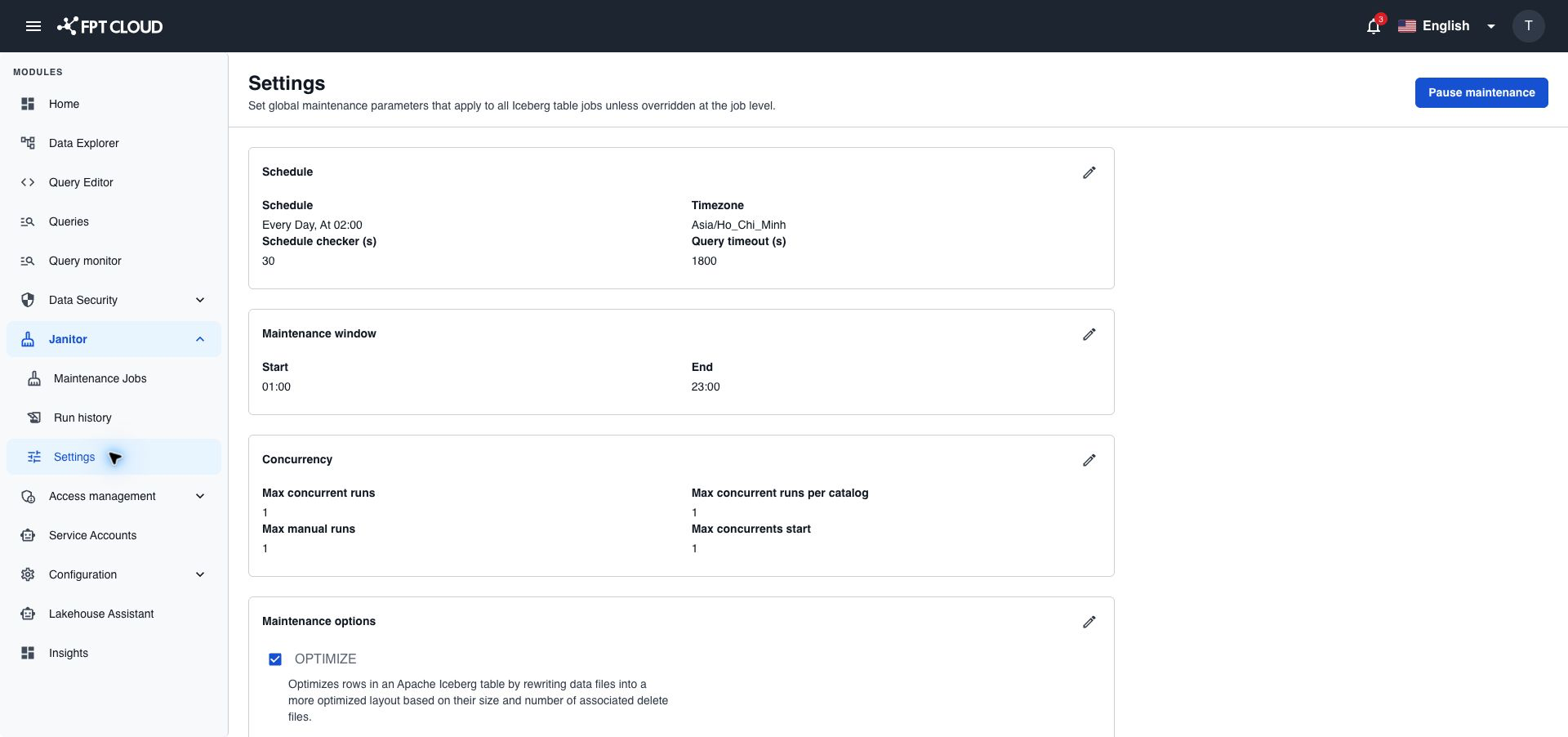
Schedule
| Field | What it sets | Allowed values |
|---|---|---|
| Schedule | The default time for jobs to run: every day, every week on a weekday, or every month on a day, at a time you pick. | — |
| Timezone | The time zone of the schedule. | A time zone from the list |
| Schedule checker (s) | How often Janitor checks for jobs that are due, in seconds. | 10 to 3600 |
| Query timeout (s) | How long Janitor waits for a response from a maintenance query, in seconds. | 30 to 3600 |
Maintenance window
The maintenance window is the time of day when job schedules are allowed, for example 00:00 to 06:00. Pick a time when the Lakehouse is quiet.
| Field | What it sets |
|---|---|
| Start | The start of the window, HH:MM. |
| End | The end of the window, HH:MM. |
The window can go past midnight, for example 22:00 to 06:00.
When a window is set, you cannot save a job whose next run falls outside it. Janitor shows an error and asks you to pick another time. When no window is set, any schedule is allowed.
Concurrency
These limits control how many runs work at the same time. Higher values finish maintenance sooner but put more load on the Lakehouse.
| Field | What it sets | Allowed values |
|---|---|---|
| Max concurrent runs | Runs that can work at the same time in the whole Lakehouse. 1 by default. | 1 to 100 |
| Max concurrent runs per catalog | Runs that can work at the same time in one catalog. | 1 to the value of Max concurrent runs |
| Max manual runs | Runs started with Run that can work at the same time. | 1 to the value of Max concurrent runs |
| Max concurrents start | Scheduled runs Janitor can start in one check. 1 by default. | 1 to the value of Max concurrent runs |
For example, when Max concurrent runs is 5, the other three limits can be 1 to 5.
Maintenance options
These options are the defaults for new jobs. You can change them for each job later.
| Option | On by default | Retention |
|---|---|---|
| OPTIMIZE | Yes | — |
| EXPIRE SNAPSHOTS | Yes | Snapshot retention (days), 7 by default |
| ORPHAN CLEANUP | No | Orphan retention (days), 7 by default |
Retention can be 7 to 365 days.
ORPHAN CLEANUP removes files for good. It cannot be undone.
Keep Orphan retention (days) the same as or longer than Snapshot retention (days). If it is shorter, Janitor saves your change but shows a warning: files that a kept snapshot still uses could be removed.
If something goes wrong
| Situation | What it means | What to do |
|---|---|---|
| A value is out of range | The number is below the minimum or above the maximum. | Enter a value in the allowed range. See Input rules. |
| A limit is higher than Max concurrent runs | Max concurrent runs per catalog, Max manual runs, and Max concurrents start cannot be higher than Max concurrent runs. | Lower the value, or raise Max concurrent runs first. |
| Retention is less than 7 days | Retention must be at least 7 days. | Pick 7 days or more. |
| Save fails with an access error | Your role has only maintenance:read. | Ask your administrator for maintenance:manage. |