Run maintenance manually
You do not have to wait for the schedule. You can check what a job would do, run it right away, or unblock a job that is stuck.
Prerequisites
- For Dry run: your role includes
maintenance:read. - For Run and Reset state: your role includes
maintenance:manage.
Check a run first with Dry run
Dry run checks each step of the job without running the maintenance. It does not create a run and does not change the table.
- Select Janitor → Maintenance Jobs in the sidebar, then select the table.
- Open the dropdown next to Run, then select Dry run.
- Read the Dry run result. Each step shows
PASSorFAILED.
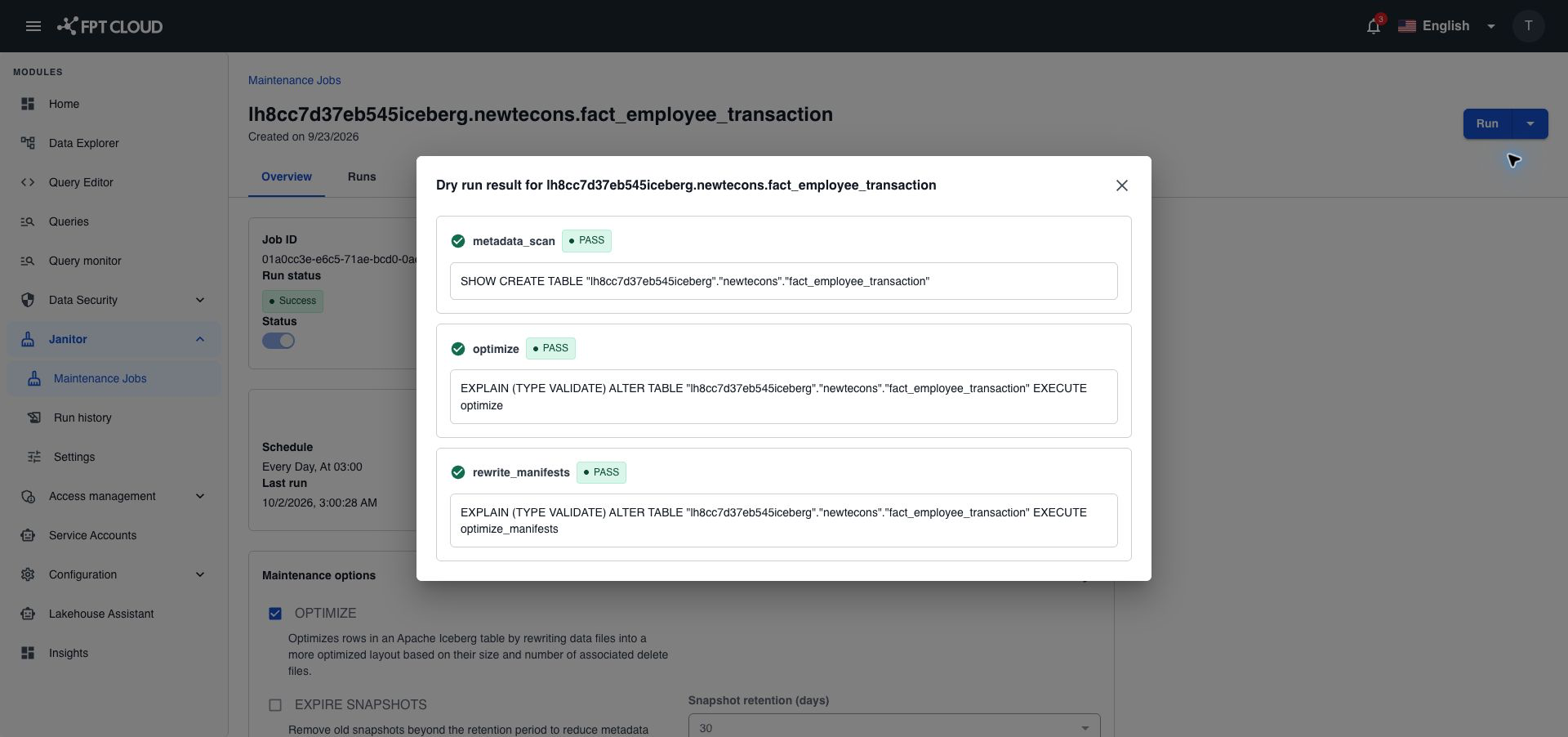
A failed step shows the reason in a red box under its name. Fix the cause before you select Run, for example check that the table still exists. If Janitor cannot check the table at all, the dialog shows one error for the whole table instead of the steps.
The steps depend on the maintenance options of the job:
| Option | Steps |
|---|---|
| OPTIMIZE | metadata_scan, optimize, rewrite_manifests |
| EXPIRE SNAPSHOTS | expire_snapshots |
| ORPHAN CLEANUP | remove_orphan_files |
Steps always run in the order of the table above.
Run a job now
- Open the job.
- Select Run.
- In Trigger Manual Run, select Trigger Run.
The run uses the maintenance options turned on for the job. To run other options, change them first. See Change the schedule or options of a job.
To follow the run, open the Runs tab of the job. See View run history and stop a run.
Use Run to catch up after maintenance was paused or down. Janitor does not rerun missed scheduled runs by itself.
Unblock a stuck job with Reset state
A job is stuck when its run shows Running but nothing happens anymore, and no new run can start. Reset state clears it, so the job can run again.
- Open the job.
- Open the dropdown next to Run, then select Reset state.
- Type
reset, then select Reset.
After a reset:
- Runs of the job that were
RunningorQueuedbecomeCancelled, with the messageCleared by operator. - The job can run again right away. Janitor sets its next run from the schedule.
- A deactivated job stays deactivated.
- Janitor records the reset as a run in the history of the job.
Reset state does not delete any table, snapshot, file, or data. It only changes the state of the job in Janitor.
Reset state is blocked while a run is really working. To stop a working run, use Stop run instead. See Stop a run.
If something goes wrong
| Situation | What it means | What to do |
|---|---|---|
Maintenance is globally paused | All maintenance is paused on the Settings page. | Wait, or ask your administrator to resume. See Pause and resume all maintenance. |
| Run is rejected because a run is active | Only one run can work on a job at a time. | Wait for the run to finish, or stop it in Run history. |
| Reset state is rejected | A run of the job is still working. It is not stuck. | Wait, or select Stop run on the run. |
A Dry run step shows FAILED | Janitor cannot run that step on the table now. | Read the error under the step. Check the table in Data Explorer. |
| Access error | Your role does not allow the action. | Ask your administrator for maintenance:manage. |