Download query results
Download a result when you need the data in a spreadsheet or another tool. You can export up to 100,000 rows, more than the 10,000 rows the grid shows.
Prerequisites
- The query has finished in the current session and returned rows. Download stays disabled for statements that return no rows, such as
CREATE TABLE.
Download the result
- Open the result tab you want to export.
- Select Download.
- Select CSV or JSON.
- Read the message
Download will re-run your query and export up to 100,000 rows. Continue?and confirm.
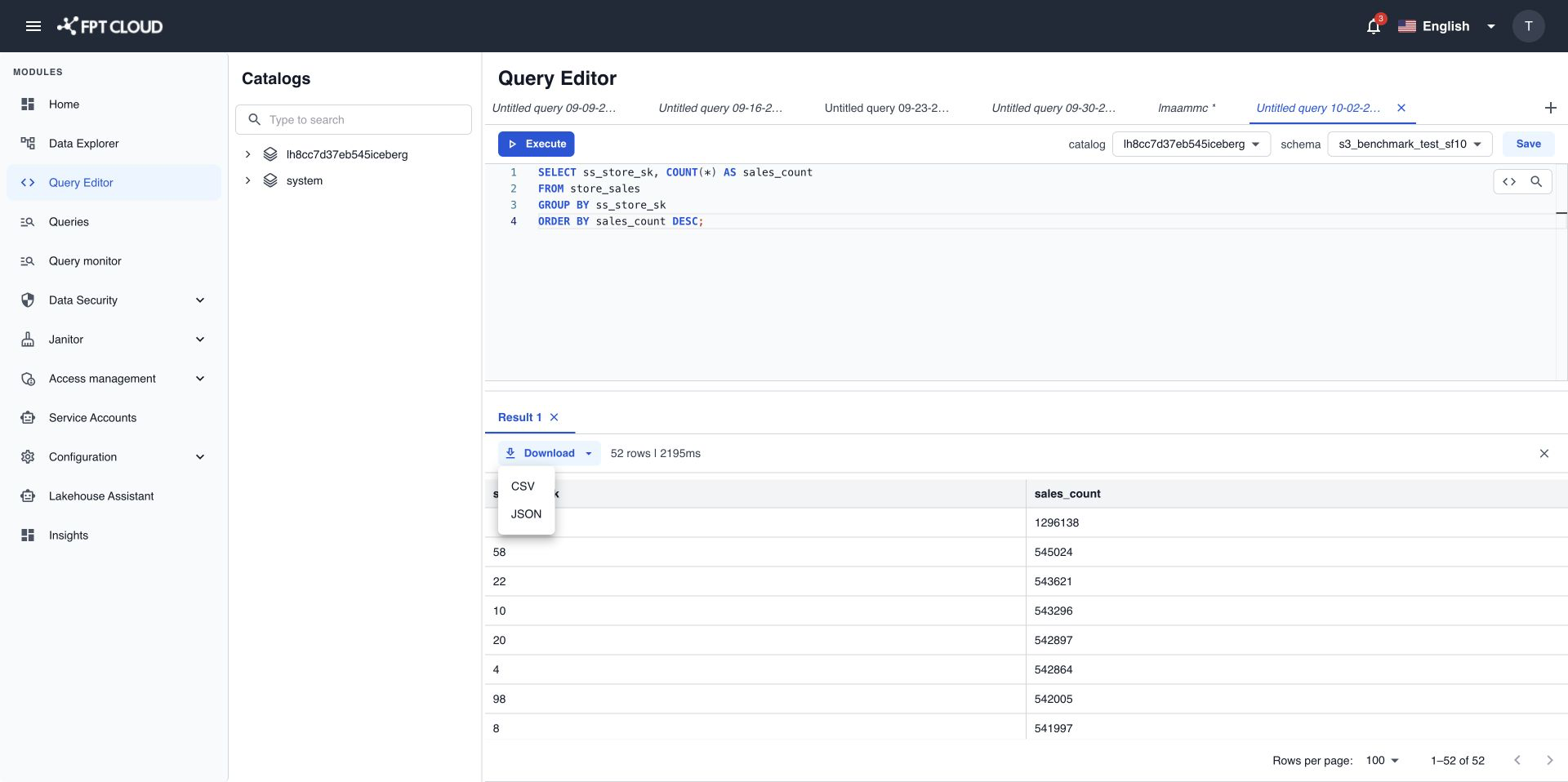
The browser saves a file named query_result_YYYYMMDD_HHMMSS.csv or query_result_YYYYMMDD_HHMMSS.json.
How the download works
Query Editor runs your query again to build the file. It does not copy the rows on screen.
- If your query has no
LIMIT, or aLIMITabove 100,000, the file holds at most 100,000 rows. - If your query has a smaller
LIMIT, the file keeps yourLIMIT. - Data that changed since you ran the query appears in the file with its new values.
warning
Because the query runs again, a large query can take as long as the first run. To export more than 100,000 rows, split the query, for example by date range, and download each part.
If the download fails
If you see Query result is no longer available. Please run the query again., run the query again and then download it.