Compare the data of two snapshots
Comparing data lists the exact rows that were added, removed, or changed between two snapshots. Use it to build an incident report after a bad write, or to check what a reload changed.
A data comparison can read a lot of data. Time Machine runs it in two steps. First it checks your request and estimates how much it will read. You run the comparison only after you see the estimate.
Prerequisites
- Your role includes
time_machine:data_diff. Theportal_admin,data_engineer, anddata_analystroles have it. - You can read the table in Data Security.
- The table has at least 2 snapshots.
Choose a comparison key
The comparison key is one or more columns that identify a row, for example order_id. Time Machine matches rows in the two snapshots by this key.
The key must be:
- Unique: no two rows in the same snapshot share the same key.
- Never empty: no row has a
NULLin a key column. - Part of the output: if you write a custom
SELECT, it must include the key columns.
After a comparison succeeds, Time Machine saves the key for you on that table. Next time, it suggests the same key. Saved keys are personal. Other users do not see yours.
Compare the data
- Open the Time Machine tab of the table.
- Select the older snapshot in Snapshot A.
- Select the newer snapshot in Snapshot B. A is "before" and B is "after", the same as in Compare the structure of two snapshots.
- Select Data Diff.
- Check the suggested key in Comparison key, or enter the key columns.
- Optional: enter a
SELECTto compare only some columns or rows. The rules are the same as for a preview. See Write a custom SELECT. - Select Prepare. Time Machine checks the request and shows the estimate.
- Check the estimated data size and number of rows, and the time the confirmation expires.
- Select Execute before the confirmation expires.
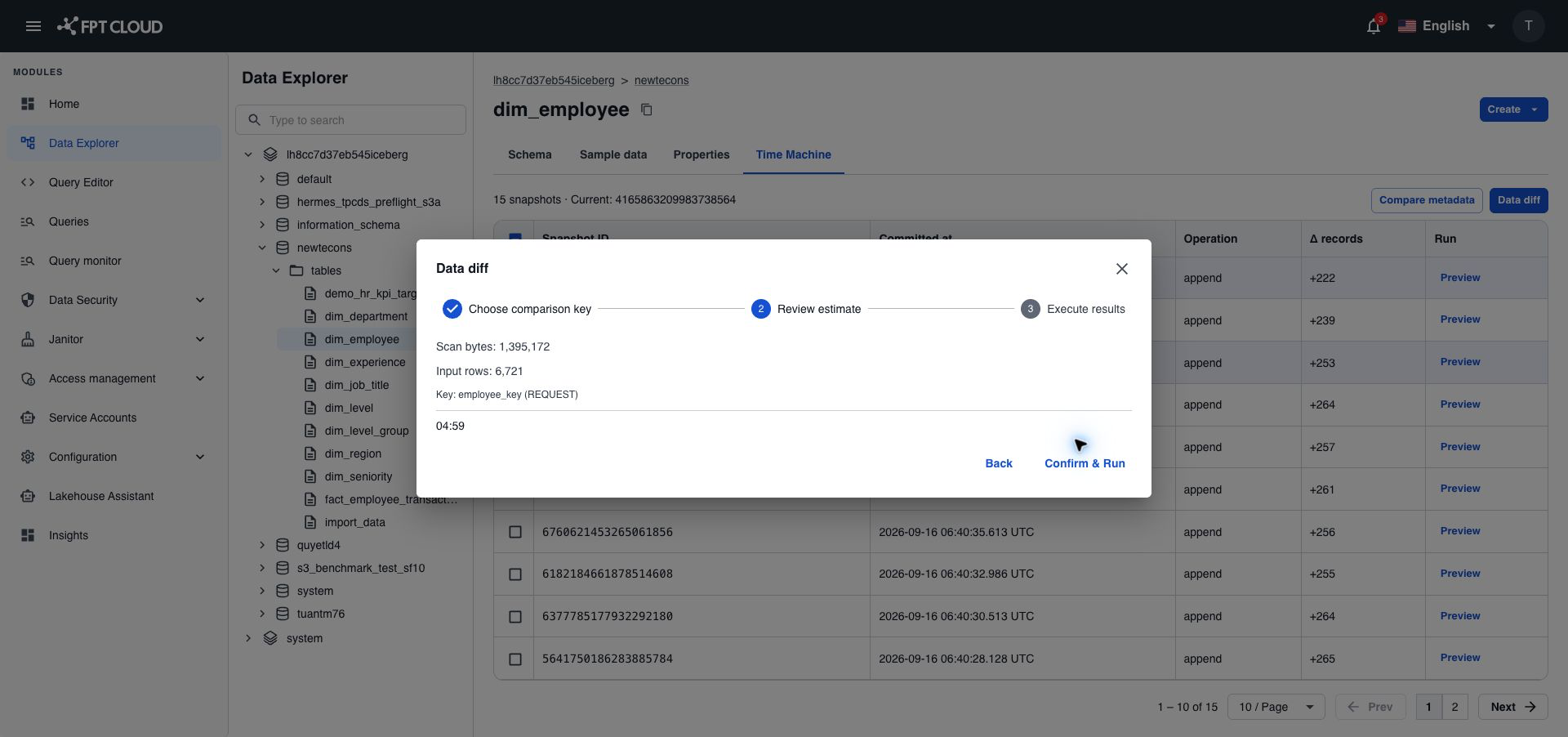
Prepare does not compare any rows and does not save the key. If the estimate is over the limit, 10 GB of data by default, you cannot continue. Add a WHERE filter in the SELECT to read less, then select Prepare again.
The confirmation expires after 5 minutes by default. After that, select Prepare again. You cannot change the snapshots, key, or SELECT after Prepare. To change them, go back and select Prepare again.
Read the result
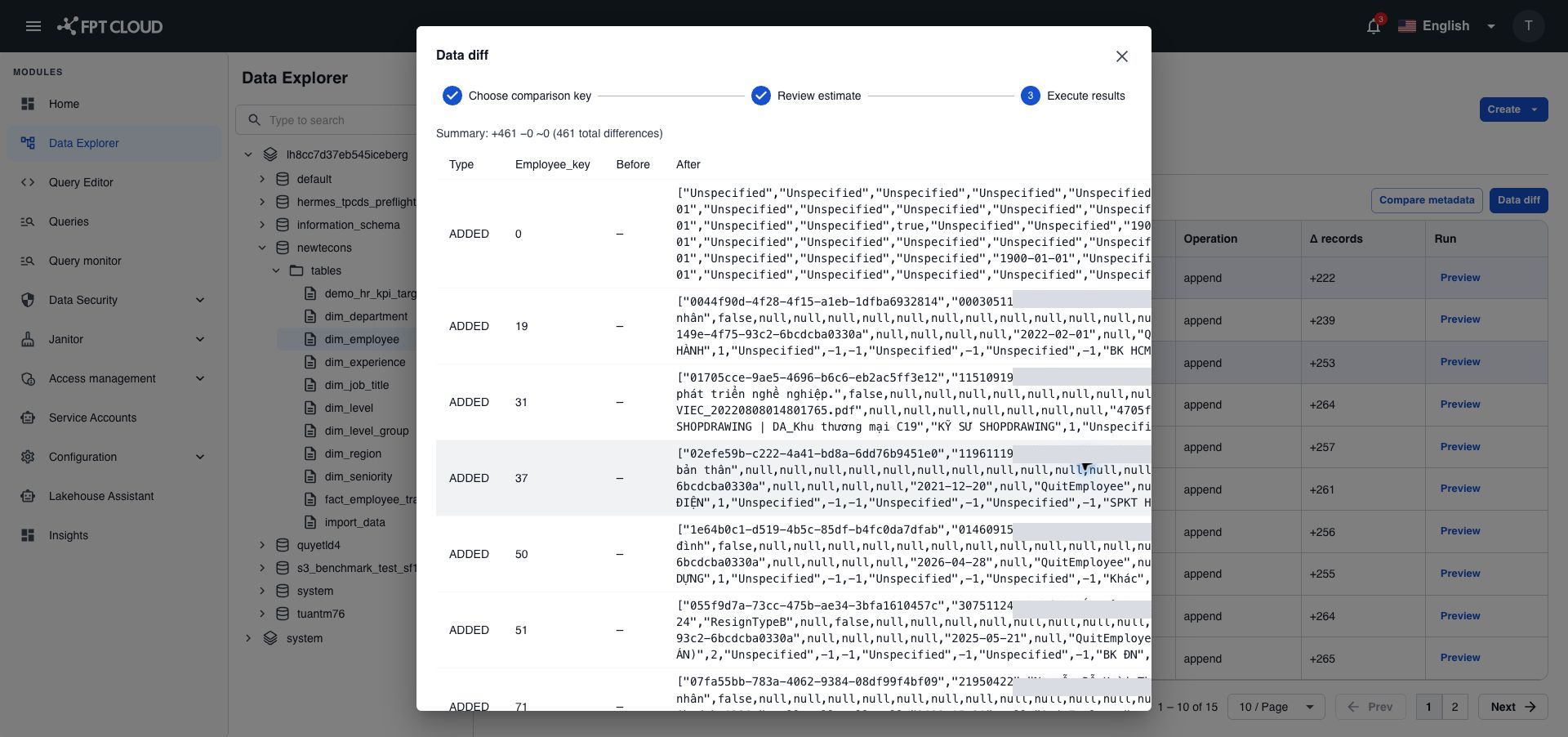
The summary counts rows in four groups. The list shows only the rows that differ.
| Change type | Meaning | Values shown |
|---|---|---|
ADDED | The key is in B but not in A. | After |
REMOVED | The key is in A but not in B. | Before |
CHANGED | The key is in both, but some values differ. | Before and after |
UNCHANGED | The key is in both, with the same values. Counted only, not listed. | — |
If the two snapshots have different columns, for example a column was added between them, the rows whose key is in both snapshots show as CHANGED.
The comparison returns up to 10,000 differences by default. If there are more, it fails instead of showing part of the list, so you never get an incomplete report.
If something goes wrong
| Situation | What it means | What to do |
|---|---|---|
| A comparison key is required | You entered no key, and you have no saved key for this table. | Enter the key columns. |
| The comparison key is not valid | A key column is missing from the output, or listed twice. Or some rows have an empty or duplicate key. | Pick columns that are unique and never empty, and include them in the SELECT. |
| The estimate is over the limit | The comparison would read more than allowed. | Add a WHERE filter, then select Prepare again. |
| The confirmation expired | More than 5 minutes passed, or the table or limits changed after Prepare. | Select Prepare again. |
| Too many differences | More than 10,000 rows differ. | Add a WHERE filter to compare a smaller part, for example one day. |
| Too many comparisons running | You already have one data comparison running, or the Lakehouse is busy. | Wait for it to finish and try again. |
| The request timed out | The comparison took longer than the time limit, 5 minutes by default. | Add a WHERE filter or pick fewer columns. |
| Access denied | Your role or your data access does not allow it. | Ask your administrator for time_machine:data_diff or for access to the table. |