View the snapshot timeline of a table
The snapshot timeline lists every version of a table, newest first. Use it to find when the data changed and which write caused it.
Prerequisites
- Your role includes
time_machine:read. Theportal_admin,data_engineer, anddata_analystroles have it. - You can read the table in Data Security.
Open the timeline
- Select Data Explorer.
- Select the table in the catalog tree. See Browse the catalog tree.
- Select the Time Machine tab.
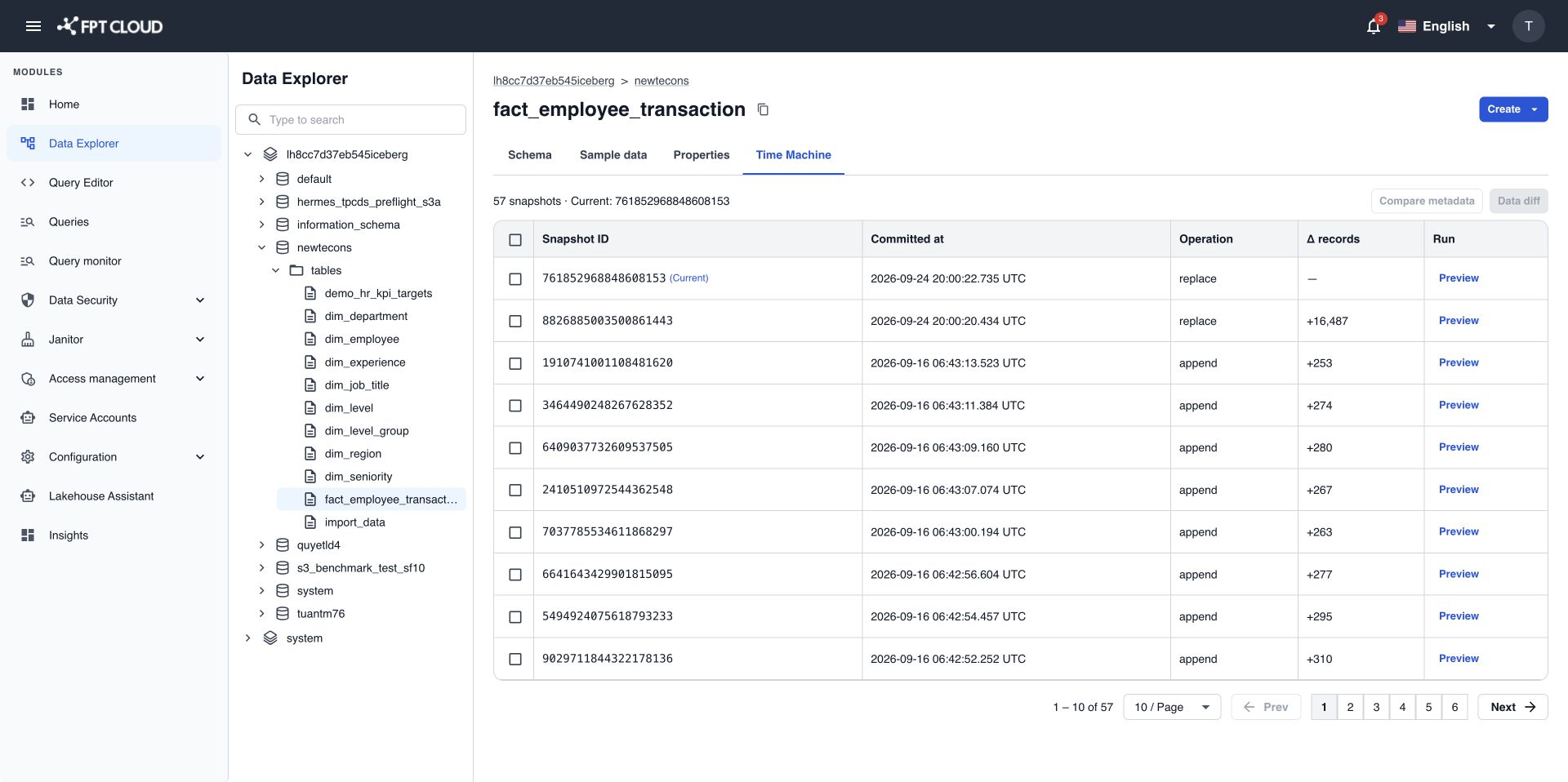
Read the timeline
Each row is one snapshot.
| Column | What it shows |
|---|---|
| Snapshot ID | The number that identifies the snapshot. You pick snapshots by this ID to preview or compare. |
| Committed at | When the write finished. |
| Operation | The kind of write, for example append (rows added) or overwrite (rows replaced). |
| Added records | How many records this write added. |
| Total records | How many records the table had after this write. |
| Current | Marks the snapshot that queries read today. |
The timeline shows up to 200 snapshots per page. Use the page controls to see older ones.
To spot a bad write, look for an overwrite, or for a record count that is very different from the runs before it.
note
Sometimes the table does not report which snapshot is current. Then no row is marked Current. This is normal and the rest of the timeline is correct.
If the table has named versions, such as branches or tags, the timeline shows their names next to the snapshot.
When the timeline is empty or short
| You see | What it means |
|---|---|
| No snapshots | The table is new and has no data written yet. |
| 1 snapshot | You can preview it, but you need 2 snapshots to compare. The compare actions stay off. |
If something goes wrong
| Situation | What it means | What to do |
|---|---|---|
| The table is not supported | The object is a view or uses a table format without snapshots. | Pick a table in the Lakehouse table format. |
| The table is not found | The table does not exist or you cannot read it. | Check the name, or ask your administrator for access in Data Security. |
| Access denied | Your role or your data access does not allow it. | Ask your administrator for time_machine:read or for access to the table. |