Configure secret backends
Keep the connections and variables of your DAGs in FPT Key Vault or Azure Key Vault, and let Airflow read them through a secret backend. Set up the secret backend on the service, then check the setup with a test DAG.
Prerequisites
- An Orchestration service. See Create an Orchestration service.
- For FPT Key Vault, the URL of your vault, the mount point and paths that hold your connections and variables, and a token for the vault.
- For Azure Key Vault, the values of the Vault URL, Tenant ID, Client ID, and Client Secret fields.
Set up the secret backend on the service
You can set up the secret backend when you create the service, on the Advanced screen of the form. See Secret backends. To set it up or change it later, use the Advanced tab of the service.
-
Select Data platform → Workspace management, then select your workspace.
-
On the Overview tab, under Services, select Orchestration.
-
Select the Advanced tab.
-
In Secret backends, select the edit icon.
-
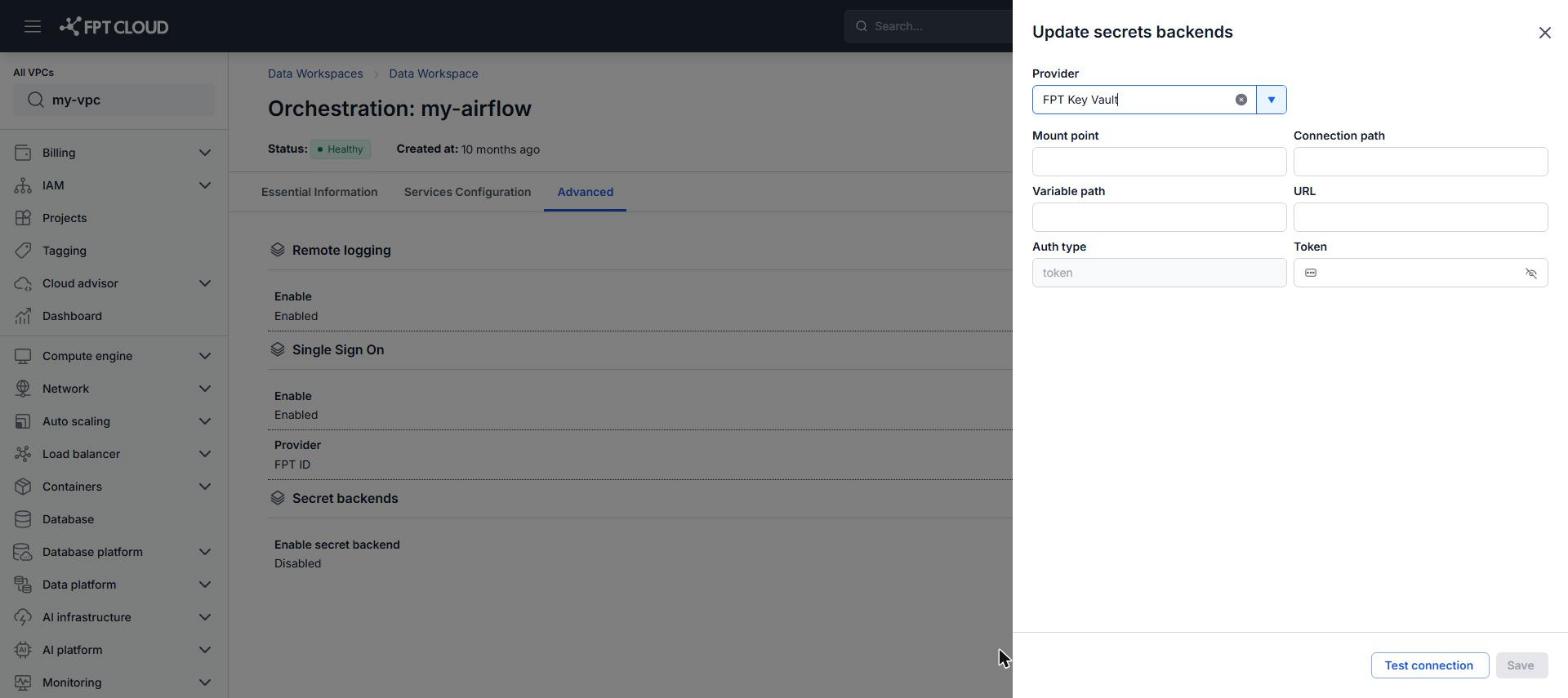
In the Update secrets backends panel, select the Provider: FPT Key Vault or Azure Key Vault.
-
Fill in the fields of your provider, as described in FPT Key Vault or Azure Key Vault.
-
Select Test connection to check the connection to the secret backend.
-
Select Save.
Save stays disabled until you run Test connection. To close the panel without saving, select the close icon. The panel has no Cancel button.
FPT Key Vault
| Field | Description |
|---|---|
| Mount point | Required. The mount point path of the secret backend, for example airflow-connections. |
| Connection path | Required. The path or key of the Airflow connections. |
| Variable path | Required. The path or key of the variables or secrets. |
| URL | Required. The endpoint address of the Vault, for example https://<VAULT-HOST>. |
| Auth type | The authentication type with the Vault. Fixed to token. |
| Token | Required. The token that authenticates with the Vault. The field is masked. The token needs read access to your connections and variables, as described in Give the token read access in Vault. |
Azure Key Vault
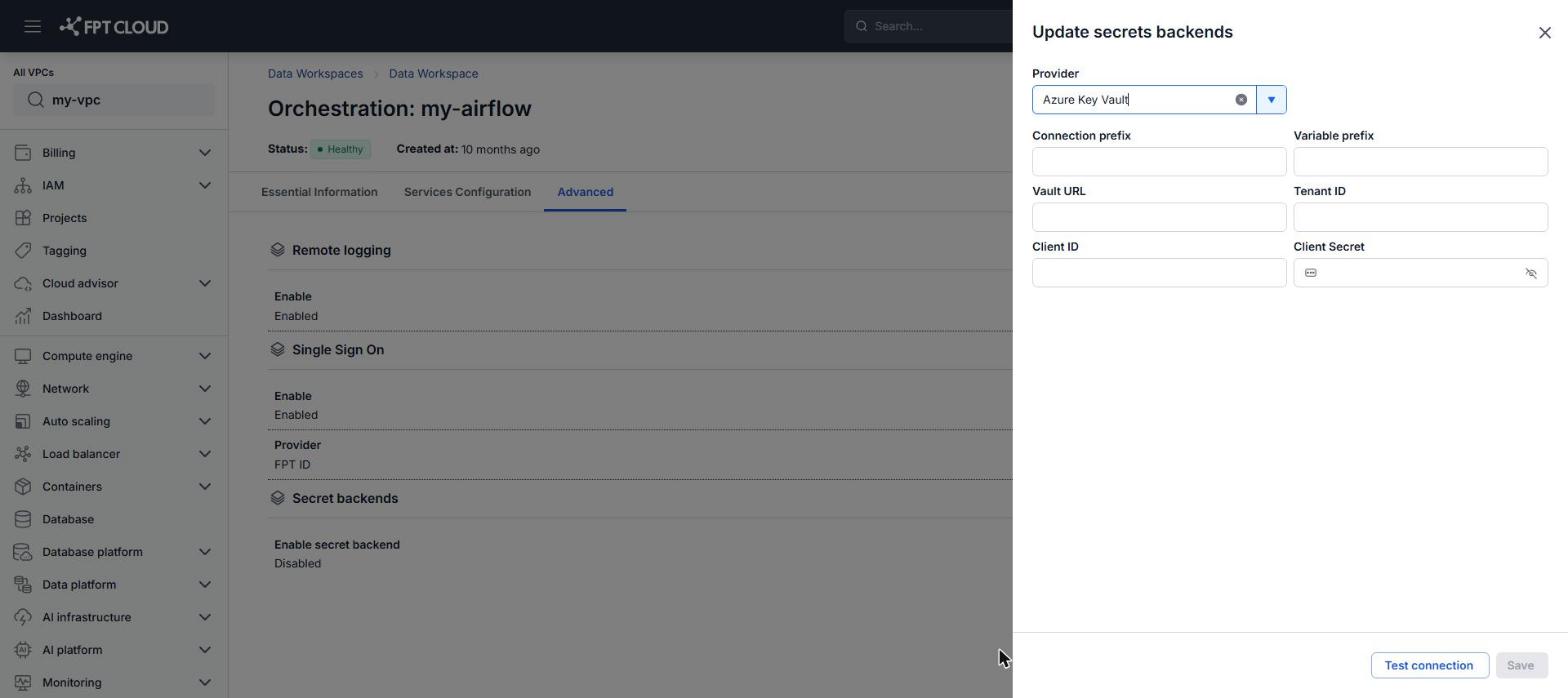
With Azure Key Vault, the panel shows these fields.
| Field | Description |
|---|---|
| Connection prefix | The prefix of the secrets that hold the Airflow connections. |
| Variable prefix | The prefix of the secrets that hold the Airflow variables. |
| Vault URL | The URL of the Azure key vault. |
| Tenant ID | The tenant ID that the service uses to authenticate with the vault. |
| Client ID | The client ID that the service uses to authenticate with the vault. |
| Client Secret | The secret of that client. The field is masked. |
Give the token read access in Vault
With FPT Key Vault, the token needs read and list permissions on the paths that hold your connections and variables. Assign a policy to the token, for example the one below. Replace <MOUNT-POINT>, <CONNECTION-PATH>, and <VARIABLE-PATH> with the values that you entered for the secret backend.
{
  "path": {
    "<MOUNT-POINT>/data/<CONNECTION-PATH>/*": {
      "capabilities": ["read", "list"]
    },
    "<MOUNT-POINT>/data/<VARIABLE-PATH>/*": {
      "capabilities": ["read", "list"]
    },
    "<MOUNT-POINT>/metadata/<CONNECTION-PATH>": {
      "capabilities": ["list"]
    },
    "<MOUNT-POINT>/metadata/<VARIABLE-PATH>": {
      "capabilities": ["list"]
    }
  }
}
Check that a DAG can read a secret
The test DAG test_vault_secret_backend reads the variable myvar with Variable.get and prints it in the log of its read_secret task. Create the variable myvar in Vault under your variable path, or change the name in the code. Then save the code below as read_vault_be.py.
from airflow import DAG
from airflow.operators.python import PythonOperator
from airflow.models import Variable
from datetime import datetime

def read_secret():
    secret = Variable.get("myvar")
    print(f"Secret from Vault: {secret}")

with DAG(
    dag_id="test_vault_secret_backend",
    start_date=datetime(2023, 1, 1),
    schedule=None,
    catchup=False
) as dag:

    read_secret_task = PythonOperator(
        task_id="read_secret",
        python_callable=read_secret
    )
- Put
read_vault_be.pyin thedagsfolder of the S3 storage that the service mounts. If your DAGs come from a Git repository, add the file to the repository instead. - Sign in to the Airflow UI at the URL of the service. See View Orchestration details.
- In the left menu, select Dags.
- Select the DAG
test_vault_secret_backendin the list. - Turn on the DAG toggle if the DAG is off.
- Select Trigger.
- Open the latest run of the DAG.
- Select the
read_secrettask and view its log. - Check that the log shows the line
Secret from Vault:followed by the value of the variable.