Find the fields of each task type before you fill in the task form. The fields that all types share are listed once at the top, and each type then lists only its own fields.
Fields common to all task types
Every task form has these fields, whatever its Type.
| Field | Description |
|---|
| Task name | Required. Letters, numbers, underscores (_), and hyphens (-). |
| Type | Required. The task type: PySpark, Jupyter Notebook, Jar, Python, DBT, Dask, or SQL Execute Job. The rest of the form depends on it. Default: Python. |
| Depends on | Optional. The tasks that this task depends on. You can select more than one. |
Execution environment
| Field | Description |
|---|
| Compute | Required. The compute that runs the task. Compute lists the computes that you can use, for example airflow-worker. You select exactly one. |
Notifications
To add notifications to a task, see Add notifications to a task.
| Field | Description |
|---|
| Type | The channel: email or Telegram. It lists only the channels that are set up and enabled. |
| Channel | The email address or the Telegram chat ID that receives the notifications. |
| Event | The statuses that send a notification. You can select more than one. |
Retries
| Field | Description |
|---|
| At most | The number of retries when the task fails. |
| Delay (seconds) | Python tasks only. The wait between two retries, in seconds. |
| Delay (minutes) | All other task types. The wait between two retries, in minutes. |
Python
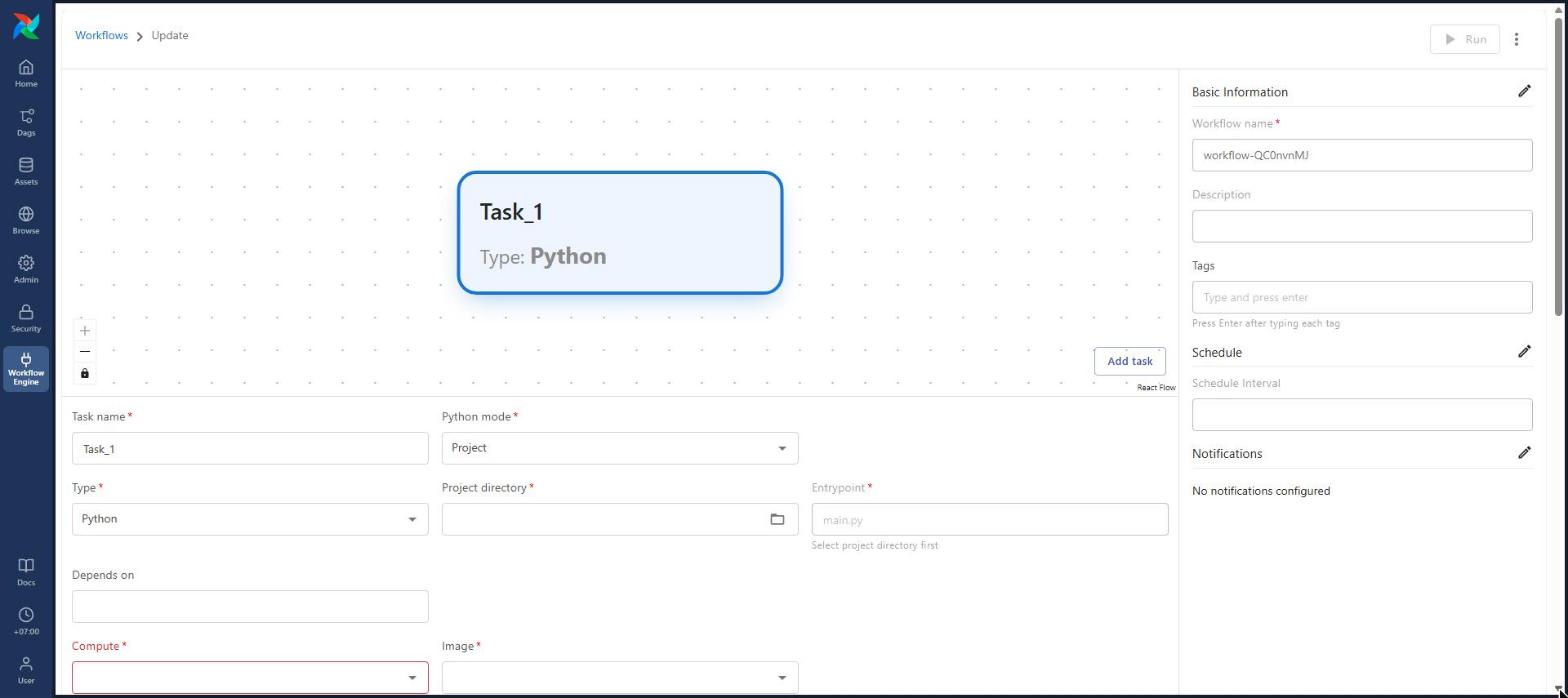
A Python task runs a Python script or a Python project. Use it for small data processing jobs, automation scripts, or simple business logic.
| Field | Description |
|---|
| Python mode | Required. Script runs one Python file. Project runs a project folder from its entry point. Default: Script. |
| Script path | Required with Script. The Python file (.py) to run. Select it with the folder icon. |
| Project directory | Required with Project. The folder of the Python project. Select it with the folder icon. |
| Entrypoint | Required with Project. The file that starts the project, for example main.py. Select the Project directory first. |
Execution environment
| Field | Description |
|---|
| Image | Required. The runtime image of the task. |
| Init script | Optional. A script that runs before the script of the task. |
| Environment variables | Optional. Environment variables passed to the job, as JSON key-value pairs in env. |
Resources
| Field | Description |
|---|
| CPU | Required. The number of CPU cores. |
| RAM (GB) | Required. The RAM, in GB. |
Libraries and arguments
| Field | Description |
|---|
| Pypi | Optional. A requirements.txt file that lists the Python libraries to install. |
| Wheel | Optional. One or more .whl files. |
| Configuration (Arguments) | Optional. The arguments passed to the script when it runs. Press Enter after each one. |
PySpark
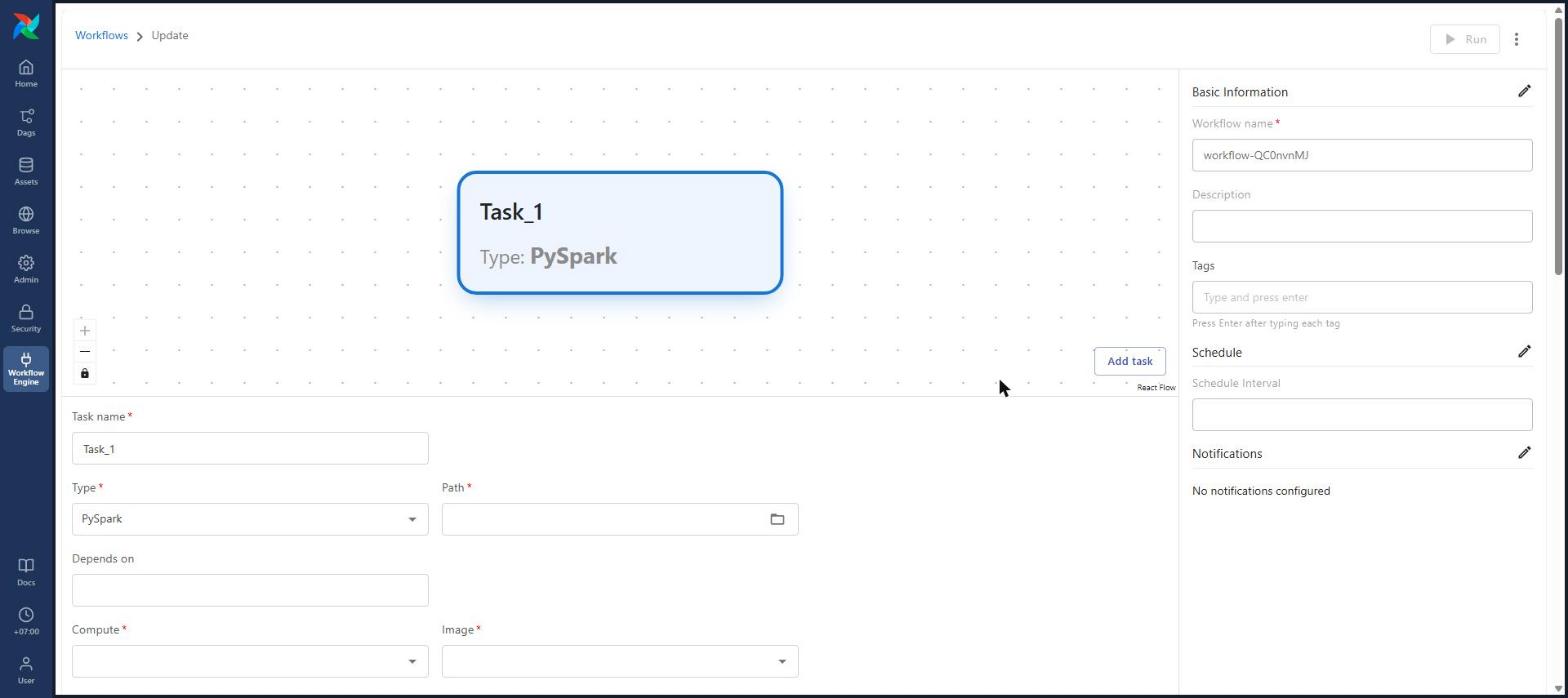
A PySpark task runs a Spark job written in Python. Use it for large-scale data processing with distributed computing.
| Field | Description |
|---|
| Path | Required. The Python file (.py) to run. Select it with the folder icon. |
Execution environment
| Field | Description |
|---|
| Image | Required. The runtime image of the task. |
| Init script | Optional. A script that runs before the script of the task. |
| Spark configuration | Optional. Spark parameters as JSON key-value pairs in spark_conf. For the parameters, see Spark configuration. |
| Environment variables | Optional. Environment variables passed to the job, as JSON key-value pairs in env. |
Resources
| Field | Description |
|---|
| Driver CPU | Required. The CPU of the Spark driver. |
| Driver RAM (GB) | Required. The RAM of the Spark driver, in GB. |
| Executor CPU | Required. The CPU of each executor. |
| Executor RAM (GB) | Required. The RAM of each executor, in GB. |
| Instances | Required. The number of instances of the job. |
Libraries and arguments
| Field | Description |
|---|
| Pypi requirements | Optional. A requirements.txt file. |
| Wheel | Optional. One or more .whl files. |
| Jar | Optional. One or more .jar files for the Java runtime. |
| Configuration (Arguments) | Optional. The arguments passed to the script when it runs. Press Enter after each one. |
Jupyter Notebook
A Jupyter Notebook task runs a notebook. Its form has the same fields as a PySpark task, and its Path is the path to the notebook that the task runs.
Jar
A Jar task runs a Java or Scala application packaged as a JAR file. Use it for Spark jobs written in Scala or Java.
| Field | Description |
|---|
| Path | Required. The JAR file (.jar) to run. |
| Main class | Required. The Java class with the main() method where the run starts. Letters, numbers, dots (.), and underscores (_). |
Execution environment
| Field | Description |
|---|
| Image | Required. The runtime image of the task. |
| Init script | Optional. A script that runs before the application. |
| Spark configuration | Optional. Spark parameters as JSON key-value pairs in spark_conf, as for a PySpark task. |
| Environment variables | Optional. Environment variables passed to the job, as JSON key-value pairs in env. |
Resources
| Field | Description |
|---|
| Driver CPU | Required. The driver CPU for the job. |
| Driver RAM (GB) | Required. The driver RAM for the job, in GB. |
| Executor CPU | Required. The executor CPU for the job. |
| Executor RAM (GB) | Required. The executor RAM for the job, in GB. |
| Instances | Required. The number of instances of the job. |
Libraries and arguments
| Field | Description |
|---|
| Jar | Optional. One or more .jar library files for the Java runtime. |
| Maven | Optional. Maven packages. Type each package, then press Enter. |
| Configuration (Arguments) | Optional. The arguments passed to the application when it runs. Press Enter after each one. |
DBT
A DBT task runs a dbt (data build tool) project. Use it to transform data in a data warehouse with the ELT model.
| Field | Description |
|---|
| Path | Required. The folder that holds the dbt project. |
Execution environment
| Field | Description |
|---|
| Image | Required. The runtime image of the task. |
| Init script | Optional. A script that runs before the dbt commands. |
| Environment variables | Optional. Environment variables as JSON key-value pairs in env. |
Resources
| Field | Description |
|---|
| CPU | Required. The CPU cores for dbt. |
| RAM (GB) | Required. The RAM for dbt, in GB. |
DBT commands
| Field | Description |
|---|
| Commands | The dbt commands to run, for example dbt run. Press Enter after each command. |
Libraries
| Field | Description |
|---|
| Pypi requirements | Optional. A Python requirements.txt file. |
| Wheel files | Optional. A Python .whl file. |
A DBT task has no Arguments.
Dask
A Dask task runs a parallel data processing job with the Dask framework. Use it for large-scale data processing with Python in a distributed environment.
| Field | Description |
|---|
| Path | Required. The Python file (.py) to run. |
Execution environment
| Field | Description |
|---|
| Image | Required. The runtime image of the task. |
| Init script | Optional. A script that runs before the script of the task. |
| Environment variables | Optional. Environment variables passed to the job, as JSON key-value pairs in env. |
Resources
The resources have three groups, Job, Scheduler, and Worker, each with a CPU and a RAM (GB) field.
| Field | Description |
|---|
| Job: CPU | Required. The CPU of the job. |
| Job: RAM (GB) | Required. The RAM of the job, in GB. |
| Scheduler: CPU | Required. The CPU of the Dask scheduler. |
| Scheduler: RAM (GB) | Required. The RAM of the Dask scheduler, in GB. |
| Worker: CPU | Required. The CPU of each Dask worker. |
| Worker: RAM (GB) | Required. The RAM of each Dask worker, in GB. |
| Worker instances | Required. The number of workers. |
Libraries and arguments
| Field | Description |
|---|
| Pypi requirements | Optional. A requirements.txt file that lists the Python libraries to install. |
| Wheel files | Optional. One or more .whl files. |
| Configuration (Arguments) | Optional. The arguments passed to the script when it runs. Press Enter after each one. |
SQL Execute Job
An SQL Execute Job task runs an SQL query through a connection. It has no Image field.
| Field | Description |
|---|
| Connection | Required. The connection to the database that the SQL runs on. |
| SQL Query | The SQL to run. |
| Auto commit | Whether to commit automatically. Default: False. |
| Split statements | Whether to split SQL Query into separate statements. Default: True. |
| CPU | Required. The number of CPU cores. |
| RAM (GB) | Required. The RAM, in GB. |
| Environment Variables | Optional. Select Add to add a variable. |
Next steps