View database cluster information
The cluster detail page is where you find the connection endpoint and credentials your application needs, alongside the cluster's current state and resource configuration.
Open the detail page
Log in to the Console Portal, then navigate to Database Platform → All Database or Non-Relational Database. Select the Cluster ID and open the Overview tab.
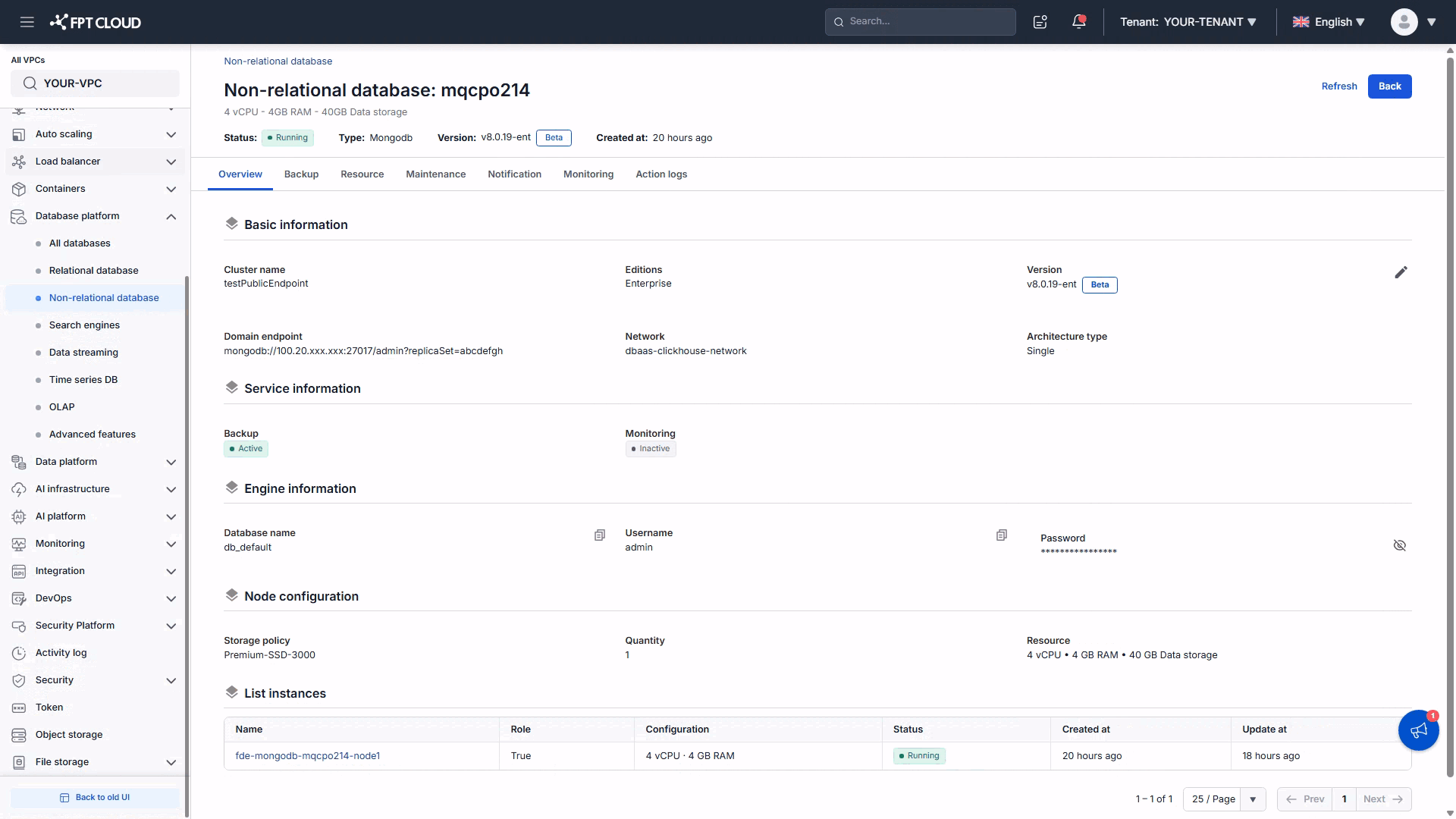
What each section shows
| Section | Information |
|---|---|
| Overview (header) | Cluster ID, status, current vCPU–RAM–Storage, engine type, engine version, creation time |
| Basic Information | Cluster name, database type, version, endpoint (domain/IP), port, network/subnet, architecture type |
| Service Information | Enabled state of the Backup and Monitoring services |
| Engine Information | Default database name and the default account credentials (username and password) |
| Data Nodes Configuration | Storage policy, node count, and current resource configuration per node |
| List Instances | Every node in the cluster — name, role (Primary/Replica), resources, status, creation and last-update times |
Basic Information and Engine Information together give you everything needed for a connection string: endpoint, port, database name, username, and password.
Architecture type on this page reads Single for a one-node cluster, while the provisioning wizard calls the same option Standalone. Two labels, one architecture.
The Overview tab is not read-only. The pencil icon next to Quantity in a node configuration section opens the scale-out control — see Scale out a database cluster.
Reading the instance list
For a Replica Set, the Role column identifies which node is currently Primary. This changes on failover — it is a live view, not a fixed assignment. A Standalone cluster has one entry and no meaningful role.
The column prints True / False rather than Primary / Secondary. True is the Primary.
A Sharded Cluster detail page
A Sharded Cluster is shown differently enough to be worth its own walkthrough.
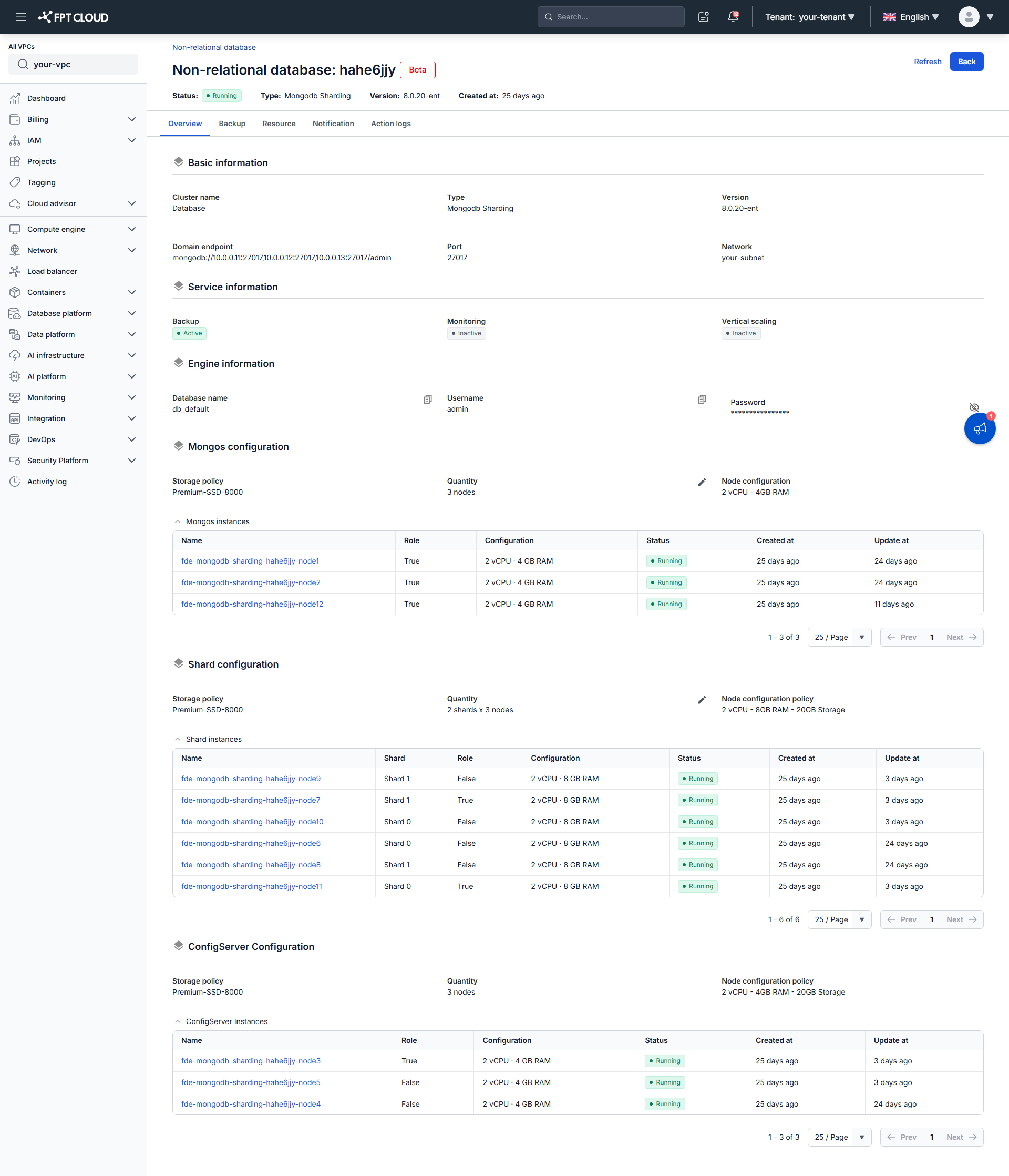
What differs from the header down
| Standalone / Replica Set | Sharded Cluster | |
|---|---|---|
| Type in the header | Mongodb | Mongodb Sharding, with a Beta badge beside the cluster ID |
| Header fields | Includes High availability | No High availability field |
| Tabs | Overview, Backup, Resource, Vertical Scaling, Maintenance, Notification, Monitoring, Action logs | Overview, Backup, Resource, Notification, Action logs — no Vertical Scaling, Maintenance, or Monitoring tab |
| Basic Information | Has Editions and Architecture type rows | Neither row; Type carries the distinction |
| Node configuration | One Data Nodes Configuration section with one instance list | Three sections, each with its own instance table |
The connection endpoint
The Domain endpoint lists the mongos routers, and unlike a Replica Set it carries no ?replicaSet= parameter:
mongodb://10.0.0.11:27017,10.0.0.12:27017,10.0.0.13:27017/admin
That is the intended way in. Clients talk to mongos, never to a shard directly, so the shard topology stays invisible to your application.
The three configuration sections
Each section repeats the same four fields (Storage policy, Quantity, Node configuration, and an instance table) for its own group:
| Section | Quantity reads | Node configuration | Instance table |
|---|---|---|---|
| Mongos configuration | 3 nodes | vCPU and RAM only, no storage | Mongos instances — every row shows Role True |
| Shard configuration | 2 shards x 3 nodes | vCPU, RAM, and storage per node | Shard instances — has an extra Shard column |
| ConfigServer Configuration | 3 nodes | vCPU, RAM, and storage per node | ConfigServer Instances |
The Shard column is the one to read carefully. It groups the rows by shard (Shard 0, Shard 1, …), and within each shard exactly one row shows Role True — that shard's Primary. A 2-shard cluster therefore lists six rows and two True values, one per shard, because each shard elects its own Primary independently.
Warnings on this page
The detail page surfaces conditions that need your action. The most common is a restart requirement after compute scale-down: reducing vCPU or RAM restarts the engine automatically, but some changes wait for a manual restart before taking effect.
Viewing the administrative password requires the FDE service-type permission. If credentials appear masked, your role does not grant it — see Configure IAM.
Next steps
- Connect to database with Floating IP to use these details
- Resource management to change the configuration shown here