Change database resource configurations
Cluster resources are the flavor (vCPU and RAM), the data disk size, and the storage policy that sets IOPS. All three can be changed within your available quota, though storage grows online while a flavor change restarts the engine.
View current resources
From the main menu, select Database Platform → All Databases or Non-Relational Database, click the Cluster ID, then open the Resource tab.
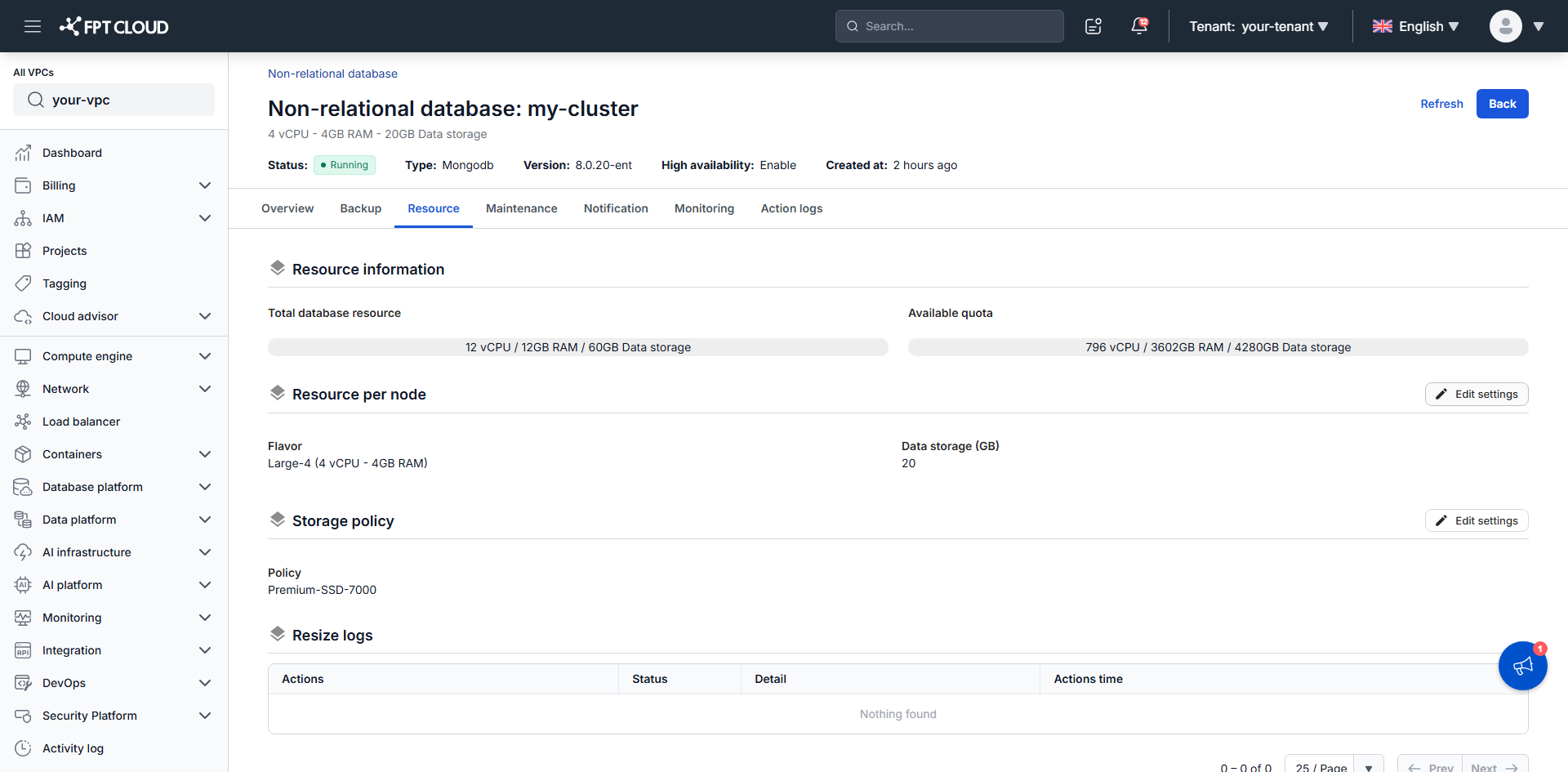
Resource information at the top gives you two figures:
| Figure | What it counts |
|---|---|
| Total database resource | What this cluster uses today, summed across every node — vCPU, RAM, and data storage |
| Available quota | The headroom left in your VPC |
Check Available quota before planning a change. Exceeding it is the most common reason an update is rejected.
Below those, the tab gives each thing you can change its own block and its own Edit settings button, and ends with Resize logs — a record of every past operation with its status, its timestamp, and the configuration it applied.
Adjust compute and disk
- In the Resource per node section, click Edit settings.
- Change what you need — Flavor to adjust vCPU and RAM, Data storage (GB) to grow the disk.
- Click Update.
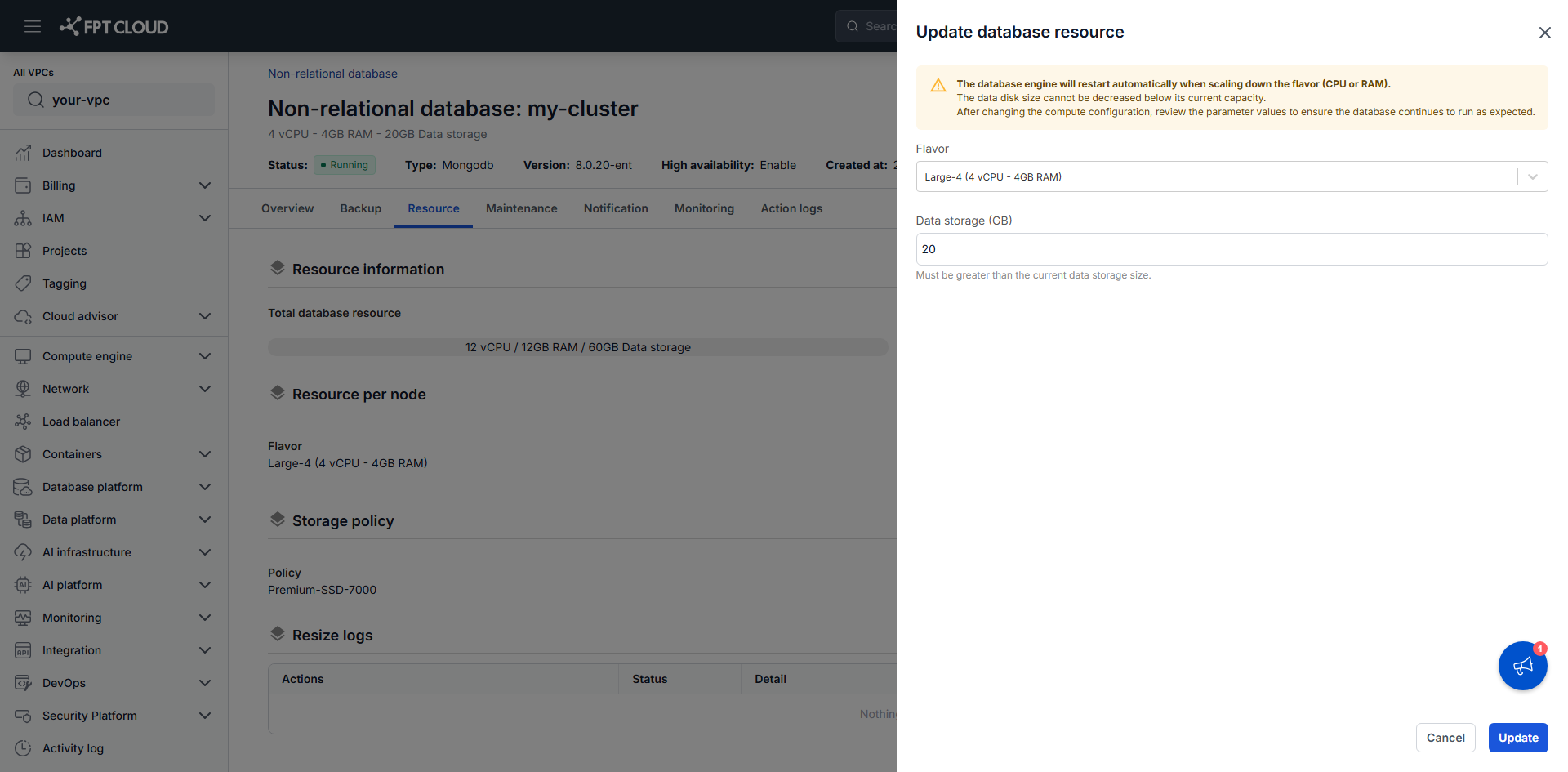
The drawer states three conditions before you commit, and each one matters:
| What it says | What it means for you |
|---|---|
| The database engine restarts automatically when scaling the flavor | Dropping vCPU or RAM drops live connections. A flavor change restarts the engine in either direction, so expect an interruption when scaling up as well. |
| The data disk size cannot be decreased below its current capacity | The field accepts only a larger number. There is no way back short of restoring into a new cluster, and you keep paying for the larger disk. |
| Review parameter values after changing the compute configuration | Engine parameters tuned against the old memory size may no longer suit the new one. |
The cluster status changes to Resizing and returns to Running once the operation finishes. Allow 5–10 minutes, and avoid other operations while it runs — you can follow progress in Resize logs at the bottom of the tab.
Quota is a hard limit. A configuration that exceeds Available quota is rejected with an error, no matter what the flavor list offers.
On a Sharded Cluster
A Sharded Cluster has three node groups with different jobs, so the tab splits the resize controls three ways instead of offering one. Each group carries its own Edit settings:
| Group | What you can change |
|---|---|
| Resource per Mongos node | Flavor only — mongos routers hold no data, so there is no disk setting |
| Resource per Shard node | Flavor and Data storage (GB) |
| Resource per ConfigServer node | Flavor and Data storage (GB) |
Storage policy stays a single setting for the whole cluster, as it is on the other architectures.
A change applies to every node in that group — resizing the shard flavor resizes all shard nodes together, not one shard. Resize logs names the group each operation targeted (mongos_node, data_node, or config_node).
The Resource tab only resizes the nodes you already have. To change how many nodes or shards there are, see Scale out a database cluster — that is driven from the Overview tab instead.
Adjust the storage policy
The storage policy determines I/O performance and cost.
- In the Storage policy section, click Edit settings.
- Select a policy that matches your workload.
- Click Update.
This also takes 5–10 minutes. Do not perform other operations while it runs.
For production, use a storage policy of at least 4,000 IOPS. Below that, storage becomes the bottleneck well before compute does, and adding vCPU will not help.
Next steps
- Scale out a database cluster to add nodes or shards instead of enlarging them
- Monitor & alert to decide whether a change is needed
- Configure Auto Vertical Scaling to let the platform resize on its own once usage crosses a threshold