View role details
The Roles screen lists the roles of the organization, with the permission sets of each role. Here you can see what a member with a given role can do on each FPT Integration Platform product.
View the role list
-
Click the logo icon at the top of the product menu on the left.
-
Select ORGANIZATION & ACCESS → Roles.
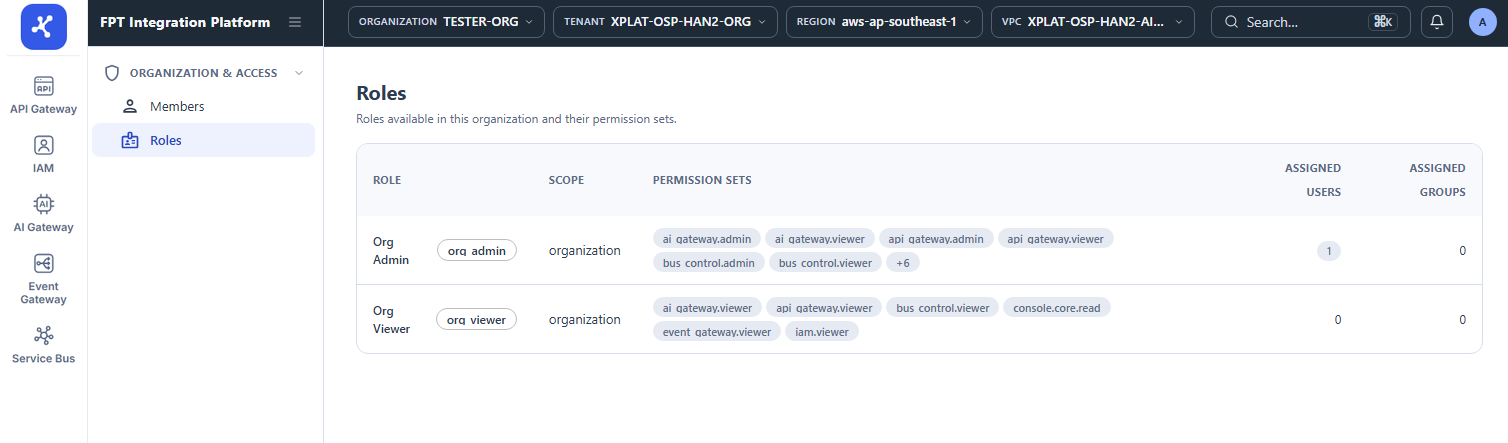
The list has the following columns:
| Column | Description |
|---|---|
| Role | Name and code of the role, for example Org Admin (org_admin) and Org Viewer (org_viewer). |
| Scope | Where the role applies, for example organization. |
| Permission Sets | Permission sets that the role grants. Up to 2 lines are shown, and the rest is grouped in a +N chip. |
| Assigned Users | Number of users assigned this role in the organization. |
| Assigned Groups | Number of groups assigned this role in the organization. |
note
The Roles screen is read-only, so you cannot add, edit, or delete roles here. For the actions each role can perform on API Gateway, see Roles and permissions.