CORS plugin
The Cors plugin (technical name cors, Security group) adds standard CORS headers (Access-Control-Allow-Origin, Access-Control-Allow-Methods, and so on) to responses, so browsers know whether a web page from another origin may read the response.
CORS is not a server-side security mechanism. CORS headers are only instructions for browsers. Requests sent with curl, Postman, or from another server ignore CORS and still reach the backend. To control who can call the API, also use an authentication plugin such as JWT Auth or OpenID Connect.
Use cases
The CORS plugin is suited to frontends (SPA, mobile web) that run on a different domain from the API Gateway and call the API with JavaScript (fetch / XHR). Without CORS headers, the browser blocks JavaScript from reading the response, even though the request reaches the backend and the backend processes it.
Typical cases:
- A frontend at
https://app.example.comcalls an API athttps://api.example.com: declarehttps://app.example.cominallow_origins. - Many tenants with dynamic subdomains such as
*.customer.example.comcall the same API: useallow_origins_by_regexinstead of listing each domain. - Many Routes / Services share one origin list: use
allow_origins_by_metadatato declare it once, centrally. - Requests carry cookies or the
Authorizationheader: turn onallow_credentialand declare the origins, methods, and headers explicitly (no*). - The backend returns a custom header (for example
X-Request-Id) that client JavaScript needs to read: declare that header inexpose_headers.
Create a CORS plugin
To create a CORS plugin, follow these steps:
-
In the left menu, select API Gateway → Plugin, select the API Gateway in the top-right corner, click New plugin, then select Cors (Security group) in the Add plugin popup. You can also add it from the Plugins tab of a Route / Service, see Add a plugin.
-
In the Basic Information section, enter the Display Name. See Basic Information.
-
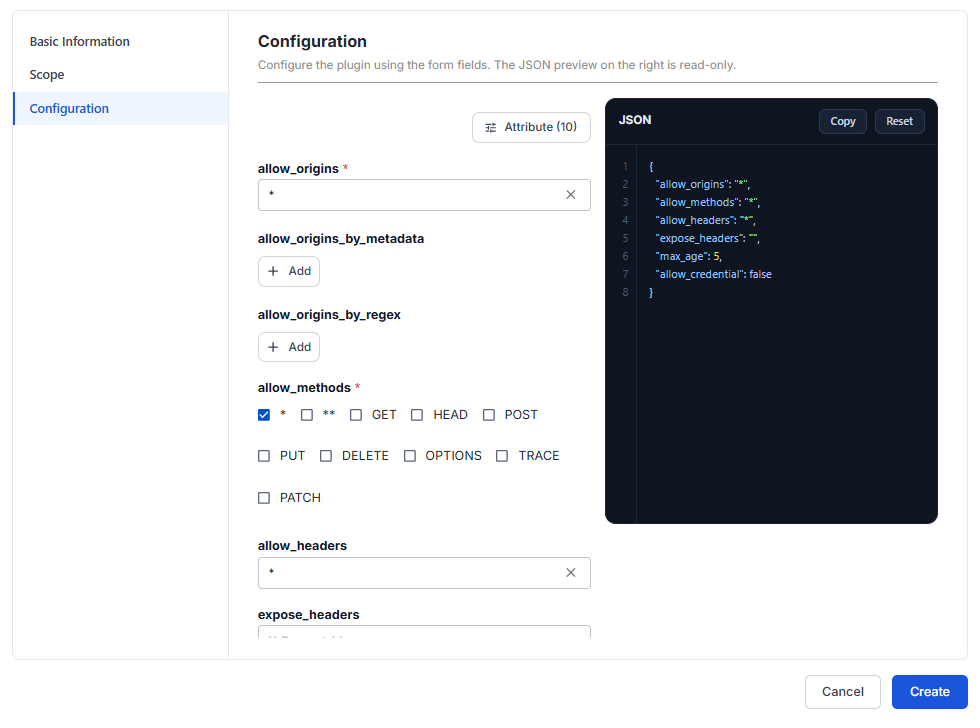
Select the Configuration section. The form already shows all 10 attributes of the plugin, and the Manage Attribute panel has no more attributes to add.
| Attribute | Required | Description |
|---|---|---|
| allow_origins | Y | Origins allowed to make cross-origin calls, in scheme://host:port format (for example https://app.example.com), separated by commas. * allows every origin and works only when allow_credential is off. Default *. |
| allow_origins_by_metadata | N | Reference an origin list defined in the Plugin metadata instead of typing it again in each plugin. Use it when many Routes / Services share one origin list. Click + Add to add each line. |
| allow_origins_by_regex | N | Regular expressions that match allowed origins, for example .*\.test\.com$. Use it when there are too many domains or domains are generated per tenant. Once set, only origins that match the regex are accepted, whatever allow_origins says. |
| allow_methods | Y | HTTP methods with CORS enabled, selected from: *, **, GET, HEAD, POST, PUT, DELETE, OPTIONS, TRACE, PATCH. Selecting * (or **) clears the specific methods. Default *. |
| allow_headers | N | Headers clients may send in cross-origin requests, for example Authorization,Content-Type, separated by commas. * allows all and cannot be used with allow_credential. Default *. |
| expose_headers | N | Response headers that client JavaScript may read, for example X-Request-Id. When empty, the plugin does not touch the Access-Control-Expose-Headers header. |
| max_age | N | Time (seconds) the browser caches the preflight OPTIONS result. Set it higher to reduce preflight requests. -1 disables caching. Accepts only whole numbers from -1. Default 5. |
| allow_credential | N | Allow requests to carry credentials (cookies, the Authorization header). When on, do not use * in allow_origins, allow_methods, or allow_headers. Off by default. |
| timing_allow_origins | N | Origins allowed to read resource loading timing (the Timing-Allow-Origin header). Relevant only to the Resource Timing API, not to normal API calls. |
| timing_allow_origins_by_regex | N | Same as timing_allow_origins, but declared with regular expressions. |
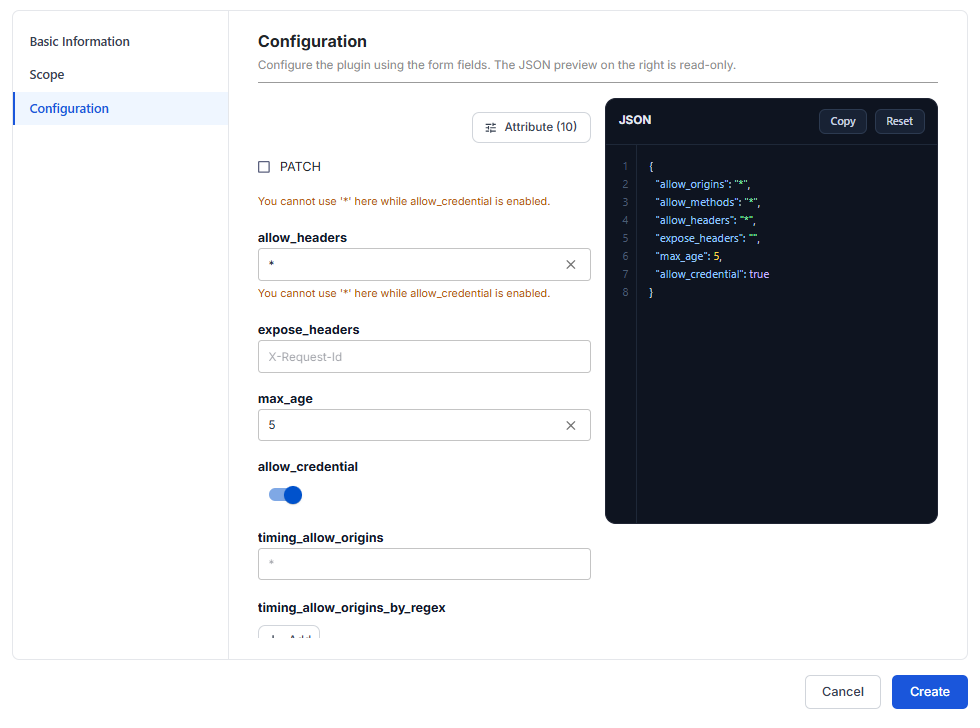
When you turn on allow_credential, the allow_origins, allow_methods, and allow_headers fields that still use * all show the warning You cannot use '*' here while allow_credential is enabled. The warning does not block the Create button, but that configuration does not work correctly in browsers. List the allowed origins, methods, and headers explicitly instead of *.
The ** value forces * regardless of this rule. It is a security risk (it opens the way to CSRF attacks), so do not use it in production.
-
Select the Scope section. If every API serves the same group of frontends, choose Global to keep it simple. If each API group has a different origin list, create several Scoped CORS plugins per Route / Service. See Scope.
-
Click Create. The message Plugin created successfully appears and the plugin appears in the list.
Sample configurations
Default configuration, open to every origin. It works right away but should not stay as is in production:
{
  "allow_origins": "*",
  "allow_methods": "*",
  "allow_headers": "*",
  "expose_headers": "",
  "max_age": 5,
  "allow_credential": false
}
An SPA at https://app.example.com calls the API with the Authorization header. List each value explicitly instead of * (because allow_credential is on), keep OPTIONS in allow_methods so preflight requests pass, and set a higher max_age so the browser preflights less often:
{
  "allow_origins": "https://app.example.com",
  "allow_methods": "GET,POST,OPTIONS",
  "allow_headers": "Authorization,Content-Type",
  "expose_headers": "X-Request-Id",
  "max_age": 3600,
  "allow_credential": true
}
Many tenants with dynamic subdomains (https://acme.customer.example.com, https://beta.customer.example.com, and so on), using allow_origins_by_regex:
{
  "allow_origins": "https://app.customer.example.com",
  "allow_origins_by_regex": [
    "^https://[a-z0-9-]+\\.customer\\.example\\.com$"
  ],
  "allow_methods": "GET,POST,PUT,DELETE,OPTIONS",
  "allow_headers": "Authorization,Content-Type",
  "max_age": 3600,
  "allow_credential": true
}
- Once
allow_origins_by_regexis set, only origins that match the regex are accepted.allow_originsis still a required field, so it still needs a value: enter a specific origin, not*, whileallow_credentialis on. - Anchor the regex with
^and$, and escape dots (\.). Otherwise.matches any character, and a domain likehttps://evil-customerXexample.comalso passes.
Check that it works
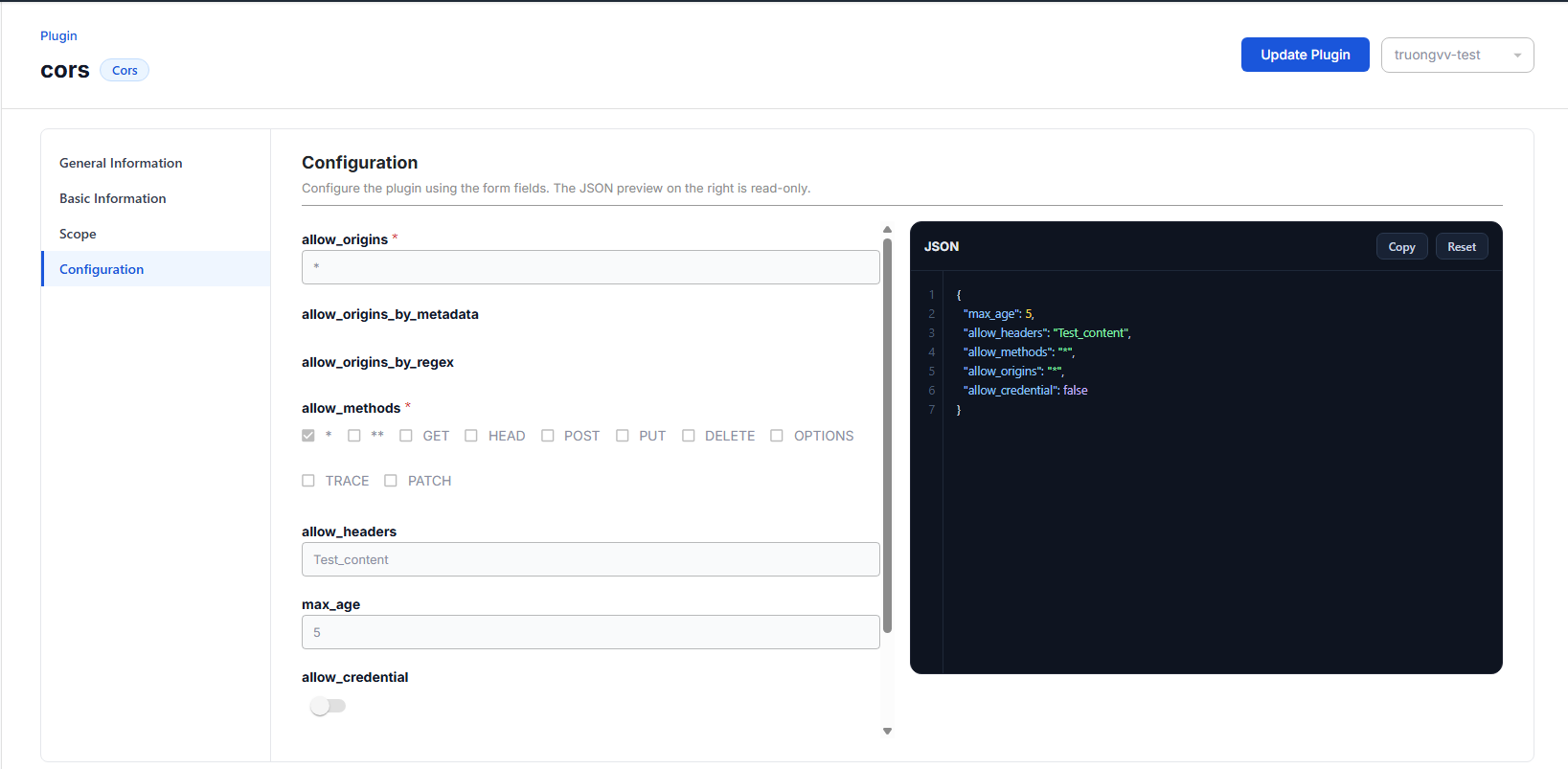
After you create the plugin, send a test request to check that the API Gateway adds CORS headers to the response as configured. The example below uses the cors plugin with this configuration:
{
  "max_age": 5,
  "allow_headers": "Test_content",
  "allow_methods": "*",
  "allow_origins": "*",
  "allow_credential": false
}
To check the CORS plugin, follow these steps:
- Open the plugin detail screen, Configuration section, to see the configuration in effect. See View plugin details.
-
Send a request to the Gateway URL with the path of a Route in the Scope of the plugin, for example
POST https://YOUR_GATEWAY_URL/v2/pet. To get the Gateway URL and send the request, see Test a Route. -
Open the Headers tab of the response and compare it with the configuration:
| Attribute | Configured value | Header in the response |
|---|---|---|
allow_origins | * | Access-Control-Allow-Origin: * |
allow_methods | * | Access-Control-Allow-Methods: * |
allow_headers | Test_content | Access-Control-Allow-Headers: Test_content |
max_age | 5 | Access-Control-Max-Age: 5 |
allow_credential | false | No Access-Control-Allow-Credentials header |
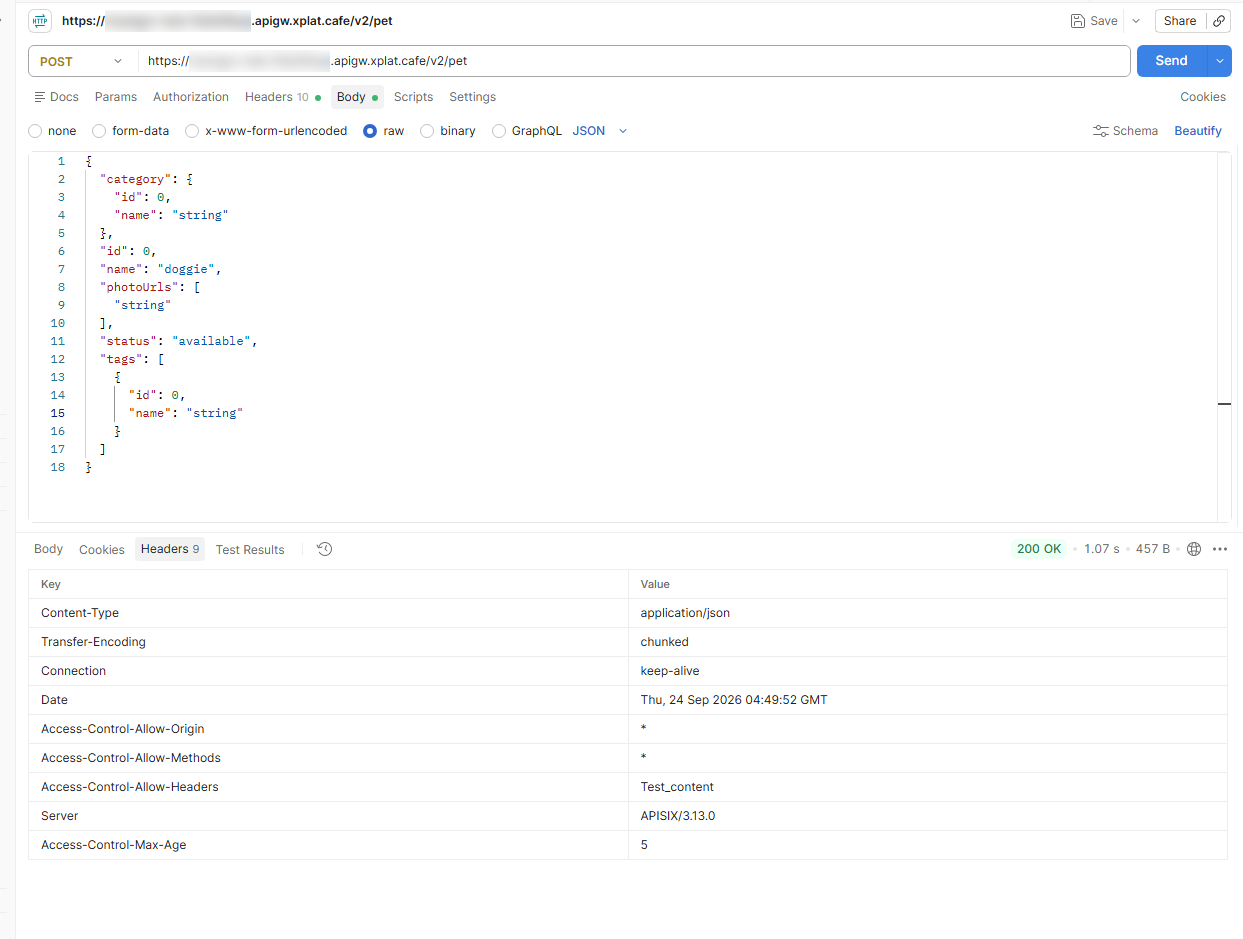
If the response has all the Access-Control-* headers in the table, the plugin works. If these headers are missing, check that the request goes through a Route / Service in the Scope of the plugin, and that the plugin is enabled, see Enable or disable a plugin.
Common issues
| Error | Cause | Solution |
|---|---|---|
| You cannot use '*' here while allow_credential is enabled. | allow_credential is on but allow_origins / allow_methods / allow_headers still use * | List the origins, methods, and headers explicitly instead of *. |
| Invalid regular expression. | allow_origins_by_regex has invalid regex syntax | Fix the regular expression. |
| Enter a whole number greater than or equal to -1. | max_age is not a whole number, or is smaller than -1 | Enter a whole number from -1. |