JWT Auth plugin
The JWT Auth plugin (technical name jwt-auth, Authentication group) protects Routes and Services with JSON Web Tokens (JWT). The plugin takes the token from the request and verifies it before the request goes on to the backend.
The JWT flow needs 2 parts:
| Part | Role | Where to configure |
|---|---|---|
| JWT Credential on a Consumer | Identity and token signing key (Key, Algorithm, Secret / Public Key). | Manage JWT credentials |
| JWT Auth plugin on a Route / Service | Where the API Gateway takes the token from the request and verifies it. | This page |
Use cases
- Allow only applications or partners that have been issued a JWT to call the API.
- Combine it with the Rate Limiting plugin to limit the number of requests per Consumer.
First create a Consumer with a JWT credential. Otherwise, once the plugin is on, every request to the Route / Service is rejected because there is no valid token.
Create a JWT Auth plugin
To create a JWT Auth plugin, follow these steps:
-
In the left menu, select API Gateway → Plugin, select the API Gateway in the top-right corner, click New plugin, then select JWT Auth in the Add plugin popup. You can also add it from the Plugins tab of a Route / Service, see Add a plugin.
-
In the Basic Information section, enter the Display Name. Description is pre-filled with Verify and authenticate JSON Web Tokens., and you can change it. See Basic Information.
-
Select the Configuration section. The form shows 1 required attribute:
| Attribute | Required | Description |
|---|---|---|
| header | Y | Name of the HTTP header that carries the JWT in the request. Default Authorization. |
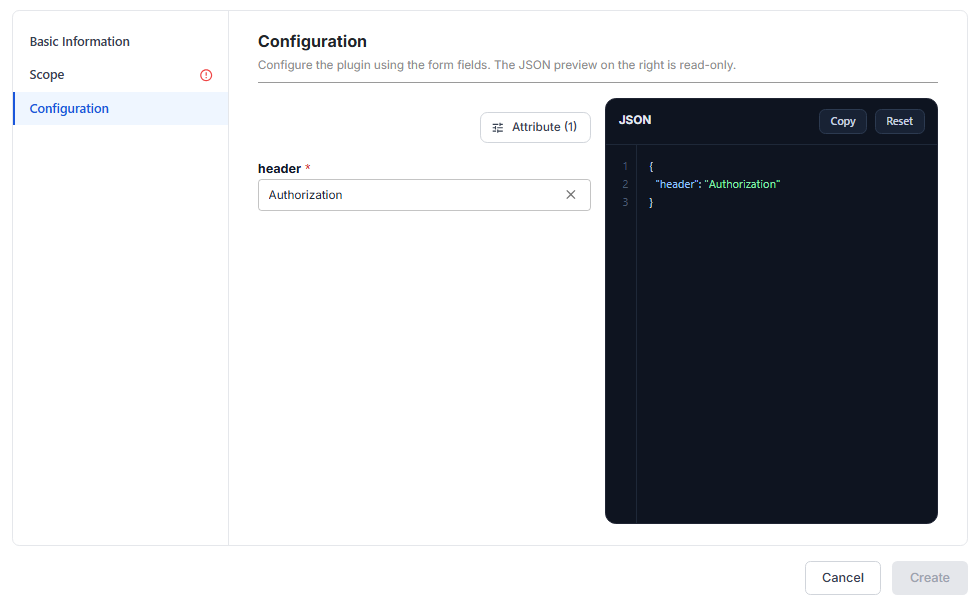
Click Attribute (N) to add other attributes if needed:
| Attribute | Required | Description |
|---|---|---|
| query | N | Name of the query parameter that carries the JWT, lower priority than header. Default jwt. |
| cookie | N | Name of the cookie that carries the JWT, lower priority than query. Default jwt. |
| hide_credentials | N | Turn on so the API Gateway does not pass the header / query / cookie that carries the JWT to the backend. Default false. |
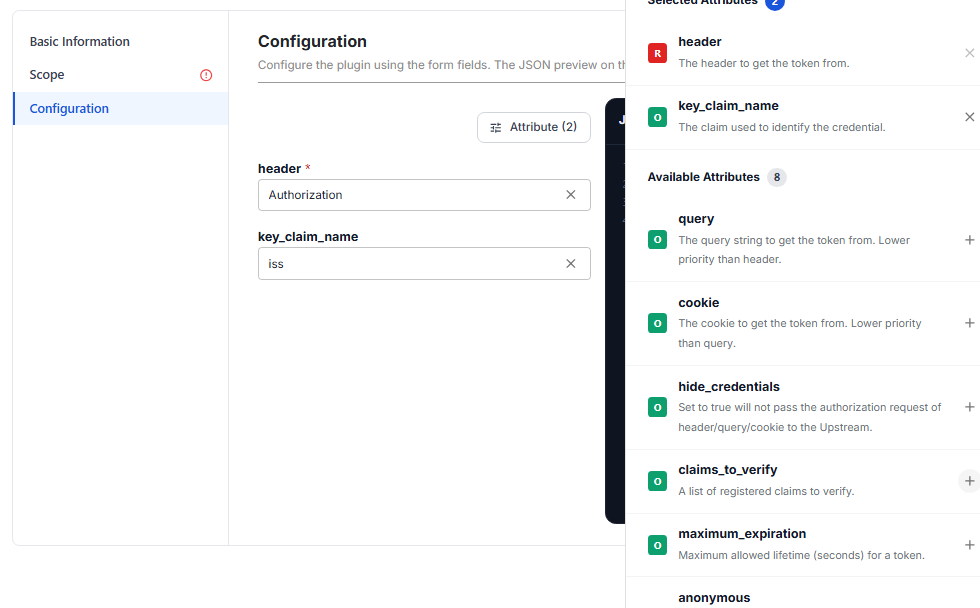
| key_claim_name | N | Claim in the JWT payload used to find the right credential / Consumer. The claim value must match the Key of the JWT credential. Default iss. |
| claims_to_verify | N | Claims to check for time validity: exp, nbf. Default exp. |
| maximum_expiration | N | Maximum allowed token lifetime (seconds). 0 means no limit. Default 0. |
| anonymous | N | Anonymous Consumer used when authentication fails, so access is still allowed. Empty by default. |
| run_on_preflight | N | Also run the plugin on preflight OPTIONS requests (CORS). Default false. |
| use_jwks | N | Use the JSON Web Key Set (JWKS) of the Identity Provider to verify signatures, instead of the Secret / Public Key of the JWT credential. Default false. |
For example, after you add key_claim_name, the form and the JSON show this attribute with the value iss:
-
Select the Scope section, choose Global or Scoped, then assign the Routes / Services to protect. See Scope.
-
Click Create. The message Plugin created successfully appears and the JWT Auth plugin appears in the list with the Applied to column matching the selected scope.
Sample configurations
Default configuration, taking the token from the Authorization header only:
{
  "header": "Authorization"
}
Find the Consumer by the iss claim in the token:
{
  "header": "Authorization",
  "key_claim_name": "iss"
}
Take the token from the Authorization header and do not pass the header that carries the token to the backend:
{
  "header": "Authorization",
  "hide_credentials": true
}
Also check the nbf claim (reject tokens that are not valid yet) in addition to exp:
{
  "header": "Authorization",
  "claims_to_verify": "exp,nbf"
}
Let clients send the token in a query parameter or cookie (for example an embedded web page that cannot set headers), and reject tokens with a lifetime over 1 hour:
{
  "header": "Authorization",
  "query": "jwt",
  "cookie": "jwt",
  "maximum_expiration": "3600"
}
Use the JWKS of the Identity Provider to verify signatures, instead of the Secret / Public Key declared on the JWT credential:
{
  "header": "Authorization",
  "use_jwks": true,
  "run_on_preflight": false
}
Keep run_on_preflight at false when the Route uses CORS. Browsers send the preflight OPTIONS request without the Authorization header. If you set it to true, the preflight gets 401 and API calls from the browser fail, even when the token of the real request is valid.
Check that it works
After creating the plugin, use a Consumer with a JWT credential to create a test token:
- Call the API through the protected Route / Service without a token: you get
401 Unauthorized, so the plugin blocks correctly. - Call again with the header
Authorization: Bearer <jwt>(or the query / cookie if configured), with a token signed with the right algorithm and Secret, and with the claim named bykey_claim_namematching the Key of the JWT credential: you get200and the request reaches the backend.
Common issues
| Error | Cause | Solution |
|---|---|---|
401 even with a token | The claim named by key_claim_name in the token does not match the Key of the JWT credential | Fix the token so the claim matches the Key, or change key_claim_name. |
401 even with a token | The token is signed with a Secret different from the one saved on the JWT credential | Sign the token again with the correct Secret. |
401 even with a token | The token signing algorithm differs from the Algorithm of the JWT credential | Sign the token again with the correct algorithm. |
Browser calls fail with a CORS error / 401 on the OPTIONS request | run_on_preflight is true | Set run_on_preflight back to false. |