OpenID Connect plugin
The OpenID Connect plugin (technical name openid-connect, Authentication group) protects Routes and Services with the OAuth 2.0 / OpenID Connect (OIDC) flow through an external Identity Provider (IdP) such as Keycloak, Auth0, Google, or Okta.
The plugin has 2 modes, chosen with the bearer_only attribute:
| Mode | bearer_only | How it works |
|---|---|---|
| Authorization Code | false (default) | The API Gateway redirects the user to the IdP sign-in page, then back to the application, and manages the session itself. Suits web applications. |
| Bearer token | true | Every request must carry a valid access token, with no sign-in redirect. Suits APIs and microservices without session state. |
Use cases
- The organization already has an IdP and requires users to sign in with their IdP account before accessing the web application behind the API Gateway.
- APIs for microservices or partners that accept only access tokens issued by the IdP.
- APIs that can be called only when the access token contains the required scopes.
Prepare 3 values from the IdP first: client_id, client_secret, and the discovery URL (for example https://your-idp.example.com/.well-known/openid-configuration).
Create an OpenID Connect plugin
To create an OpenID Connect plugin, follow these steps:
-
In the left menu, select API Gateway → Plugin, select the API Gateway in the top-right corner, click New plugin, then select OpenID Connect in the Add plugin popup. You can also add it from the Plugins tab of a Route / Service, see Add a plugin.
-
In the Basic Information section, enter the Display Name. See Basic Information.
-
Select the Configuration section. The form shows 5 required attributes and the Quick Start Templates block:
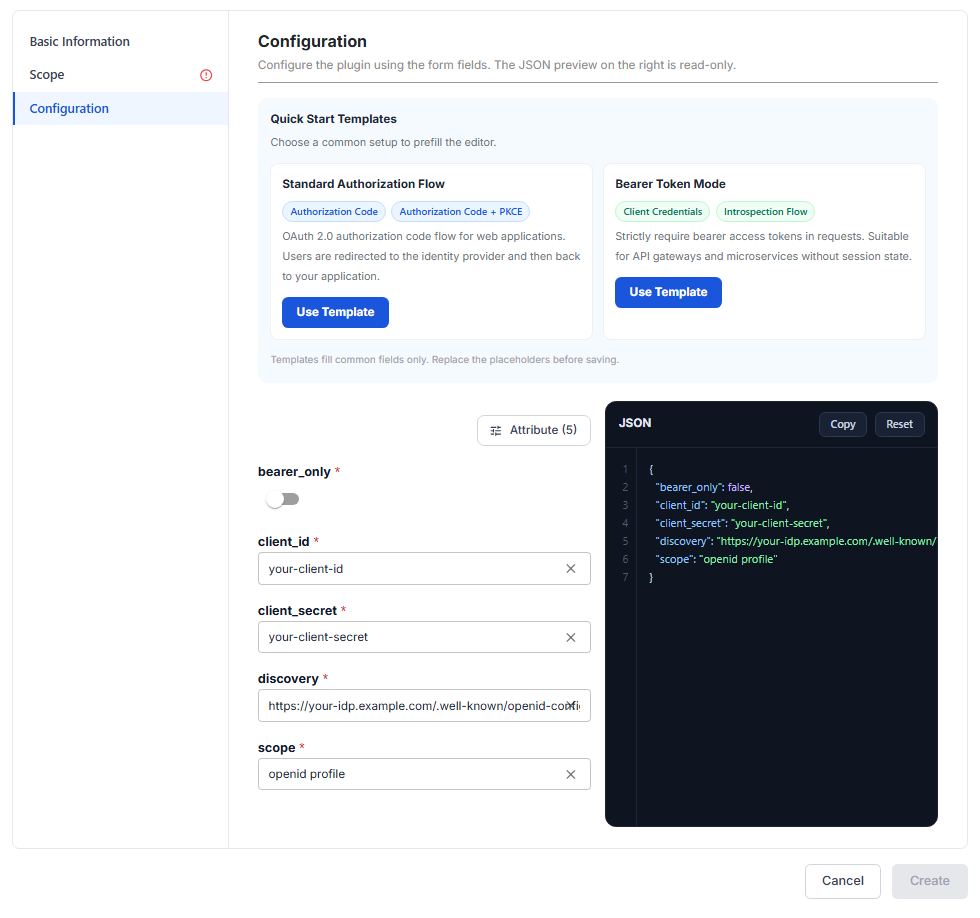
| Attribute | Required | Description |
|---|---|---|
| bearer_only | Y | false (default): Authorization Code mode, redirecting users to the IdP to sign in. true: accept only requests that already carry a valid bearer access token. |
| client_id | Y | OAuth 2.0 Client ID of the API Gateway registered at the IdP. |
| client_secret | Y | OAuth 2.0 Client Secret the API Gateway uses to authenticate with the IdP at the token / introspection endpoint. |
| discovery | Y | URL of the OIDC Discovery document (.well-known/openid-configuration), where the IdP publishes its endpoints (authorization, token, userinfo, jwks, and so on). |
| scope | Y | OIDC scopes to request, which decide what user information the IdP returns. Must include openid to get the sub claim that identifies the user. |
Click Attribute (N) to add other attributes if needed:
| Attribute | Required | Description |
|---|---|---|
| session | N | Object with a secret, a key (at least 16 characters) to encrypt the session cookie when bearer_only is false. |
| redirect_uri | N | URI the IdP redirects to after a successful sign-in, preferably a sub-path of the Route. Default /callback. |
| logout_path | N | Path on the API Gateway. Requests to this path sign out of the current OIDC session. |
| token_endpoint_auth_method | N | How the API Gateway authenticates when calling the token endpoint to exchange the authorization code for a token, for example client_secret_basic, client_secret_post. |
| use_jwks | N | Use the JSON Web Key Set (JWKS) of the IdP to verify token signatures. |
| required_scopes | N | Scopes the access token must contain, used with introspection when bearer_only is true. Requests missing a scope are rejected with 403. |
| introspection_endpoint | N | URL of the introspection endpoint (RFC 7662) used to check access tokens. Leave it empty to take it from discovery. |
| introspection_endpoint_auth_method | N | How the API Gateway authenticates when calling the introspection endpoint. |
| ssl_verify | N | Verify the SSL certificate of the IdP. |
| leeway | N | Allowance (seconds) when checking token expiry, to cover clock skew between the IdP and the API Gateway. |
Use Quick Start Templates (optional): click Use Template on a card to fill in the configuration quickly.
| Template | Use when | Attributes added |
|---|---|---|
| Standard Authorization Flow (Authorization Code, Authorization Code + PKCE) | Web applications: users sign in at the IdP and return to the application. | session, redirect_uri, logout_path, token_endpoint_auth_method, use_jwks |
| Bearer Token Mode (Client Credentials, Introspection Flow) | APIs / microservices without session state, where every request must carry an access token. | bearer_only = true, required_scopes, introspection_endpoint, introspection_endpoint_auth_method, token_endpoint_auth_method, use_jwks. Removes session, redirect_uri, logout_path. |
Templates only fill in placeholder values (your-client-id, your-client-secret, https://your-idp.example.com/...). Replace them with the real values of your IdP before you click Create.
-
Select the Scope section, choose Global or Scoped, then assign the Routes / Services to protect. See Scope.
-
Click Create. The message Plugin created successfully appears. Check the Enabled column in the list, and the Plugins tab of the Routes / Services if you selected Scoped.
Sample configurations
Default configuration with the 5 required attributes:
{
  "bearer_only": false,
  "client_id": "your-client-id",
  "client_secret": "your-client-secret",
  "discovery": "https://your-idp.example.com/.well-known/openid-configuration",
  "scope": "openid profile"
}
After using the Standard Authorization Flow template:
{
  "bearer_only": false,
  "client_id": "your-client-id",
  "client_secret": "your-client-secret",
  "discovery": "https://your-idp.example.com/.well-known/openid-configuration",
  "scope": "openid profile",
  "session": {
    "secret": "change-me-session-secret"
  },
  "redirect_uri": "/callback",
  "logout_path": "/logout",
  "token_endpoint_auth_method": "client_secret_basic",
  "use_jwks": true
}
After using the Bearer Token Mode template:
{
  "bearer_only": true,
  "client_id": "your-client-id",
  "client_secret": "your-client-secret",
  "discovery": "https://your-idp.example.com/.well-known/openid-configuration",
  "scope": "openid",
  "required_scopes": [],
  "introspection_endpoint": "https://your-idp.example.com/oauth2/introspect",
  "introspection_endpoint_auth_method": "client_secret_basic",
  "token_endpoint_auth_method": "client_secret_basic",
  "use_jwks": true
}
The introspection path differs between IdPs. Use the exact introspection_endpoint value published in the discovery document of your IdP, or remove this field so the API Gateway takes it from discovery.
Check that it works
When users access the protected Route / Service:
bearer_onlyisfalse: the browser is redirected to the IdP sign-in page before reaching the application.bearer_onlyistrue: requests without a valid access token are rejected with401.