Proxy Rewrite plugin
The Proxy Rewrite plugin (technical name proxy-rewrite, Transformation group) rewrites request information before the API Gateway forwards it to the backend: the Host header, the path (URI), the HTTP method, or adding / changing / removing headers.
Proxy Rewrite is not a security plugin and never blocks requests. It only transforms valid requests, after they have passed other steps such as authentication and rate limiting.
Use cases
The Proxy Rewrite plugin is suited to cases where the URI, host, method, or headers that clients send to the API Gateway differ from what the backend requires.
Typical cases:
- The API Gateway publishes the path
/v1/users, but the backend only accepts/internal/users: useuriorregex_urito rewrite the path. - The backend requires an internal Host header that differs from the public domain clients call: use
host. - A legacy backend accepts only one fixed method, for example
POST: usemethodto send every request with that method. - Pass the authenticated Consumer name to the backend in a custom header, and remove the header that carries the original API key: combine
headers.setwithheaders.remove.
Create a Proxy Rewrite plugin
To create a Proxy Rewrite plugin, follow these steps:
-
In the left menu, select API Gateway → Plugin, select the API Gateway in the top-right corner, click New plugin, then select Proxy Rewrite in the Add plugin popup. You can also add it from the Plugins tab of a Route / Service, see Add a plugin.
-
In the Basic Information section, enter the Display Name. See Basic Information.
-
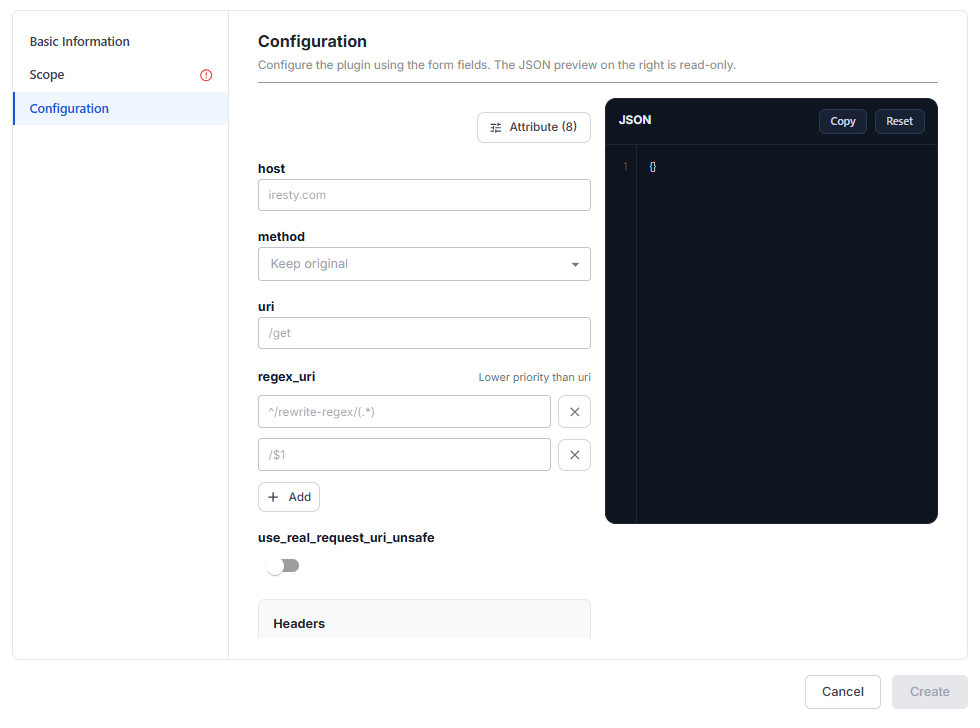
Select the Configuration section. The form shows all 8 attributes, but all of them are empty. The grey text in the fields (
iresty.com,/get,^/rewrite-regex/(.*),/$1) is only an input hint, so the initial JSON is{}. The plugin has no required attributes and no Quick Start Templates: each attribute you fill in appears in the JSON.
| Attribute | Required | Description |
|---|---|---|
| host | N | New Host header sent to the backend, replacing the original Host header of the client. Must be a valid domain name. |
| method | N | Change the HTTP method of the request before forwarding it to the backend. Keep Keep original (default) to keep the original method. |
| uri | N | New fixed path sent to the backend, supporting NGINX variables such as $arg_name. Must start with /. When both uri and regex_uri are set, uri takes priority. |
| regex_uri | N | A [pattern, replacement] pair that rewrites the path with a regex, used when the new path is derived from the original path. If pattern matches, the request is forwarded with replacement. Otherwise the original path is kept. $1, $2, and so on refer to capture groups. Click + Add to add a pair. The number of filled lines must be even. |
| use_real_request_uri_unsafe | N | Use the raw URI of the client and skip URI normalization. Unsafe, so turn it on only if you fully understand the security risk. |
| headers.add | N | Add headers to the request. Existing headers with the same name are kept, not overwritten. |
| headers.set | N | Overwrite header values, or add the header if it does not exist. To change Host, use the host attribute instead of setting the Host header here. |
| headers.remove | N | Remove headers from the request before forwarding it to the backend. Only the header name is needed. |
When all 3 header groups are set, they are processed in the order add → remove → set.
In the JSON, regex_uri is a flat array whose items come in [pattern, replacement] pairs. The 3 header groups sit in a headers object: add and set are objects like {"header-name": "value"}, and remove is an array of header names.
-
Select the Scope section, choose Global or Scoped, then assign the Routes / Services. See Scope.
-
Click Create. The message Plugin created successfully appears and the plugin appears in the list with the Applied to column matching the selected scope.
Sample configurations
The 4 configurations below match the 4 cases in Use cases.
Change only the Host header and keep the path the client called:
{
  "host": "backend.internal"
}
Strip a path prefix before reaching the backend: the client calls /v1/users/42, and the backend receives /users/42:
{
  "regex_uri": [
    "^/v1/(.*)",
    "/$1"
  ]
}
Change the path to a fixed value and force the method (a legacy backend that accepts only POST). When both uri and regex_uri are set, uri takes priority, so usually use only one of them:
{
  "uri": "/internal/users",
  "method": "POST"
}
Pass the authenticated Consumer name to the backend in a custom header, and remove the header that carries the original API key:
{
  "headers": {
    "set": {
      "X-Consumer-Name": "$consumer_name",
      "X-Forwarded-Client-IP": "$remote_addr"
    },
    "remove": [
      "X-API-Key"
    ]
  }
}
Values starting with $ are NGINX variables, replaced with real values when the request passes through the API Gateway. $consumer_name has a value only when the Route / Service has an authentication plugin (such as JWT Auth) running first. Otherwise the header is empty.
Common issues
The form checks the values and shows errors as you type:
| Error | Cause | Solution |
|---|---|---|
host shows an error | The value is not a valid domain name | Enter a valid domain name, for example backend.internal. |
uri shows an error | The value does not start with / | Add / at the start, for example /internal/users. |
regex_uri shows an error | The number of filled lines is odd, so a pattern has no replacement | Fill in each pattern / replacement pair. |
| A header name shows an error | The header name contains : | Remove : from the header name. |