Rate Limiting plugin
The Rate Limiting plugin (shown as Rate Limit by Request Count on the creation screen, technical name limit-count, Traffic Control group) limits the number of requests to an API in a time window. Requests over the quota are rejected.
Use cases
The Rate Limiting plugin protects the backend from overload during traffic spikes, when faulty clients resend requests in a loop, or when there is abuse or an attack.
Typical cases:
- Allow each client IP address at most N requests in a time window.
- Limit per authenticated Consumer: each Consumer has its own quota without affecting others.
- Limit by the value of a custom header, for example an API key in the
X-API-Keyheader. - The API Gateway runs several nodes and needs one accurate shared quota for the whole cluster: use
policyset toredisinstead of counting on each node.
To limit per Consumer (limit_by set to consumer), the Route / Service must already have an authentication plugin such as JWT Auth. Unauthenticated requests have no Consumer to count.
Create a Rate Limiting plugin
To create a Rate Limiting plugin, follow these steps:
-
In the left menu, select API Gateway → Plugin, select the API Gateway in the top-right corner, click New plugin, then select Rate Limiting in the Add plugin popup. You can also add it from the Plugins tab of a Route / Service, see Add a plugin.
-
In the Basic Information section, enter the Display Name. See Basic Information.
-
Select the Configuration section. The form shows 8 attributes and the Quick Start Templates block. The
request_count_limitfield is still empty (the grey100is only a hint), so the Configuration section shows a red ⓘ icon until you enter a value.
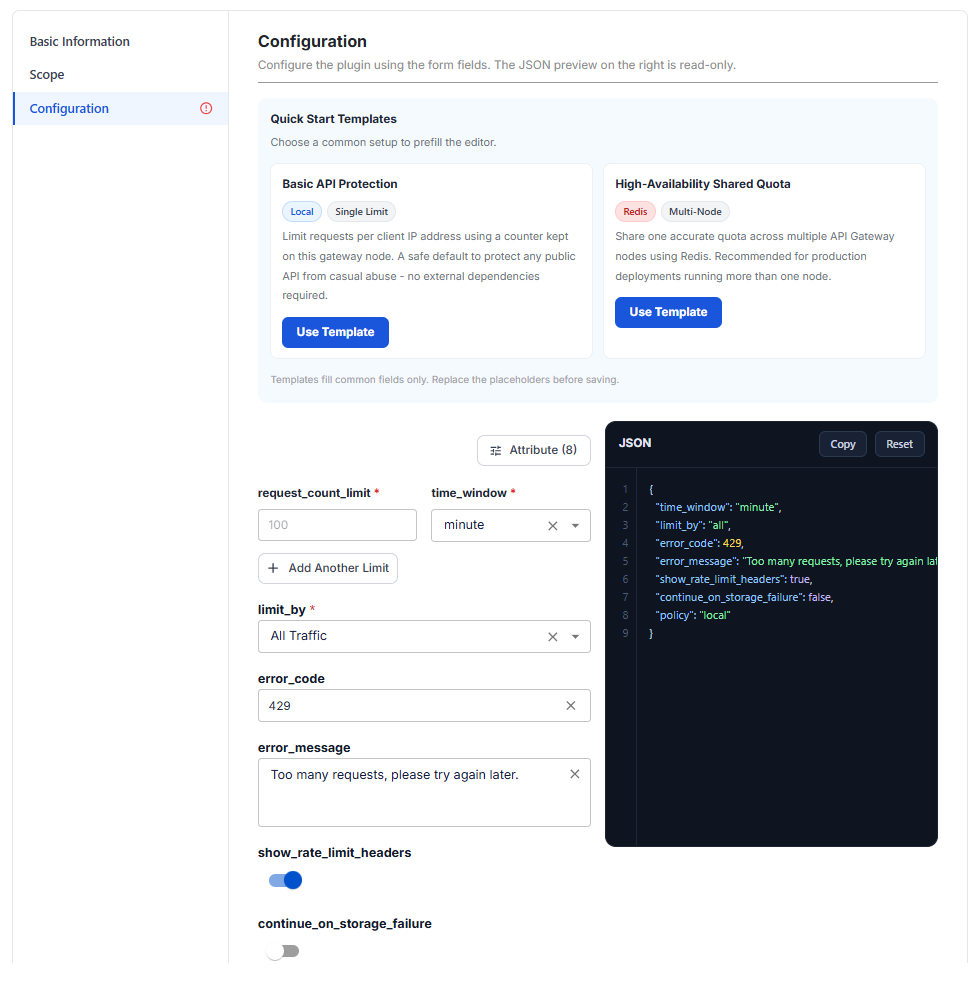
| Attribute | Required | Description |
|---|---|---|
| request_count_limit | Y | Maximum number of requests allowed in one time_window. |
| time_window | Y | Length of the counting window: second, minute, hour, day. Default minute. |
| limit_by | Y | How requests are grouped into counters, see Choose the counting key. Default all. |
| error_code | N | HTTP code returned when the limit is exceeded. Default 429. |
| error_message | N | Message returned with the error code. Default Too many requests, please try again later. |
| show_rate_limit_headers | N | Add the X-RateLimit-Limit and X-RateLimit-Remaining headers to responses so clients know their remaining quota. Default true. |
| continue_on_storage_failure | N | When the counter storage fails, let requests through instead of blocking them. Turning it on favors availability over quota accuracy. Default false. |
| policy | N | Where counters are stored: local (a separate count on each API Gateway node) or redis (shared by the whole cluster). Default local. |
Click Attribute (8) to add attributes when you need them:
When limit_by is header:
| Attribute | Required | Description |
|---|---|---|
| header_name | Y | Name of the HTTP header that identifies the client, for example X-API-Key. This field is added automatically (empty) when you set limit_by to header. |
When policy is redis:
| Attribute | Required | Description |
|---|---|---|
| redis_host | Y | Redis server address. |
| redis_port | N | Redis server port. |
| redis_password | N | Redis password, if any. |
| redis_database | N | Redis database index to use. |
| redis_cluster_name | N | Name of the Redis cluster the nodes belong to. |
| connection_timeout | N | Time (milliseconds) to wait for Redis before treating it as an error. |
| enable_ssl | N | Encrypt the connection to Redis. |
| verify_ssl_certificate | N | Verify the Redis server certificate, used when enable_ssl is on. |
Several limits at once: click + Add Another Limit to add more request_count_limit / time_window pairs in the same plugin, for example 100 requests / minute against bursts plus 5000 requests / day to cap total usage. With 2 or more limits, the pairs move into a limits array, and the other attributes (limit_by, error_code, policy, and so on) apply to every limit.
Use Quick Start Templates (optional): click Use Template on a card.
| Template | Use when |
|---|---|
| Basic API Protection (Local · Single Limit) | Limit per IP, with counters stored on each node and no external component. Suits protecting a public API from bursts. |
| High-Availability Shared Quota (Redis · Multi-Node) | The whole API Gateway cluster shares one counter in Redis. Recommended for production with several nodes: with policy set to local, each node counts separately, so the real quota is multiplied by the number of nodes. |
The High-Availability Shared Quota template fills in your-redis-host as a placeholder. Replace it with your real Redis address before you click Create.
-
Select the Scope section, choose Global or Scoped, then assign the Routes / Services to limit. See Scope.
-
Click Create. The message Plugin created successfully appears and the plugin appears in the list with the Applied to column matching the selected scope.
Choose the counting key with limit_by
limit_by decides which requests share one counter:
| To limit by | limit_by | Notes |
|---|---|---|
| Each client IP address | ip | Most common for public APIs. Clients behind the same NAT / proxy count as one IP. |
| Each authenticated Consumer | consumer | The Route / Service must have an authentication plugin running first. |
| The value of a custom header | header | Enter the header name in header_name, for example X-API-Key. |
| IP and Consumer combined | ip_consumer | One counter per (IP, Consumer) pair, stricter than consumer when one account is used from many places. |
| All traffic sharing one quota | all | Be careful: request_count_limit is then the combined quota of every client, not the quota of each client. This is the default. |
Scope and limit_by are 2 independent layers. Scope decides which Routes / Services the plugin applies to. limit_by decides how counters are split among the requests within that Scope.
Sample configurations
Configuration when the form first opens, without request_count_limit:
{
  "time_window": "minute",
  "limit_by": "all",
  "error_code": 429,
  "error_message": "Too many requests, please try again later.",
  "show_rate_limit_headers": true,
  "continue_on_storage_failure": false,
  "policy": "local"
}
Basic API Protection template, 100 requests / minute per IP:
{
  "request_count_limit": 100,
  "time_window": "minute",
  "limit_by": "ip",
  "error_code": 429,
  "error_message": "Too many requests, please try again later.",
  "show_rate_limit_headers": true,
  "continue_on_storage_failure": false,
  "policy": "local"
}
High-Availability Shared Quota template, sharing the counter in Redis:
{
  "request_count_limit": 100,
  "time_window": "minute",
  "limit_by": "ip",
  "error_code": 429,
  "error_message": "Too many requests, please try again later.",
  "show_rate_limit_headers": true,
  "continue_on_storage_failure": false,
  "policy": "redis",
  "redis_host": "your-redis-host",
  "redis_port": 6379,
  "redis_password": "",
  "redis_database": 0,
  "connection_timeout": 1000,
  "enable_ssl": false,
  "redis_cluster_name": ""
}
Two limits at once per IP: 100 requests / minute and 5000 requests / day:
{
  "limit_by": "ip",
  "error_code": 429,
  "error_message": "Too many requests, please try again later.",
  "show_rate_limit_headers": true,
  "continue_on_storage_failure": false,
  "policy": "local",
  "limits": [
    {
      "request_count_limit": 100,
      "time_window": "minute"
    },
    {
      "request_count_limit": 5000,
      "time_window": "day"
    }
  ]
}
Limit per authenticated Consumer, 1000 requests / hour:
{
  "request_count_limit": 1000,
  "time_window": "hour",
  "limit_by": "consumer",
  "error_code": 429,
  "error_message": "Too many requests, please try again later.",
  "show_rate_limit_headers": true,
  "continue_on_storage_failure": false,
  "policy": "local"
}
Limit by the X-API-Key header, 500 requests / minute:
{
  "request_count_limit": 500,
  "time_window": "minute",
  "limit_by": "header",
  "header_name": "X-API-Key",
  "error_code": 429,
  "error_message": "Too many requests, please try again later.",
  "show_rate_limit_headers": true,
  "continue_on_storage_failure": false,
  "policy": "local"
}
Check that it works
Call the API through the Route / Service repeatedly, beyond request_count_limit within time_window. Requests over the quota get the error_code (default 429) with the error_message. With show_rate_limit_headers on, every response carries X-RateLimit-Limit and X-RateLimit-Remaining, so you know how many calls are left without waiting to be blocked.
Common issues
| Error | Cause | Solution |
|---|---|---|
| Configuration shows the red ⓘ icon and Create is disabled | request_count_limit is empty (the grey number is only a hint) | Enter a value for request_count_limit. |
| The real quota is higher than configured on several nodes | policy is local, so each node counts separately | Use policy set to redis so the whole cluster shares one counter. |
Limiting by consumer has no effect | The Route / Service has no authentication plugin | Add an authentication plugin such as JWT Auth to the same Route / Service. |