Access Native Alert
Native Alert manages alerts per VPC, so open the VPC that contains the resources you want to monitor. This page helps you check your permissions and open Native Alert for the first time.
Prerequisites
- An FPT Cloud account that can sign in to the FPT Cloud Portal. If you do not have one, sign up at fptcloud.com.
- The IAM permission for what you need to do:
| Task | Permission |
|---|---|
| View the alert list | alert:List |
| Create an alert | Alert:createAlert |
- At least one resource to monitor in the VPC, such as a Virtual Machine or Load Balancer.
Open Native Alert
- Sign in to the FPT Cloud Portal.
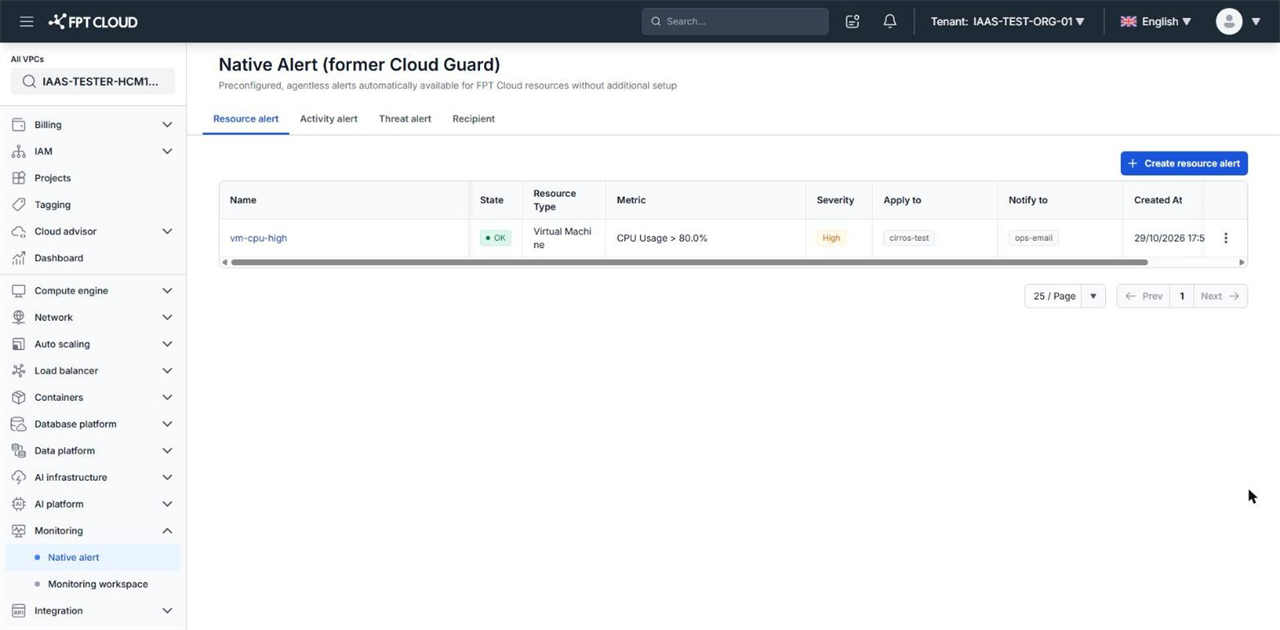
- Select the Tenant, Region, and VPC that contain the resources to monitor.
- Select Monitoring → Native alert.
Native Alert opens on the Resource alert tab. The other tabs are Activity alert, Threat alert, and Recipient.
tip
Alerts and VPC-level recipients appear only in the VPC where they were created. If you cannot find an alert you created, check the selected VPC.
Next steps
- Create your first alert — create an Email recipient and a Resource alert.
- Native Alert overview — alert types and how thresholds are evaluated.