Create an Activity alert
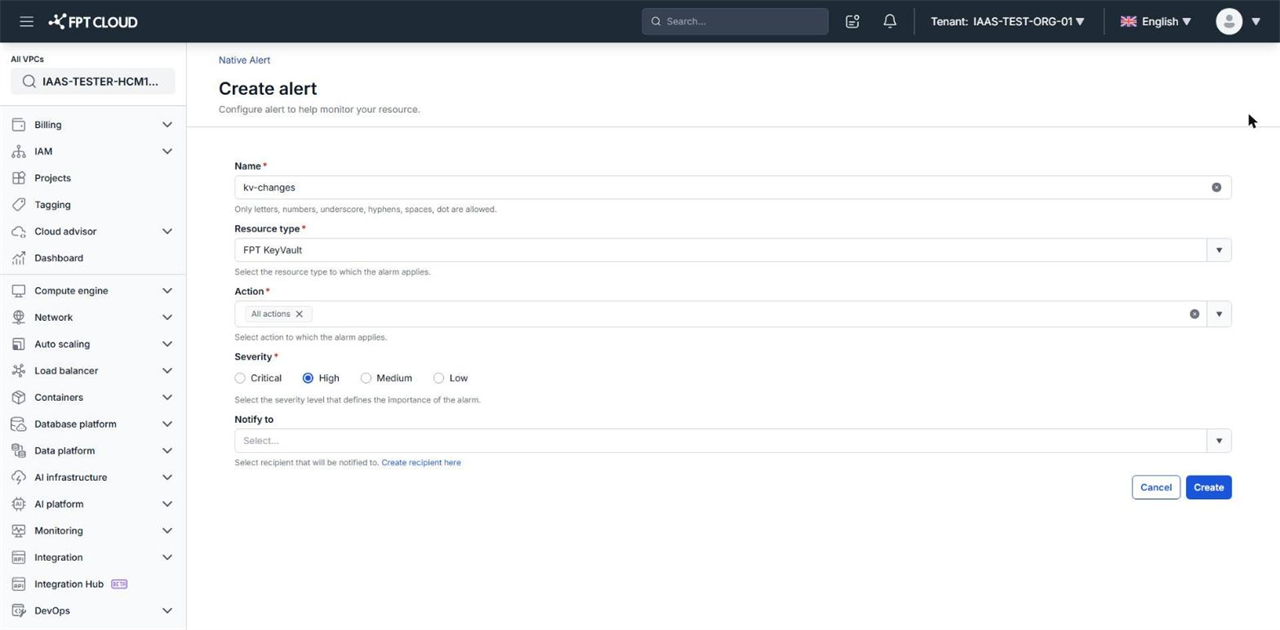
An Activity alert notifies you whenever someone performs an important action on a resource, for example deleting a Key Vault. Use Activity alerts to catch unplanned changes in a shared VPC.
Prerequisites
- The
Alert:createAlertpermission. - To receive notifications: a
VPC-level recipient. See Manage recipients.
Create an Activity alert
- Select Monitoring → Native alert and open the Activity alert tab.
- Click Create activity alert.
- Enter a Name for the alert.
- Select the service to monitor in Resource type.
- Select the actions in Action. Select
All actionsto be alerted on every action of that service. - Set Severity to
Critical,High,Medium, orLow. - Select the recipients in Notify to.
- Click Create.
The new alert appears on the Activity alert tab, with the VPC name in the Apply to column.
note
An Activity alert applies to the whole VPC, so it has no Apply To field. The Action list depends on the service, and each action carries the service prefix, for example FKV:Delete for FPT Key Vault.
Next steps
- Create a Threat alert — alert on signs of attacks against your Floating IPs.
- Manage alerts — pause, edit, or delete alerts.