Add external members to a Load Balancer
The External member feature helps you spread traffic across servers, services, or applications that run outside the VPC by adding them to a Server Pool. This expands the Load Balancer's processing capacity without moving workloads into the VPC.
External members can also be added during initial Load Balancer creation. This works with both Internet facing and Internal Load Balancers.
Prerequisites
- A Load Balancer with at least one Server Pool.
- The IP address and listening port of the external endpoint.
Add an external member
-
In the Load Balancer list, select the Load Balancer to which you want to add an external member.
-
On the Load Balancer detail page, select the Server pool tab, then choose the Server Pool you want to add the external member to.
-
Under Add server, click Add external member and fill in the row:
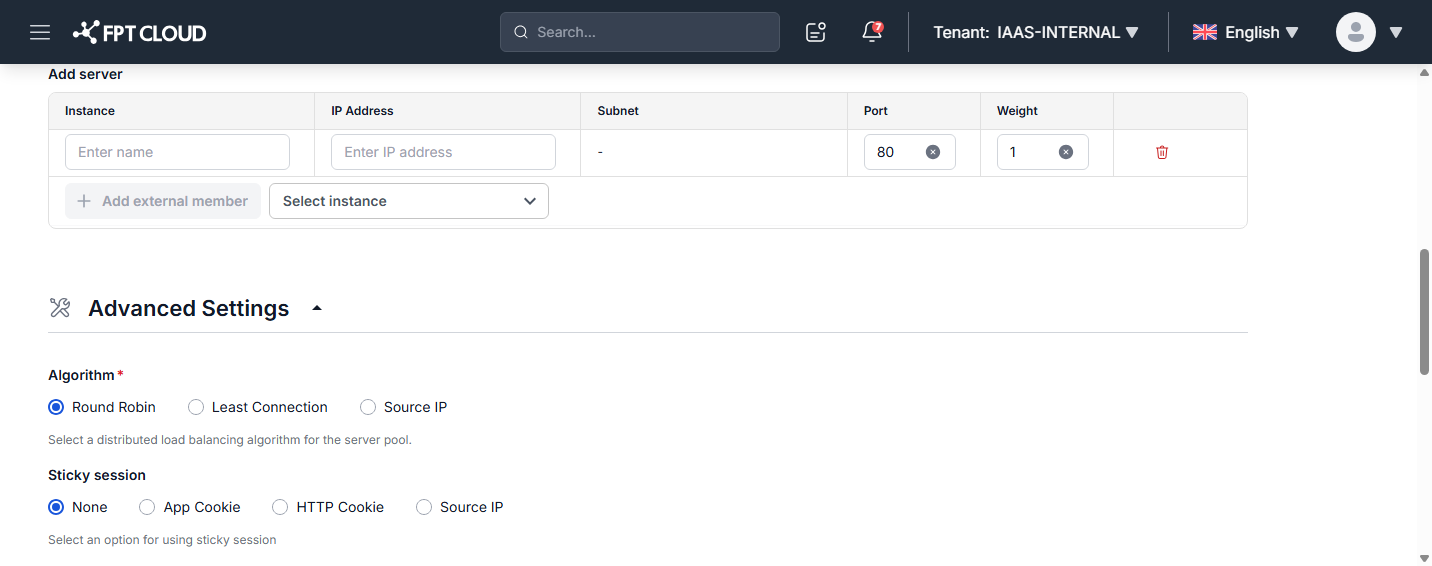
- Name: Display name for the external member.
- IP Address: IP address of the external member.
- Port: The port the member listens on to handle incoming requests. Default is
80. - Weight: The priority weight of the external member (default
1). Members with higher weights receive more requests.
-
Click Update Server pool to save.
To remove an external member, click Remove in the member's Action menu.