Accept a VPC Peering request
Accept a request to connect your VPC to the VPC Requester. Once accepted, the connection becomes Active and you can route traffic between the two VPCs.
Before you begin
- You have the
VPCPeering:ListandVPCPeering:Acceptpermissions on the VPC Accepter. - The VPC Gateway on the VPC Accepter side is Active and Online.
- The VPC Accepter still has VPC Peering connection Quota available.
Find the request
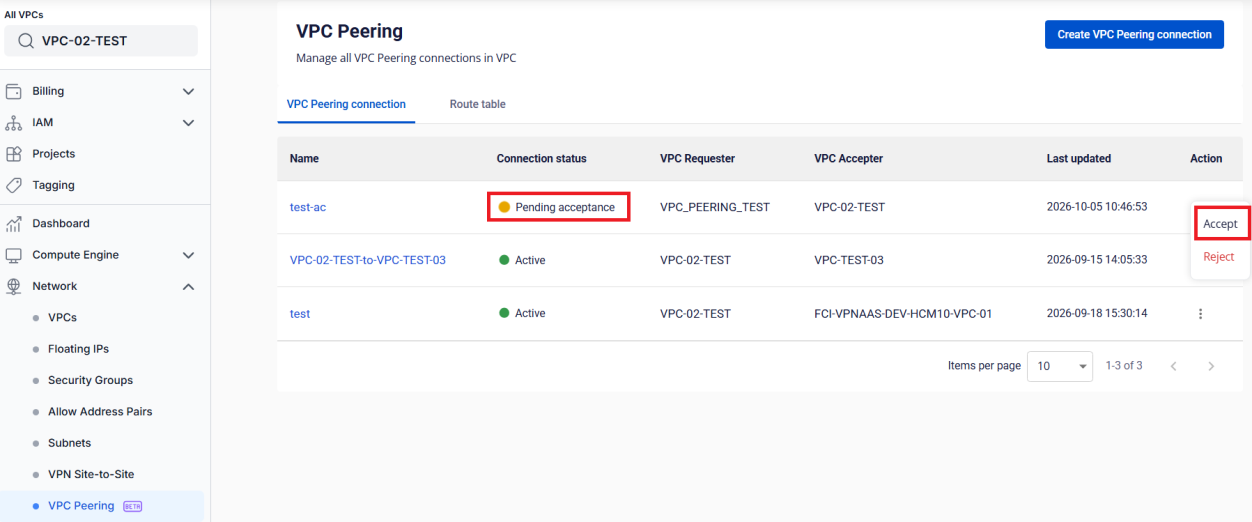
On the connection list of the VPC Accepter, find the connection with the Pending acceptance status. Click Accept in the Action column.
Confirm
In the dialog, type accept and click Accept. Click Cancel to leave the request pending.
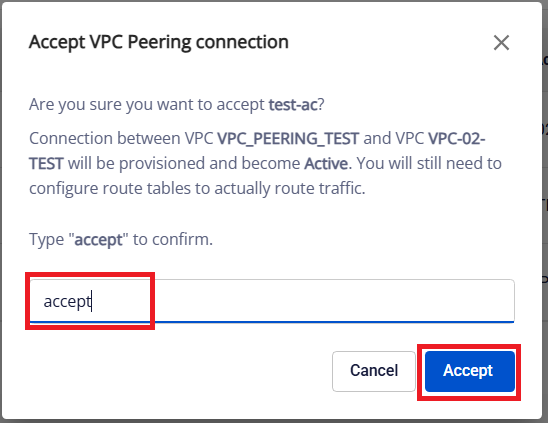
The connection changes to Provisioning, then Active.
warning
If the VPC Accepter has no Quota left, the Portal shows an error and the connection stays in Pending acceptance. Free up Quota or ask for more, then accept again before the 7 days run out.
Next steps
- Configure the Route Table in both VPCs.
- Connection statuses