Associate / Dissociate Subnet
Associate a subnet with a Firewall to bring it under firewall protection, or dissociate it to remove protection.
Open Associate Subnet
On the Firewall Management screen, click ⋮ → Associate subnet on the Firewall row. This option is only available when Status = Integrated or Protected.
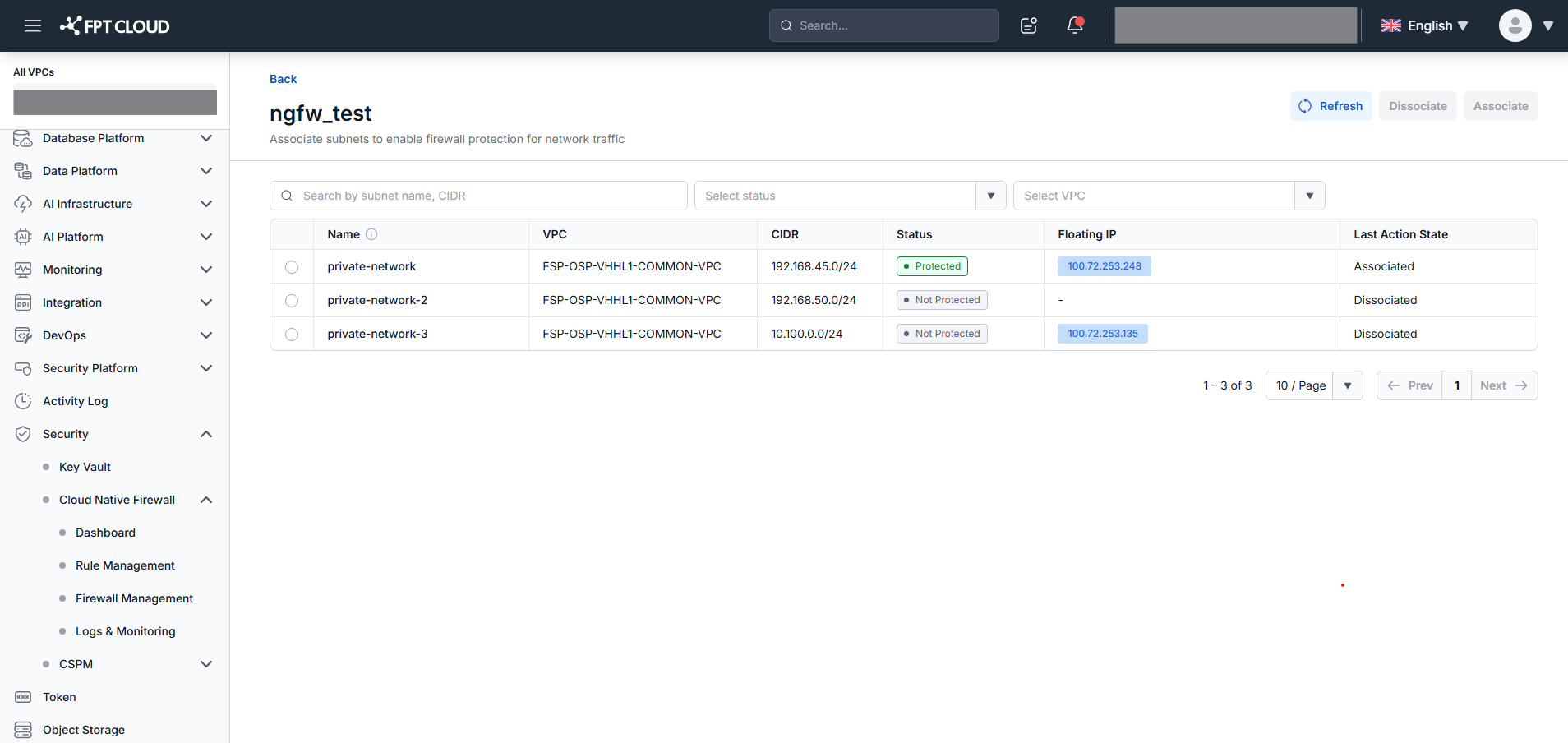
The screen lists all subnets from all VPCs integrated with this Firewall. Filter by Status (Not Protected / Protected) or VPC, or search by subnet name or CIDR.
Associate a subnet
- Select a subnet with Status = Not Protected (radio button).
- Click Associate.
- Confirm in the popup — it warns that traffic will be denied by default until rules are configured.
The system shows "Associating subnet. This may take a few minutes." and sets Last Action State = In Progress.
Dissociate a subnet
- Select a subnet with Status = Protected (radio button).
- Click Dissociate.
- Type dissociate (lowercase exactly) in the confirmation field, then click Confirm.
The system shows "Dissociating subnet. This may take a few minutes." and sets Last Action State = In Progress.
note
- Only one subnet can be processed at a time.
- A subnet with Last Action State = In Progress is locked; other subnets remain available.
- The screen auto-refreshes every 15 seconds. Click Refresh to update manually.
- Only subnets of type Routed appear in the list.