Deployment mode
FPT Cloud WAF runs in one of two deployment modes at the tenant level. The mode is set by your subscription or provisioning, applies to every domain in the tenant, and is read-only in the UI. Domain management, policy configuration, and logs work the same in both modes — the only difference is the DNS guidance shown when you onboard a domain (Add Domain → Step 3).
- Shared — the WAF data plane runs on FPT's shared, multi-tenant cluster. This is the standard SaaS model.
- Dedicated — the WAF data plane runs on your tenant's own cluster, for resource isolation and higher compliance needs.
You cannot change the deployment mode from the interface. Switching to a Dedicated plan is done in the Cloud portal / billing, outside the WAF screens.
Find your deployment mode
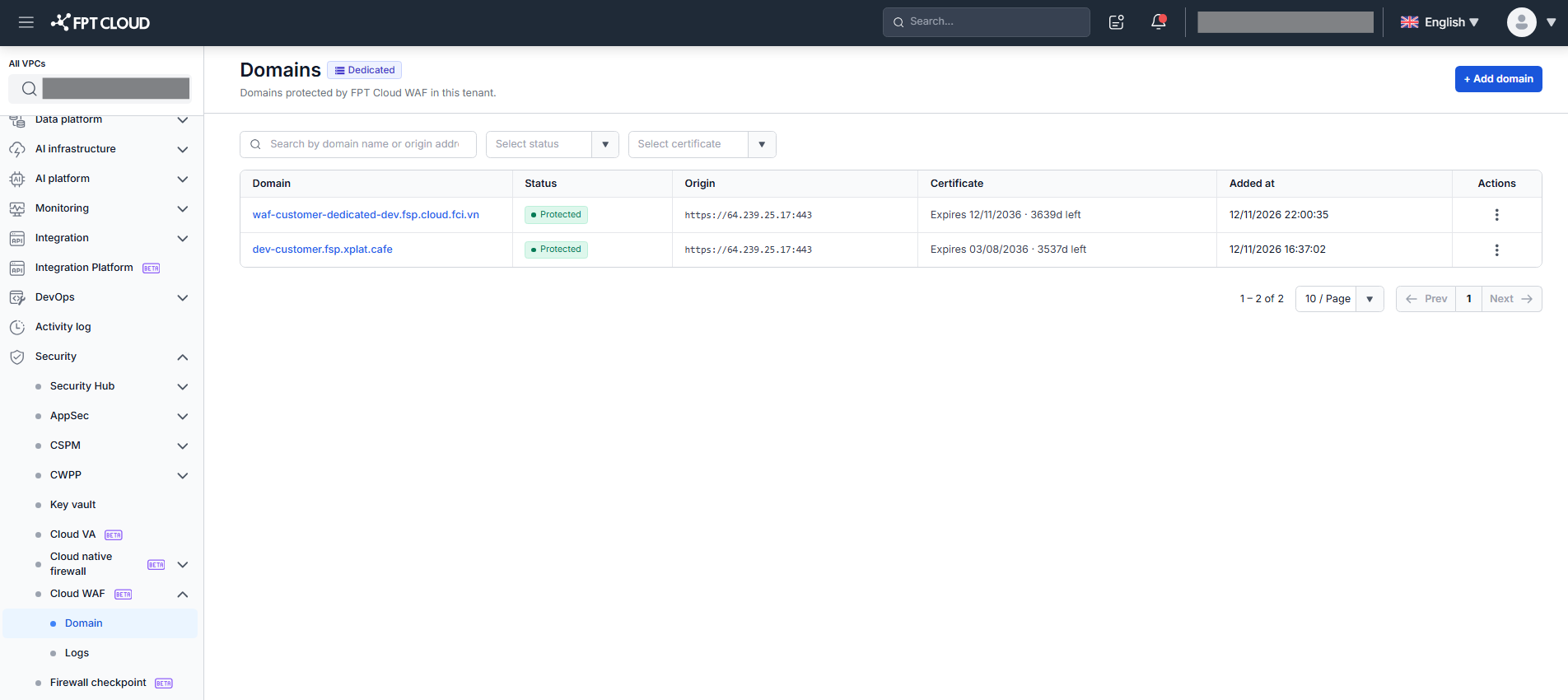
On the Domains header, next to the Domains title, a read-only badge shows the current mode:
Shared— slate pill with a users/globe icon.Dedicated— indigo pill with a server/shield icon.
Configure DNS by mode (Add Domain — Step 3)
At Step 3 — Provision of the Add Domain wizard, the Point your DNS to WAF section shows two tabs: Subdomain and Root domain. The tab that matches the domain you entered in Step 1 (subdomain or root/apex) is selected automatically; the other tab is disabled. The DNS records differ by mode as follows.
Shared tenant
Standard guidance pointing to FPT's shared WAF edge:
- Subdomain tab — a CNAME record pointing the subdomain to the shared edge hostname.
- Root domain tab — a RECOMMENDED option (CNAME/ALIAS at
@) plus a FALLBACK option (an A record) when your DNS provider does not support CNAME at the root.
Dedicated tenant — cluster with a hostname
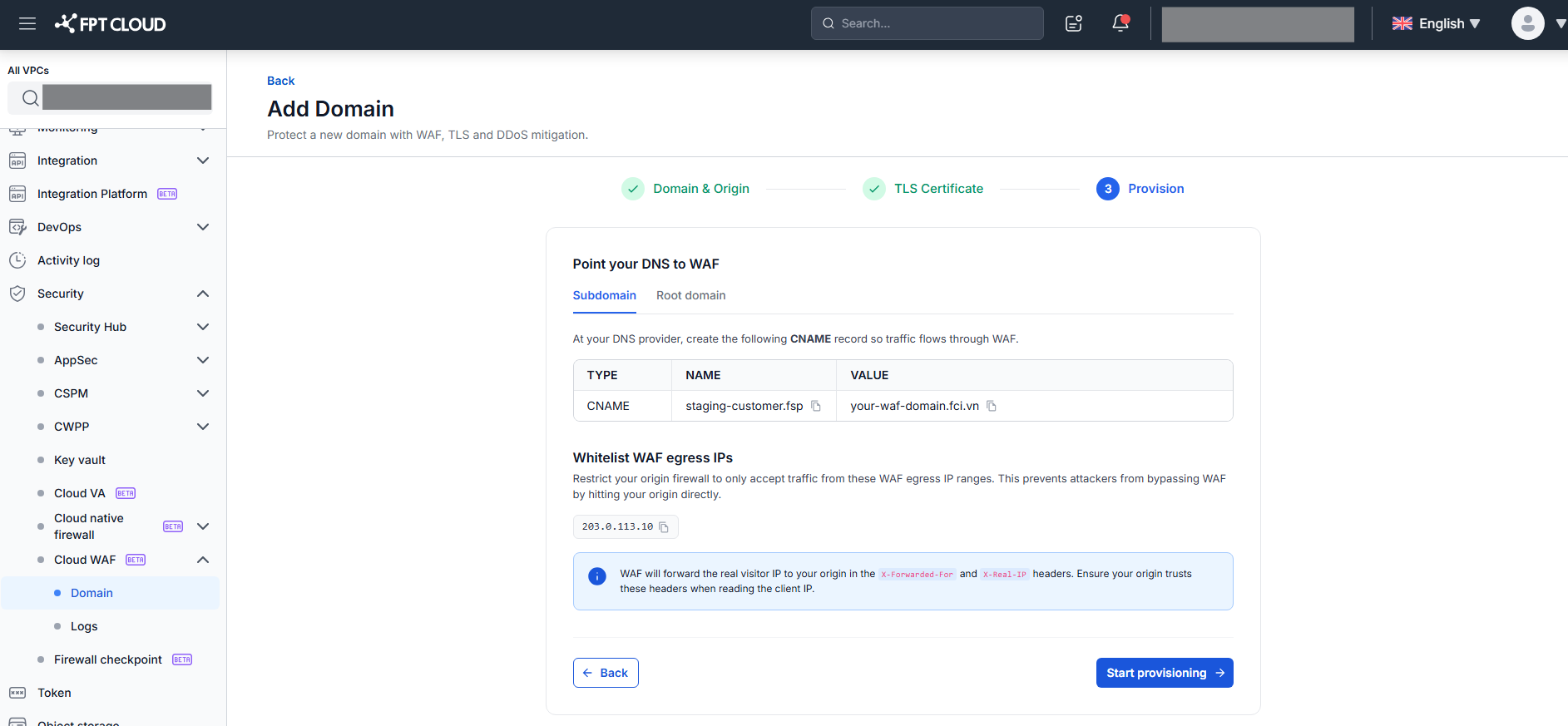
The dedicated cluster has an edge hostname (e.g., your-waf-domain.fci.vn); point DNS to that hostname.
- Subdomain tab — a CNAME record: Name = the subdomain to point (e.g.,
staging-customer.fsp), Value = the dedicated cluster hostname (e.g.,your-waf-domain.fci.vn). Both Name and Value have a Copy button.
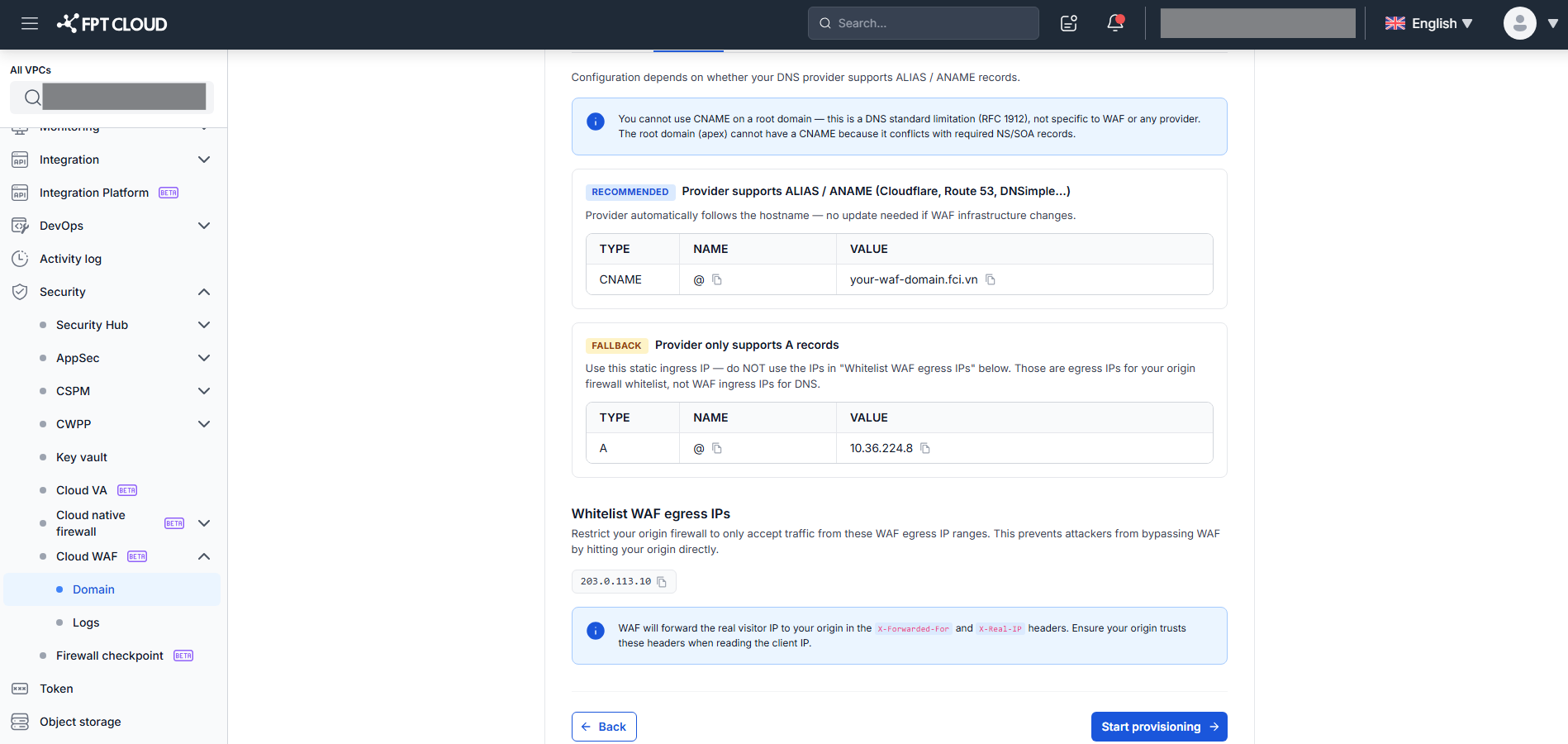
- Root domain tab — an RFC 1912 banner and two options:
- RECOMMENDED (provider supports ALIAS / ANAME) — a CNAME at
@, Value = the dedicated cluster hostname. - FALLBACK (provider supports A records only) — an A record: Name =
@, Value = the cluster's static ingress IP (e.g.,10.36.224.8).
- RECOMMENDED (provider supports ALIAS / ANAME) — a CNAME at
Dedicated tenant — cluster with IP only
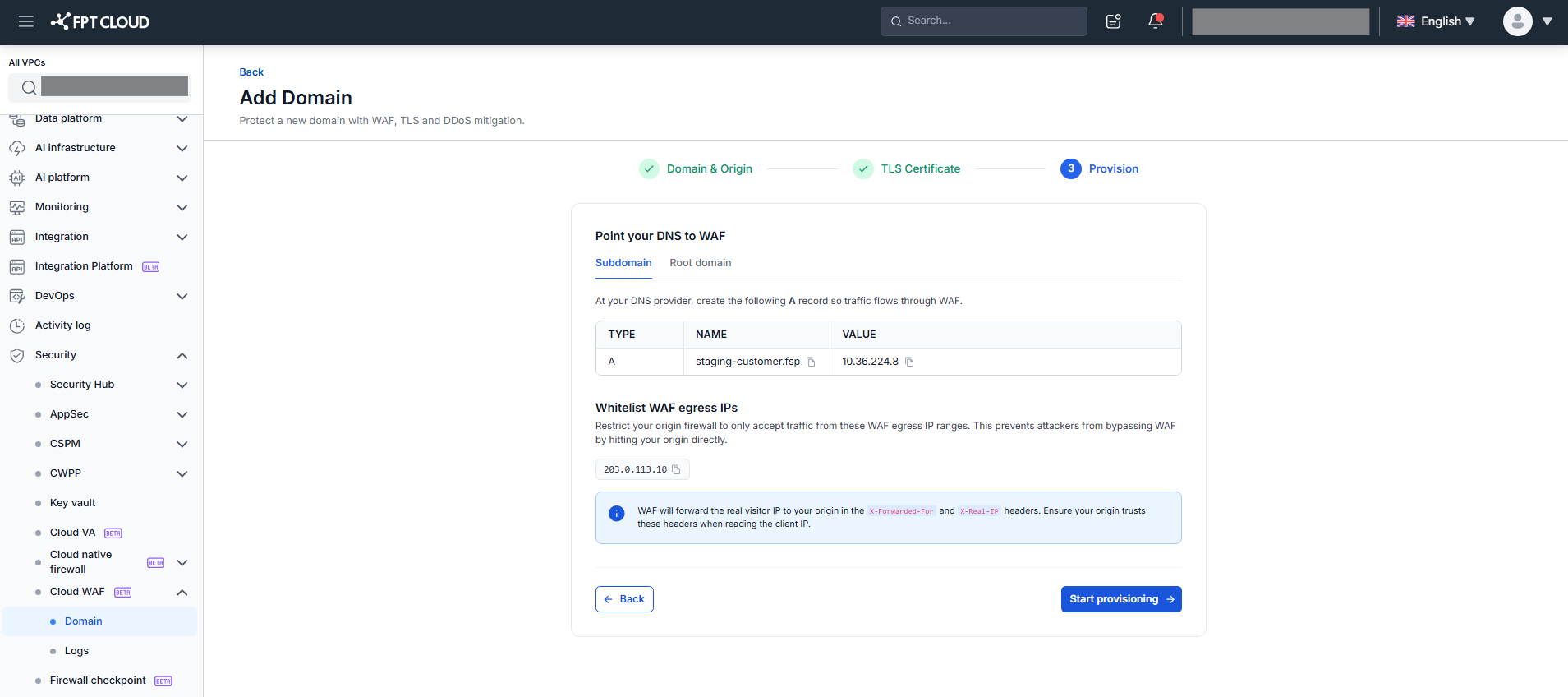
When the dedicated cluster has no edge hostname yet, use an A record pointing to the cluster's static ingress IP.
- Subdomain tab — an A record only: Type =
A, Name = the subdomain to point (e.g.,staging-customer.fsp), Value = the cluster's static ingress IP (e.g.,10.36.224.8). Both Name and Value have a Copy button.
- Root domain tab — an RFC 1912 banner and two options:
- RECOMMENDED (provider supports ALIAS / ANAME) — a CNAME at
@, but the Value is empty and has no Copy button, because the cluster has no hostname to point a CNAME to. Use the FALLBACK A record below instead. - FALLBACK (provider supports A records only) — an A record: Name =
@, Value = the cluster's static ingress IP. This is the usable record for the root domain.
- RECOMMENDED (provider supports ALIAS / ANAME) — a CNAME at
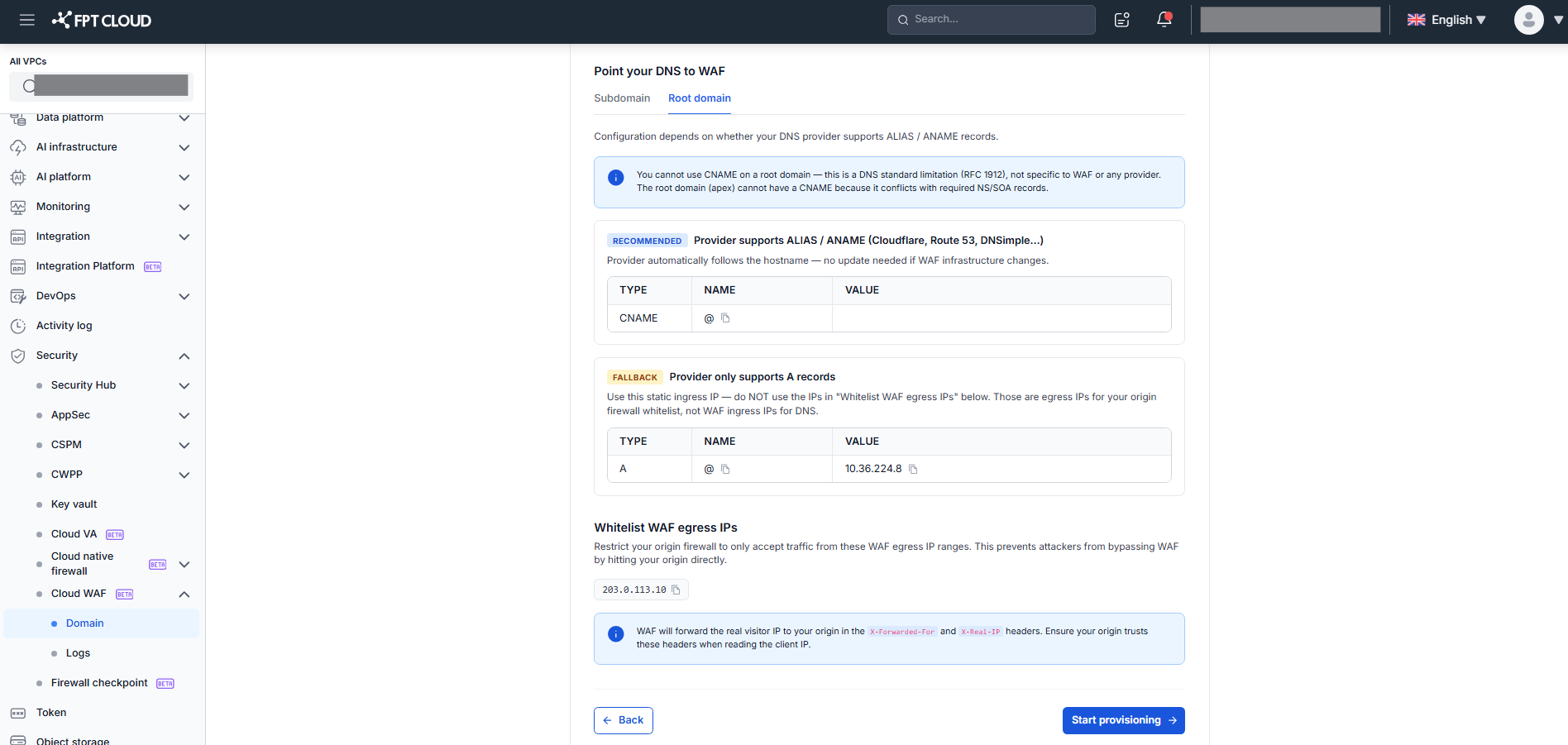
The Whitelist WAF egress IPs list in Step 3 shows the egress range for your mode: a Shared tenant uses FPT's shared WAF egress, a Dedicated tenant uses its own cluster's egress. Whitelist that exact range on your origin firewall.
For the FALLBACK A record, use the static ingress IP shown in this section. Do not use the IPs from the Whitelist WAF egress IPs list — those are WAF → origin egress IPs, not the address to point your domain at.
What's next
- Domain management — add a domain and complete Step 3 using the records above.
- WAF logs — logs and investigation work the same in both deployment modes.