Inference API を呼び出す
endpoint URL を取得する
endpoint が Running になったら、詳細ページを開いて endpoint URL を確認します。inference gateway URL は次のパターンです(環境ごとに異なります)。
https://<ddi-gateway-domain>/v1/chat/completions
endpoint は標準の chat completions API を公開しています。
curl で呼び出す
curl https://<ddi-gateway-domain>/v1/chat/completions \
  -H "Authorization: Bearer sk-vgw-xxxxxxxxxxxxxxxxxxxxxxxxxxxxxxxxxxxxxx" \
  -H "Content-Type: application/json" \
  -d '{
    "model": "mistralai/Mistral-7B-Instruct-v0.3",
    "messages": [
      {"role": "system", "content": "You are a helpful assistant."},
      {"role": "user", "content": "Summarize the benefits of dedicated GPU inference."}
    ],
    "max_tokens": 256
  }'
<ddi-gateway-domain> は endpoint 詳細ページの gateway domain に、sk-vgw-xxxxxxxxxxxxxxxxxxxxxxxxxxxxxxxxxxxxxx は API keys タブで取得した key に置き換えます。
Python で呼び出す
import requests

url = "https://<ddi-gateway-domain>/v1/chat/completions"
headers = {
    "Authorization": "Bearer sk-vgw-xxxxxxxxxxxxxxxxxxxxxxxxxxxxxxxxxxxxxx",
    "Content-Type": "application/json",
}
payload = {
    "model": "mistralai/Mistral-7B-Instruct-v0.3",
    "messages": [
        {"role": "system", "content": "You are a helpful assistant."},
        {"role": "user", "content": "Hello!"},
    ],
    "max_tokens": 256,
}

response = requests.post(url, headers=headers, json=payload)
result = response.json()
print(result["choices"][0]["message"]["content"])
streaming レスポンス
import requests, json

url = "https://<ddi-gateway-domain>/v1/chat/completions"
headers = {
    "Authorization": "Bearer sk-vgw-xxxxxxxxxxxxxxxxxxxxxxxxxxxxxxxxxxxxxx",
    "Content-Type": "application/json",
}
payload = {
    "model": "mistralai/Mistral-7B-Instruct-v0.3",
    "messages": [{"role": "user", "content": "Write a short poem."}],
    "max_tokens": 200,
    "stream": True,
}

with requests.post(url, headers=headers, json=payload, stream=True) as r:
    for line in r.iter_lines():
        if line and line.startswith(b"data: "):
            data = line[6:]
            if data != b"[DONE]":
                chunk = json.loads(data)
                content = chunk["choices"][0]["delta"].get("content", "")
                print(content, end="", flush=True)
Playground で試す
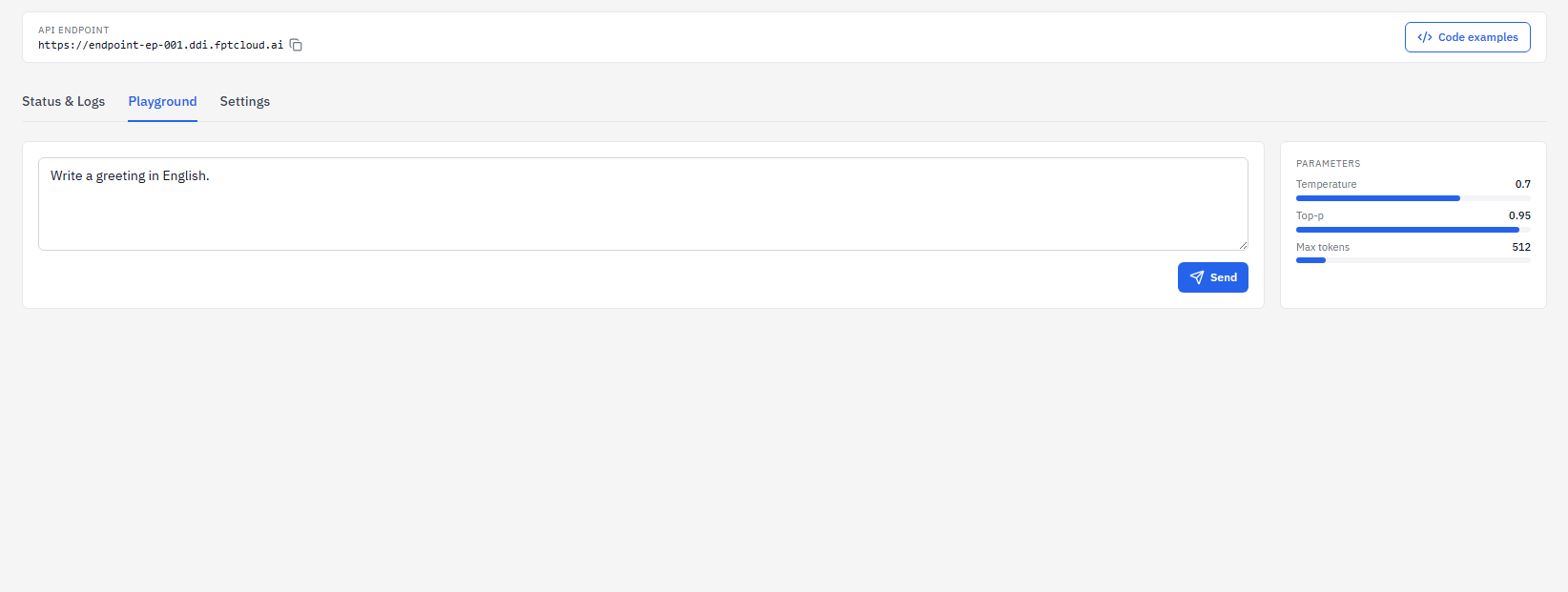
endpoint 詳細ページを開き、Playground タブをクリックすると、コードを書かずにブラウザから直接テストリクエストを送信できます。右側の Parameters パネルで Temperature、Top-p、Max tokens を調整できます。
よくある HTTP エラー
| ステータス | 原因 | 対処 |
|---|---|---|
401 Unauthorized | API key が未指定または無効 | API keys タブで API key を確認します |
429 rate_limited | レート制限を超過(RPM、TPM、同時リクエスト数) | 時間をおいて再試行するか、上限引き上げをサポートに依頼します |
503 Service Unavailable | endpoint が Running ではない | My endpoints で endpoint が Running になるまで待ちます |