Audit Logs
Audit logs record all user and system actions across your Organization. Use them to track who did what, when, and whether it succeeded.
Logs are read-only and retained for 3 months. Events older than 3 months are no longer accessible.
Access and scope
The Audit Logs page is accessible to all roles, but what you see depends on your role:
| Role | Scope visible |
|---|---|
| Organization Owner | All events: Organization, Billing, Workspace, and Service |
| Workspace Admin | Workspace and Service events for their Workspace only |
| Workspace Member | Workspace and Service events for their Workspace only |
To open it: click Audit Logs in the left sidebar.
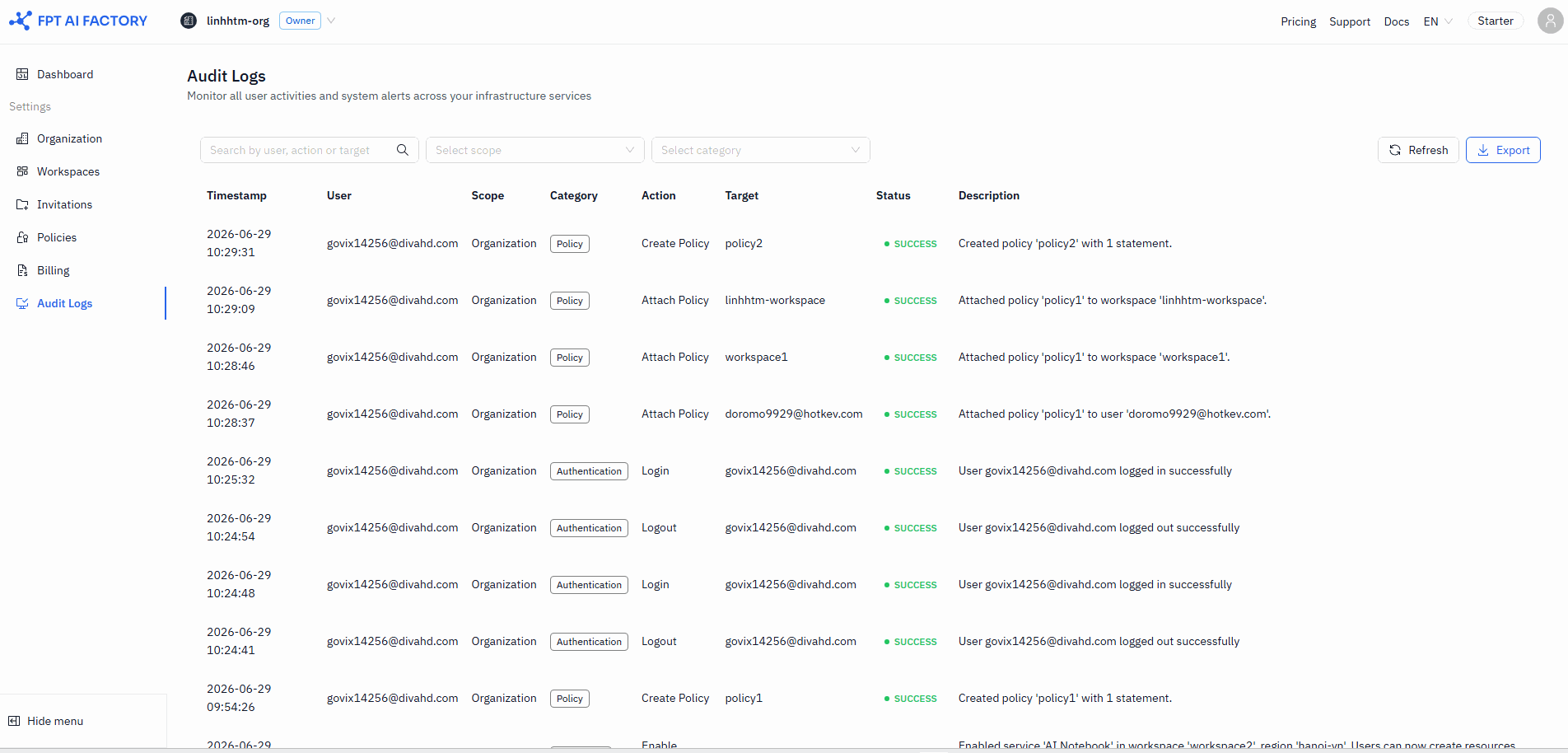
Table columns
Each row represents a single event. Timestamps are shown in your local timezone.
| Column | Description |
|---|---|
| Timestamp | Date and time the event occurred |
| User | Email of the user who performed the action |
| Scope | Area of the system: Organization, Billing, Workspace, or Service. Shown in Organization view only. |
| Category | Sub-area within the scope (see filter options below) |
| Action | The specific action taken (e.g. Invite Member, Create Notebook) |
| Target | The resource or user affected |
| Status | SUCCESS (green) or FAILED (red) |
| Description | A human-readable summary of the event |
Filter events
Use the filter bar above the table to narrow results.
Search — type any keyword to filter across user, action, target, and description fields.
Scope (Organization view only) — select a scope to show only events in that area:
| Scope | Category options |
|---|---|
| Organization | Member, Policy, Workspace, IAM |
| Billing | Credit, Payment, Plan, Voucher |
| Workspace | Member, IAM, GPU Quota, Workspace Settings |
| Service | AI Notebook, AI Inference, GPU Container |
The Category filter is disabled until you select a Scope. Clearing the Scope also resets the Category filter.
Category (Workspace view) — always visible and enabled. Options cover both Workspace and Service events: Member, IAM, GPU Quota, Workspace Settings, AI Notebook, AI Inference, GPU Container.
Refresh
Click Refresh to reload the latest events without reloading the page.
Export
Click Export to download all records matching your current filters as a CSV file. The file is named audit_logs_YYYY-MM-DD.csv and includes all matching records — not just the current page.
Export includes all filtered records, not just the current page. If the result set is too large, narrow your filters and try again. Timestamps in the exported file are in UTC.
CSV columns: Timestamp, User, Scope, Category, Action, Target, Status, Description.
What's next
- Policies — use audit logs to verify policy creation and attachment events.
- Workspaces — trace quota changes and service enable/disable events.