Terminate Lakehouse Setup
Use this when a Lakehouse is in the middle of setup or has encountered an error and you want to stop — without continuing the creation process.
Applies to the following statuses:
- Initializing
- Preparing infrastructure
- Connection information required
- Setting up your Lakehouse
- Setup couldn't be completed
Steps
Step 1. In the menu bar, select Data Platform > select Lakehouse > select the Lakehouse you want to terminate
Step 2. On the Lakehouse detail screen, click Terminate setup

Step 3. The confirmation dialog "Terminate Lakehouse setup?" appears with the following information:
- This action will stop the setup and reclaim all platform resources provisioned for the Lakehouse
- The customer's S3 bucket and data will not be deleted
- This action cannot be undone
- The resource reclamation process may take some time; you can leave the page and return to check later
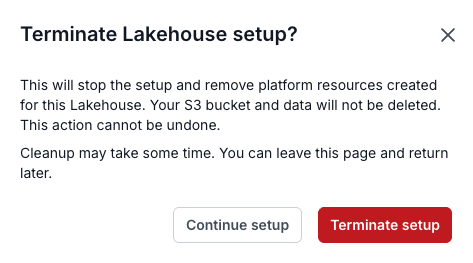
Click Terminate setup to confirm, or Continue setup to cancel and resume the current setup.
Result
The Lakehouse transitions to Terminating setup while resources are being reclaimed.
Once complete, the Lakehouse transitions to Setup terminated and no longer appears in the Lakehouse listing.
If the resource reclamation process encounters an error, the Lakehouse transitions to Termination incomplete — the Ops team will be notified to handle it. No further action is required from you.