View Lakehouse Information
This page covers how to view Lakehouse information and monitor its status.
Steps
Step 1. In the menu bar, select Data Platform > select Lakehouse > the Lakehouse listing appears
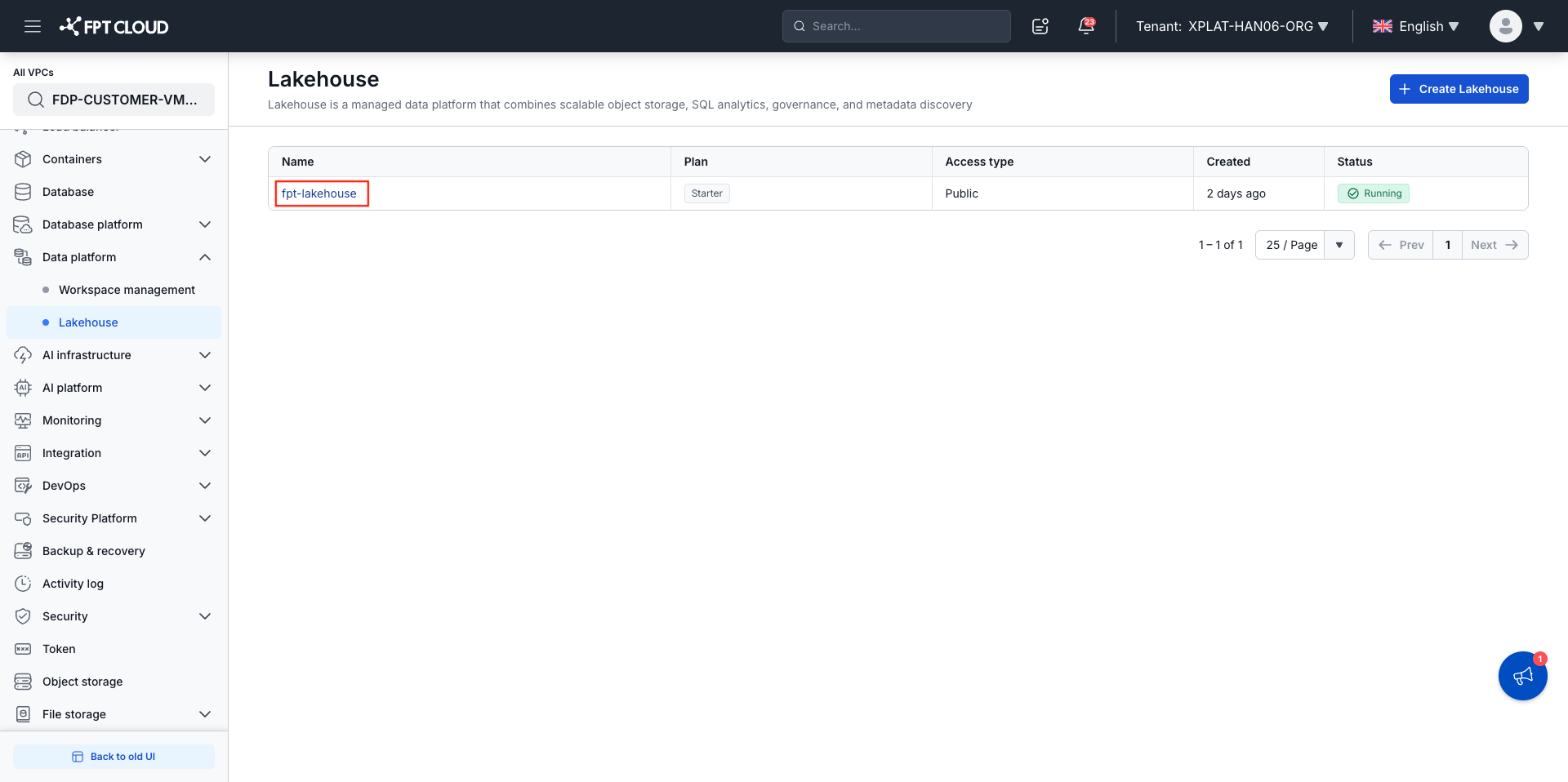
Step 2. Click the name of the Lakehouse you want to view > the Lakehouse detail screen appears
Information Displayed
On the Lakehouse listing
Displays columns: Name, Plan (Starter / Standard / Advanced), Access type (Private / Public), Created (relative time, e.g. "2 hours ago"), and Status — the Status column shows the status label along with a progress percentage while the Lakehouse is being set up.
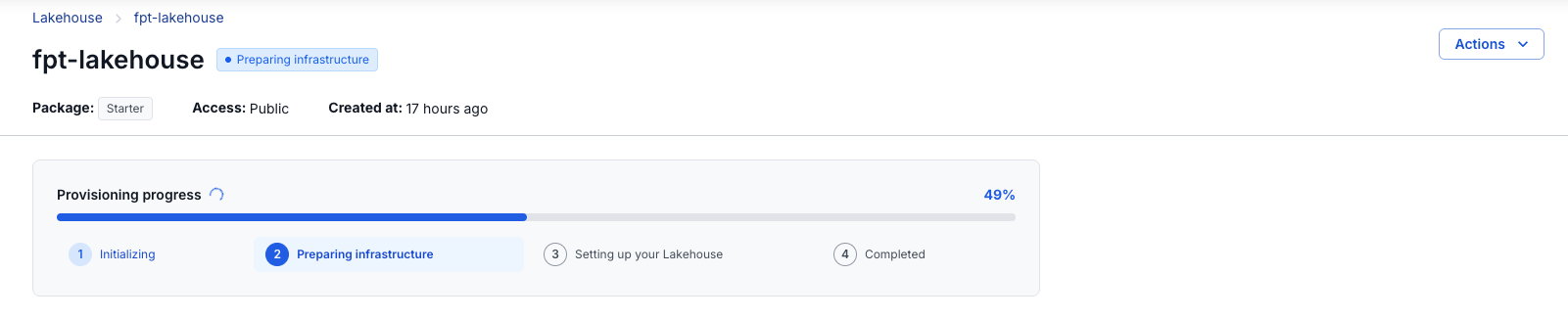
On the detail screen (during Provisioning)
The "Provisioning progress" card shows the completion percentage and a 4-step stepper:
Initializing → Preparing infrastructure → Setting up your Lakehouse → Completed
Status Labels
During setup:
| Status | Meaning |
|---|---|
| Initializing | The creation request has been received; the system is initializing |
| Preparing infrastructure | Infrastructure is being prepared |
| Connection information required | S3 connection information needs to be updated, or the session needs to be re-confirmed — see Update S3 Connection / Re-confirm Session |
| Setting up your Lakehouse | The service is being configured; almost complete |
| Setup couldn't be completed | Setup encountered an unrecoverable error — contact Support or see Terminate Lakehouse Setup |
While running:
| Status | Meaning |
|---|---|
| Completed | Lakehouse has been delivered and is ready to use; no health checks have been performed yet |
| Running | Lakehouse is operating normally |
| Some features are unavailable | Lakehouse is running but some features are experiencing issues |
| Service unavailable | Lakehouse is temporarily inaccessible |
| Status unavailable | A health check was performed but current status could not be determined |
During termination or deletion:
| Status | Meaning |
|---|---|
| Terminating setup | Setup is being terminated and provisioned resources are being reclaimed |
| Termination incomplete | Not all resources were cleaned up during termination — the Ops team is handling it; no action required |
| Setup terminated | Setup was successfully terminated and all related resources have been cleaned up |
| Deleting | The Lakehouse and related resources are being deleted |
Once deletion is complete, the Lakehouse no longer has a status label to display — it disappears entirely from the Lakehouse listing.
After Completed — Full Detail View
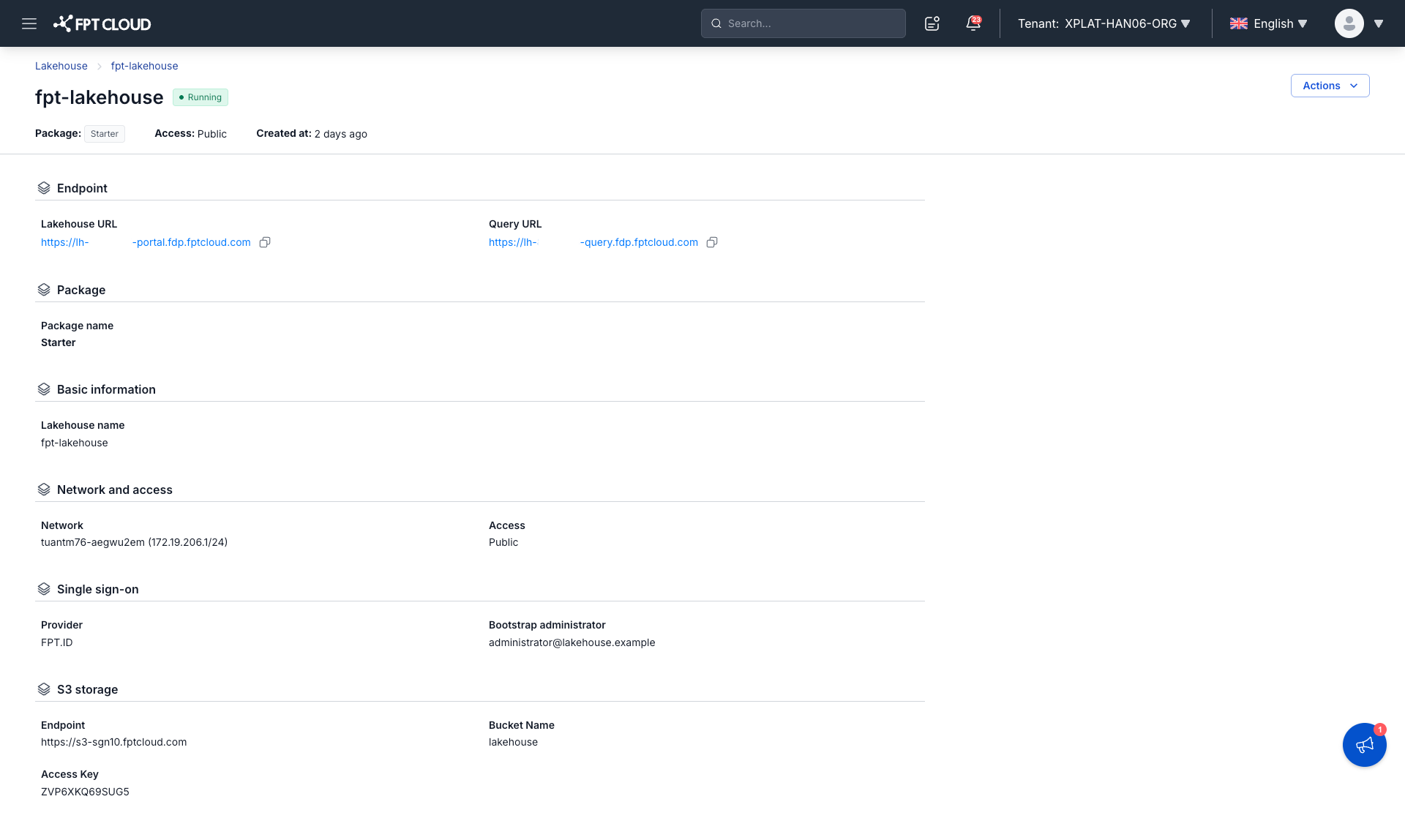
Endpoint:
| Field | Description |
|---|---|
| Lakehouse URL | Link to access the Lakehouse Portal — click to open, with a Copy button. When Access = Private, the URL is only reachable from a network connected to your VPC. |
| Query URL | Direct connection address for external query tools or BI tools (e.g., JDBC/ODBC clients), with a Copy button. |
Package:
| Field | Description |
|---|---|
| Package name | The package configured for the Lakehouse — Starter, Standard, or Advanced |
Basic information:
| Field | Description |
|---|---|
| Lakehouse name | The display name of the Lakehouse |
Network and access:
| Field | Description |
|---|---|
| Subnet | The subnet configured for the Lakehouse |
| Access | The configured access mode — Private or Public |
Single sign-on:
| Field | Description |
|---|---|
| Provider | The configured login method — FPT.ID or Google |
| Bootstrap administrator | The email of the Lakehouse's initial admin |
| Client ID | Displayed only when Provider = Google |
Client secret is always masked for security reasons.
S3 storage:
| Field | Description |
|---|---|
| Endpoint | Displays the configured value; can be reviewed at any time |
| Bucket name | Displays the configured value |
| Access key | Displays the configured value |
| Secret key | Always masked for security — only supports updating with a new value; the current value cannot be retrieved |