User from Old Portal
If you have an existing account on the Old Portal (Portal V1), this page explains what changes, what carries over, and how to complete the migration.
This page is for Old Portal users only. If you are new to FPT AI Factory, start with Getting Started.
What changes
| Item | Old Portal | New Portal |
|---|---|---|
| Account structure | Single account | Organization → Workspaces |
| Billing | Per-account balance | Organization Wallet, allocated to Workspaces |
| Services | Legacy GPU resources | GPU Virtual Machine and more |
| Login | Email + password | FPT ID, Google, GitHub, or Microsoft |
What carries over
When you migrate, the following are transferred automatically:
- Credits — your VN Wallet (VND) and JP Wallet (JPY) balances transfer in full, in their original currencies. Prices are shown based on current exchange rates and may change daily.
- Migration bonus — a $20.00 credit is added to your new account.
- Account deactivation — your Old Portal account is deactivated automatically after migration completes.
Your Old Portal data (notebooks, containers, stored files) does not transfer. Save any files you need before migrating.
How to migrate
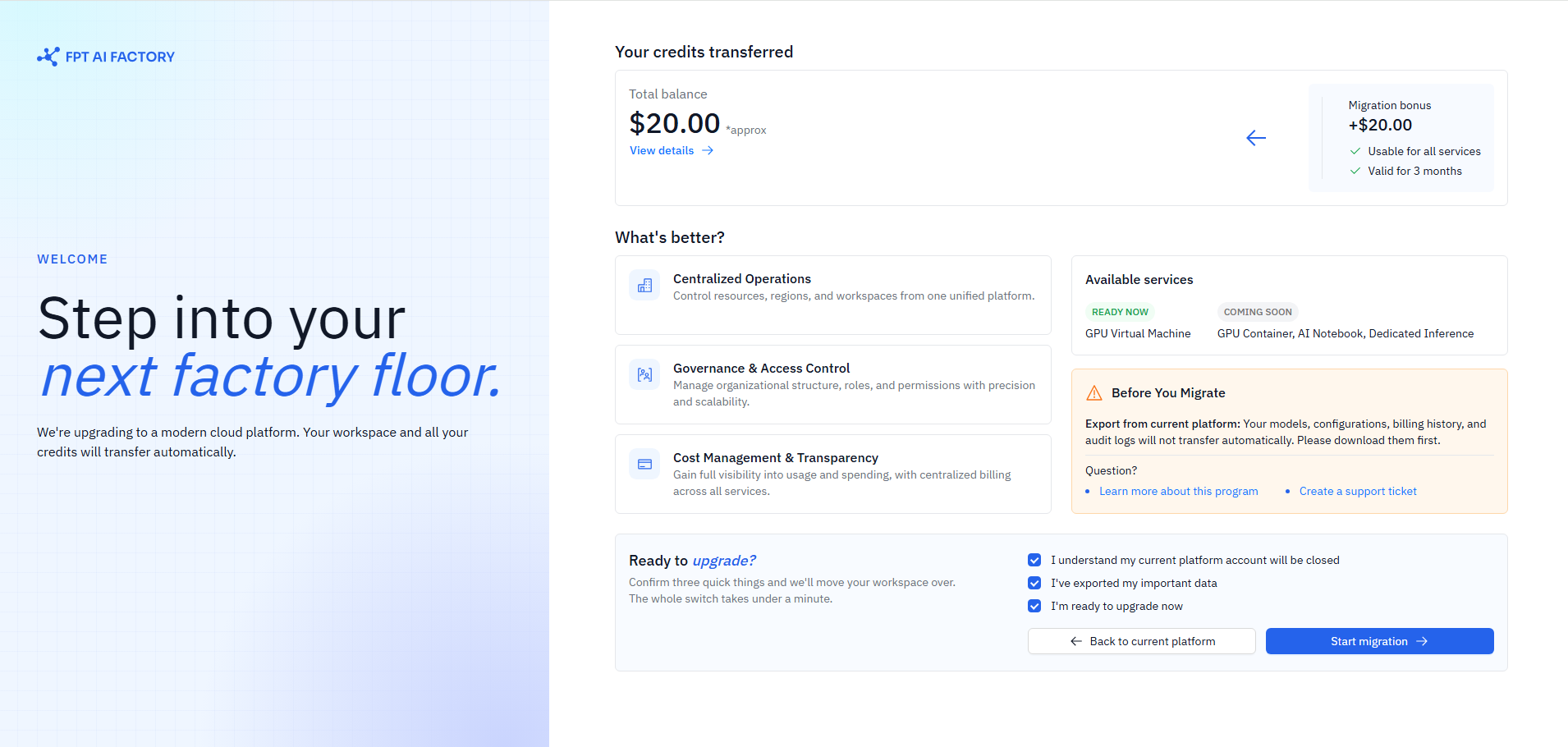
Migration is by invitation only. FPT will send you an email when your account is eligible.
- Check your inbox for an email with subject: "Welcome to FPT AI Factory Next".
- Sign in with your new login method (FPT ID, Google, GitHub, or Microsoft), then click "Start Migration" on the migration page.
- Review what will be transferred — your Wallet balances and the $20 bonus are shown on the page.
- Check all three confirmation boxes to confirm you understand:
- Your Old Portal account will be closed.
- You have exported any important data from the Old Portal.
- You are ready to upgrade now.
- Click "Start Migration" — setup runs automatically (about 7 seconds):
- Creates your new Organization and Workspace (if not already set up).
- Transfers your VN and JP Wallet balances.
- Adds the $20 migration bonus.
- Deactivates your Old Portal account.
- Marks migration as complete.
- Complete the onboarding survey — 4 quick questions about your use case.
- Land on your Workspace Dashboard — migration is complete.
Stop any running workloads on the Old Portal before migrating. Active GPU instances are terminated when your Old Portal account is deactivated.
If migration fails
If something goes wrong during setup, the process rolls back automatically and your Old Portal account is restored to its original state. Your credits and data are not affected.
You can try again from the migration link in your email. If the email link has expired, contact support at support@fptcloud.com or call 1800 6139 to request a new invitation.
What's next
Your Organization and Workspace are already set up after migration. You can skip directly to billing setup:
- Getting Started — set your billing currency and top up your Wallet if you haven't done so yet.
- Understanding billing — how your transferred credits and Wallet work in the new Portal.